Notice

The forum is in read only mode.

Support Forum

Welcome! Support Forums have been reactivated
Welcome the Technical Support section. Help us in assisting you by providing us with a concise and descriptive elaboration of your issues. Be specific and if possible, provide us with a step-by-step instruction in replicating your problem.

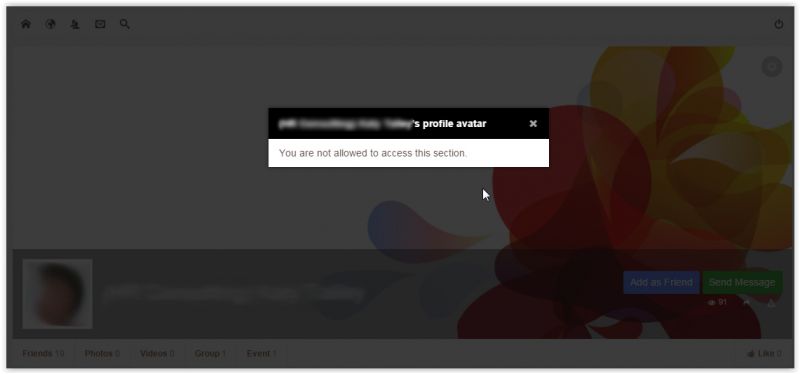
You are not authorised to access this section for profile avatar

11 years 3 months ago
  • Scott's Avatar
    Topic Author
  • Scott
  • Offline
  • Fresh Boarder
  • Posts: 30
  • Thank you received: 1
Licenses:
JomSocial Active iSEO Expired Socialize Active

ISSUE SUMMARY:

Whenever a registered user views a profile and clicks the profile's avatar, they review a message stating: You are not authorised to access this section

11 years 3 months ago
  • Dimas's Avatar
  • Dimas
  • Visitor
  • Thank you received: 0
Licenses:

Hi Scott,

Please you set photos access menu on Jomsocal toolbar to public, right now its for registered.

thank you

11 years 3 months ago
  • Scott's Avatar
    Topic Author
  • Scott
  • Offline
  • Fresh Boarder
  • Posts: 30
  • Thank you received: 1
Licenses:
JomSocial Active iSEO Expired Socialize Active

Thank you. I tried that but it didn't work. Also, I can't have photos public. Only registered users should be able to view photos.

In any case. This is problem is ONLY when the AVATAR is clicked. When I click photos, it's fine. For whatever reason, it doesn't enlarge the avatar. Instead, It states that I am not authorized to access that section.

11 years 3 months ago
  • Dimas's Avatar
  • Dimas
  • Visitor
  • Thank you received: 0
Licenses:

Hi Scott,

Please provide me the screenshoot, in which page you click the avatar? I just test it and cant replicate your issue.

thank you
11 years 3 months ago
  • Scott's Avatar
    Topic Author
  • Scott
  • Offline
  • Fresh Boarder
  • Posts: 30
  • Thank you received: 1
Licenses:
JomSocial Active iSEO Expired Socialize Active

Sure thing. Please note, it's only happening on certain profiles. not all of them (i just noticed). On some profiles, the avatar doesn't ac like a link. It's not clickable so the error doesn't appear. On the ones where it is clickable the message shows up like in this screen shot,

Attachments:
11 years 2 months ago
  • Dimas's Avatar
  • Dimas
  • Visitor
  • Thank you received: 0
Licenses:

Hi Scott,

My apologize for delay answer, currently I am on holiday, I will be back and continue inspect your issue on July 30th.

Thank you for your undestanding

11 years 2 months ago
  • Dimas's Avatar
  • Dimas
  • Visitor
  • Thank you received: 0
Licenses:

Hi Scott,

I am back, can you provide me the sample user for testing it, please?

thank you

11 years 2 months ago
  • Scott's Avatar
    Topic Author
  • Scott
  • Offline
  • Fresh Boarder
  • Posts: 30
  • Thank you received: 1
Licenses:
JomSocial Active iSEO Expired Socialize Active
11 years 2 months ago
  • Dimas's Avatar
  • Dimas
  • Visitor
  • Thank you received: 0
Licenses:

Hi Scott,

I see, I got it.. I can replicate it if browsed with guest.

thank you

11 years 2 months ago
  • Scott's Avatar
    Topic Author
  • Scott
  • Offline
  • Fresh Boarder
  • Posts: 30
  • Thank you received: 1
Licenses:
JomSocial Active iSEO Expired Socialize Active

Hey,
I just wanted to see where we stand with this. The problem still persist. Would you give me some direction?

11 years 2 months ago
  • Dimas's Avatar
  • Dimas
  • Visitor
  • Thank you received: 0
Licenses:

Hi Scott,

this issue is not fixed yet, I will let you know when our developer fix this.

thank you

Moderators: Piotr Garasiński
Powered by Kunena Forum

Join 180,000 websites creating Amazing communities

JomSocial is the most complete, easy-to-use addon that turns Joomla CMS into a
full -fledged, social networking site

TRY NOW BUY NOW
