Notice

The forum is in read only mode.

Support Forum

Welcome! Support Forums have been reactivated
Welcome the Technical Support section. Help us in assisting you by providing us with a concise and descriptive elaboration of your issues. Be specific and if possible, provide us with a step-by-step instruction in replicating your problem.

Photo Upload issue

11 years 4 months ago
  • D.'s Avatar
    Topic Author
  • D.
  • Offline
  • Fresh Boarder
  • Posts: 34
  • Thank you received: 1
Licenses:
JomSocial Active

ISSUE SUMMARY:
There are 2 issues: 1. members are not able to upload photos. There are two areas on the upload page in the fronted (causing some confusing) When I attempt to add a photo the software allows an upload of sorts, but then displays, "No public photos available"
2. I can not change the Community menu items, I can't create a new All photos menu item or change upload photos to All photos from the backend.

Browser: Safari and/or Firefox

Attachments:
11 years 4 months ago
Licenses:

Hi,

1)
the error with database, please execute this query from phpmyadmin or any database manager at your server

ALTER TABLE `gavg_community_photos` ADD `params` TEXT CHARACTER SET utf8 COLLATE utf8_general_ci NOT NULL ;

2)
about the menu still showing "upload photos" after selected "all photos", its ok, that joomla issue. if you have a look that menu at frontpage already pointing to ''all photos" page

Regards

11 years 4 months ago
  • D.'s Avatar
    Topic Author
  • D.
  • Offline
  • Fresh Boarder
  • Posts: 34
  • Thank you received: 1
Licenses:
JomSocial Active

Hello,
I ran the SQL query, there is no change that I can see. I still can not upload any images or see any images.
When I go to the Upload Menu the page has two area to upload to. Both sections are slightly different, but neither, after selecting a file, allows the file to actually upload. (do I need to have both areas active, it's a bit confusing to members?)
The upload button is selected but nothing happens. This a real "bummer".

Please, log into the site and try uploading something to see what I mean.
D. Ashley

Attachment ScreenShot2015-06-02at11.56.24AM.png not found

Attachments:
11 years 4 months ago
Licenses:

Hi D.

for temporary, please remove Upload Photos from toolbar menu. and use sharebox or Photos page to upload the photos.
I confirmed that Upload Photos page issue has a "bug"

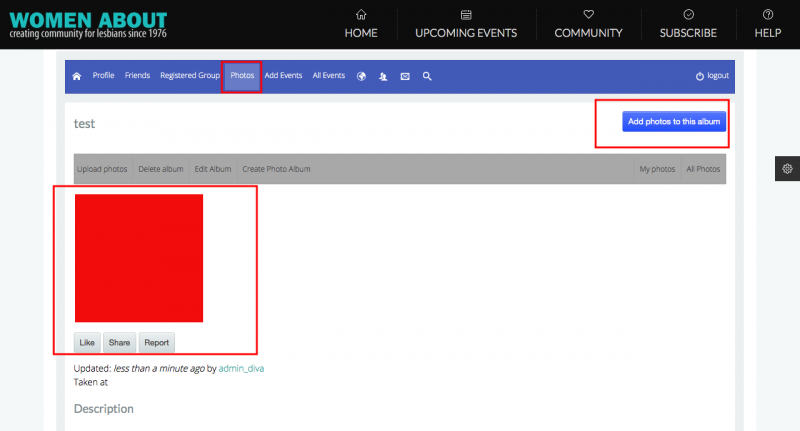
I made a test, your site was able to upload the photo:


Regards

Attachments:
11 years 4 months ago
Licenses:

Hi D,

please do not use Upload Photos as menu item. that Upload Photos only for non HTML 5 browser (IE8).

Regards

Moderators: Piotr Garasiński
Powered by Kunena Forum

Join 180,000 websites creating Amazing communities

JomSocial is the most complete, easy-to-use addon that turns Joomla CMS into a
full -fledged, social networking site

TRY NOW BUY NOW