Notice

The forum is in read only mode.

Support Forum

Welcome! Support Forums have been reactivated
Welcome the Technical Support section. Help us in assisting you by providing us with a concise and descriptive elaboration of your issues. Be specific and if possible, provide us with a step-by-step instruction in replicating your problem.

Video upload not working

11 years 7 months ago
  • Pierre's Avatar
    Topic Author
  • Pierre
  • Offline
  • Fresh Boarder
  • Posts: 14
  • Thank you received: 0
Licenses:
JomSocial Active

Hello,

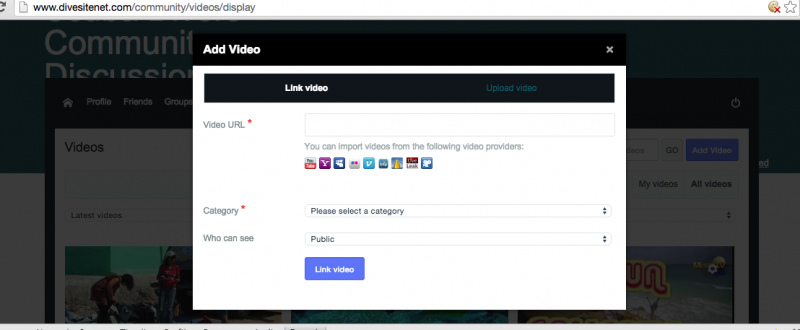
The video upload button does not work on my site.
As Admin I can see it but nothing when I click it
as users I see a small square where the video upload button is.

For Photos, registered user see the upload button but nothing happens when we select it

Can you check it out?

Thanks
Pierre

11 years 7 months ago
Licenses:

Hi Pierre,

seem your website using cloudflare, and the javascript compressed by cloudflare. that will make many issues, because the javacripts can a lot broken.

please try to disable it first. do not make the cloudflare compressing the javascripts

Regards

11 years 7 months ago
  • Pierre's Avatar
    Topic Author
  • Pierre
  • Offline
  • Fresh Boarder
  • Posts: 14
  • Thank you received: 0
Licenses:
JomSocial Active

Hello,

I have turn off all cloudflare optimization and compression. I only used it now as CDN.

The problem persist.

Thanks
Pierre

11 years 7 months ago
Licenses:

Hi Pierre,

your site still using cloudflare compression. if you view source, you can still find cloudflare.min.js
that will make many issue with jomsocial.

please turn off CDN too, please try turn off cloudflare completely.

Regards

11 years 7 months ago
  • Pierre's Avatar
    Topic Author
  • Pierre
  • Offline
  • Fresh Boarder
  • Posts: 14
  • Thank you received: 0
Licenses:
JomSocial Active

It is now off Completely

11 years 7 months ago
  • Dimas's Avatar
  • Dimas
  • Visitor
  • Thank you received: 0
Licenses:

Hi Pierre,

This issue caused by the compressor plugin, please you disabled it for making it works.

thank you

11 years 6 months ago
  • Pierre's Avatar
    Topic Author
  • Pierre
  • Offline
  • Fresh Boarder
  • Posts: 14
  • Thank you received: 0
Licenses:
JomSocial Active

Hello, Here is the answere from the plugin maker:

Actually the problem is not JCH optimize at all. The plugin is disabled and you can confirm from the source that it is not running and the button is still not working. That confirms that the plugin is not the cause.

If you look in the javascript console you will see an error occurring in /components/com_community/assets/vendors/toolkit.min.js whenever the button is clicked. I don't know if that is jomsocial's file but I suspect it is, so check with the developer and see if they can give you further insight.

Here's the screenshot of the page with errors:
prntscr.com/6lb345

thanks
Pierre
11 years 6 months ago
  • Dimas's Avatar
  • Dimas
  • Visitor
  • Thank you received: 0
Licenses:

Hi Pierre,

I found the problem, this issue caused by your Joomla template, when I use beez template the javascript is working fine.


Attachments:
Moderators: Piotr Garasiński
Powered by Kunena Forum

Join 180,000 websites creating Amazing communities

JomSocial is the most complete, easy-to-use addon that turns Joomla CMS into a
full -fledged, social networking site

TRY NOW BUY NOW
