Notice

The forum is in read only mode.

Support Forum

Welcome! Support Forums have been reactivated
Welcome the Technical Support section. Help us in assisting you by providing us with a concise and descriptive elaboration of your issues. Be specific and if possible, provide us with a step-by-step instruction in replicating your problem.

Changing the color of the picture load button

11 years 7 months ago
  • Ofer's Avatar
    Topic Author
  • Ofer
  • Offline
  • Fresh Boarder
  • Posts: 4
  • Thank you received: 4
Licenses:
JomSocial Expired Socialize Expired

Hi,
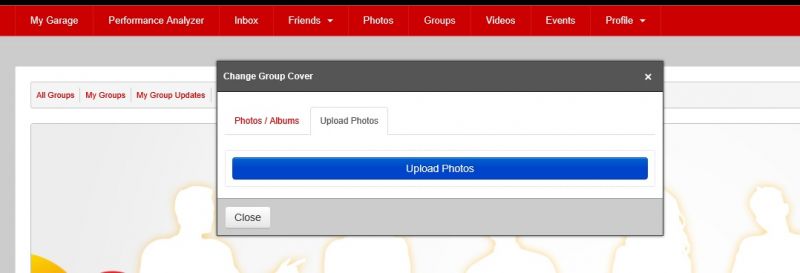
I would like to change the color of the Upload Photos button and link video.
The blue does not go well with out theme.

The constants are:
COM_COMMUNITY_PHOTOS_UPLOAD_PHOTOS
COM_COMMUNITY_VIDEOS_LINK

Can you please let me know where I can change that?
Thank you.
Ofer

Attachments:
11 years 7 months ago
Licenses:

Hi Ofer,

you can put this CSS at /templates/socialize/css/custom.css (create if not exist)

body #cWindow .btn-primary{
    color:#ffffff;
    text-shadow:0 -1px 0 rgba(0, 0, 0, 0.25);
    background-color:#9b0404;
    background-image:-moz-linear-gradient(top, #9b0404, #b90000);
    background-image:-webkit-gradient(linear, 0 0, 0 100%, from(#9b0404), to(#b90000));
    background-image:-webkit-linear-gradient(top, #9b0404, #b90000);
    background-image:-o-linear-gradient(top, #9b0404, #b90000);
    background-image:linear-gradient(to bottom, #9b0404, #b90000);
    background-repeat:repeat-x;filter:progid:DXImageTransform.Microsoft.gradient(startColorstr='#ff0088cc', endColorstr='#ff0044cc', GradientType=0);
    border-color:#b90000 #b90000 #9b0404;
    border-color:rgba(0, 0, 0, 0.1) rgba(0, 0, 0, 0.1) rgba(0, 0, 0, 0.25);
    *background-color:#b90000;
    filter:progid:DXImageTransform.Microsoft.gradient(enabled = false);
}

body #cWindow .btn-primary:hover,body #cWindow .btn-primary:focus,body #cWindow .btn-primary:active,body #cWindow .btn-primary.active,body #cWindow .btn-primary.disabled,body #cWindow .btn-primary[disabled]{
    color:#ffffff;
    background-color:#b90000;
    *background-color:#9b0404;
}

and about those constants you can changing it from joomla language overrides:
docs.joomla.org/J3.x:Language_Overrides_in_Joomla

Regards

Moderators: Piotr Garasiński
Powered by Kunena Forum

Join 180,000 websites creating Amazing communities

JomSocial is the most complete, easy-to-use addon that turns Joomla CMS into a
full -fledged, social networking site

TRY NOW BUY NOW