Support Forum
Members Link videos in group
Hi,
I am having issues with allowing members to upload pictures and link videos in groups. Under the group options either when creating the group or by editing the group I am unable to check the box to allow member posting of videos and images. Both check boxes for 'Enable Photo Sharing' and 'Enable Video Sharing' are checked but this only allows group admins to post content. When I try to click the option below to allow members to upload the cursor changes to an access denied symbol and I cannot check the box.
I am happy to allow members of the group to upload their own photos to our server but we would like to limit video sharing to linking only and not uploads. As it stands, members are unable to share photos or videos in the group at all.
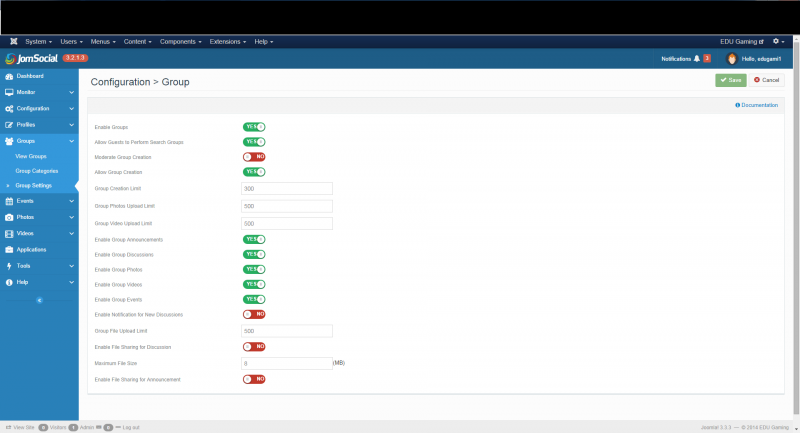
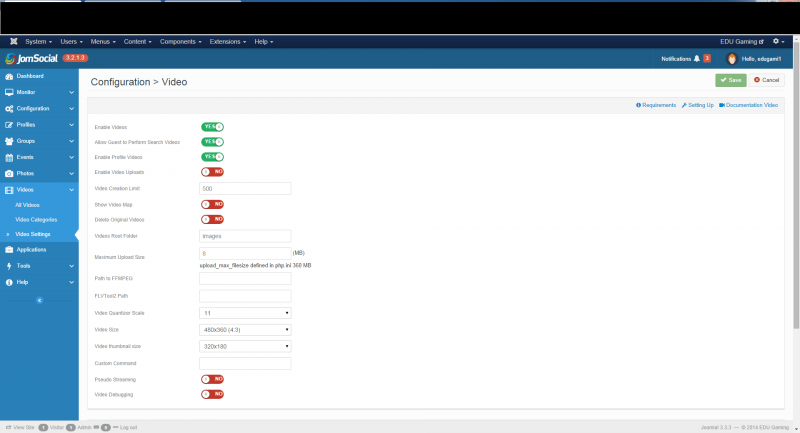
The backend setting can be seen in the images below.
-

- Dimas Tekad Santosa
- Visitor
- Thank you received: 0
Licenses:
Hi J,
Thank you very much for your explantion, but I am sorry I think I dont really understand it very well.. if you dont mind, can you provide me the points steps by steps to replicate your issue, please? if possible with additional screenshoot / videos.
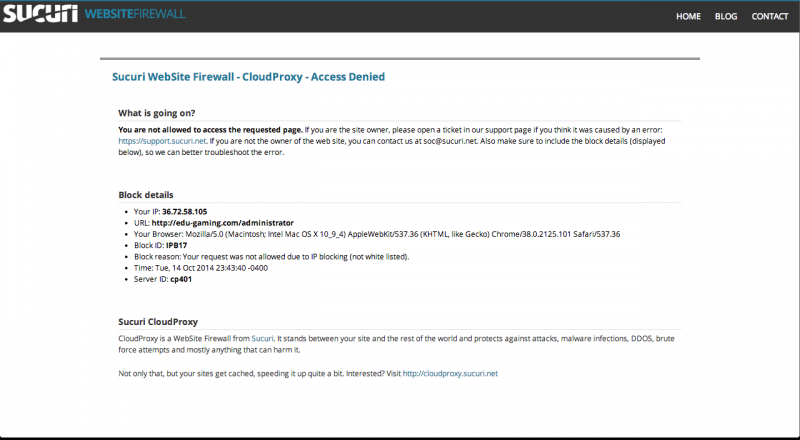
Beside that I cant access your backend, check my screenshoot.
thank you
Hi Dimas,
Sorry for my poor explanation earlier. Hopefully this round will be better :)
Sucuri is our external firewall and your IP needs to be whitelisted to gain access to the backend. However, due to the nature of our company we enforce a strict safeguarding policy and therefore I can't grant you backend access to our production server. However, I can install a copy of the website on our development server with user information removed if it comes to that.
The issue in a nutshell:
When a group is created in Jomsocial the admin is able to add pictures and link videos but group members are unable to do so.
To replicate the issue:
1. With any website member we can create a group in jomsocial.
2. The member who creates the group becomes the admin for that group.
3. On the group creation page the options for 'allow members to upload photos and create albums' under albums and 'allow members to upload videos' are unselectable - even if the user creating the group is a website superuser.
4. Once the group is created admins of the group can add photos and videos but members can't.
You can see the setup for video config and group config in the backend in the images of my previous post.
Unfortunately, I am unable to take a screen shot of the options being denied when creating a group as it is the cursor that changes to an access denied symbol when hovering over these options and this doesn't show up in the screenshot.
Thanks for the help.
-
- Dimas Tekad Santosa
- Visitor
- Thank you received: 0
Licenses:
Hi J,
Would you mind provide me the dev site and provide me the sample user and sample group for testing it, please?
So I able to replicate this issue on your site very well.
As I understand with your issue, you can't enabled this options 'allow members to upload photos and create albums' under albums and 'allow members to upload videos' right? because by default
1. once you enable 'Enable Photo Sharing', so you able to setup 'Allow Members to Upload Photos and Create Albums'
2. once you disabled 'Enable Photo Sharing', so you not able to setup 'Allow Members to Upload Photos and Create Albums'
3. once you enable 'Enable Video Sharing', so you able to setup 'Allow Members to Upload Videos'
4. once you disabled 'Enable Video Sharing',so you not able to setup 'Allow Members to Upload Videos'
thank you
That's correct.
With videos we would like for admins and members to be able to link them rather than upload them due to server space. This currently works with admins being able to link videos but members are unable to do so.
I will sort out an account for you on the dev site over the next day.
Thank you.
-
- Dimas Tekad Santosa
- Visitor
- Thank you received: 0
Licenses:
Hi J,
Ok I think it will be better if I test on your dev site, please you provide me the sample user, admin access and sample group URL.
thank you