Notice

The forum is in read only mode.

Support Forum

Welcome! Support Forums have been reactivated
Welcome the Technical Support section. Help us in assisting you by providing us with a concise and descriptive elaboration of your issues. Be specific and if possible, provide us with a step-by-step instruction in replicating your problem.

Flat Border

10 years 6 months ago
  • David's Avatar
    Topic Author
  • David
  • Offline
  • Junior Boarder
  • Posts: 154
  • Thank you received: 0
Licenses:
JomSocial Active Publisher Active AdAgency Expired Socialize Expired

Greetings Pro's,
I have Ad Agency on my site, www.madd-talent.com and with it I have created a right ad zone and it's works exactly as it's supposed to. However, currently this zone border is bossed as indicated in the attached screenshot. I would like it to simply be flat. The same color just not bossed. It will look better on my site if it's flat. Can you change this to flat or better, tell me how to do it so I can change it as needed?

Thanks,

David
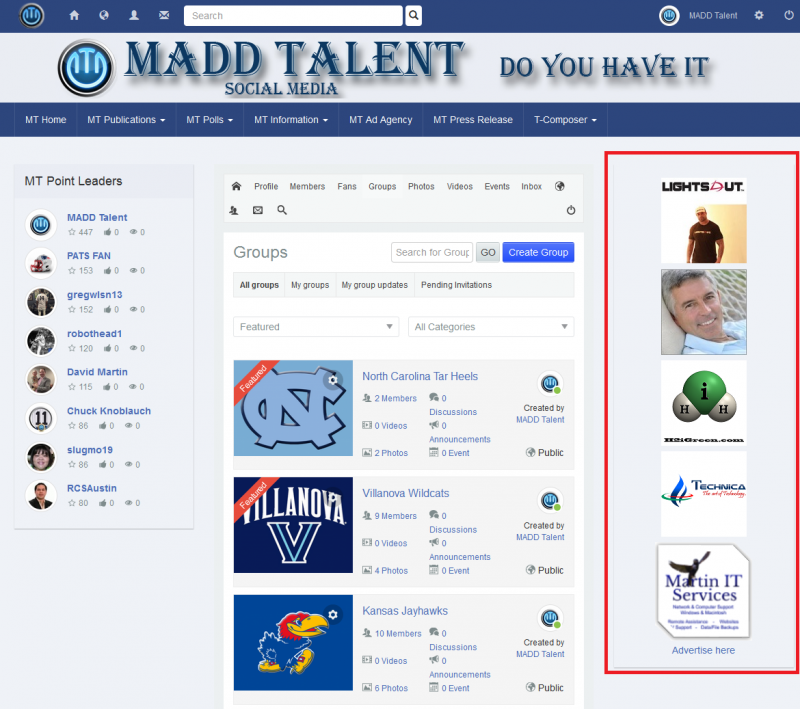
Attachments:
10 years 6 months ago
Licenses:

Hi,

please put this CSS at:
/templates/socialize/css/custom.css

#Mod140 {
  box-shadow: none;
}

Regards

10 years 6 months ago
  • David's Avatar
    Topic Author
  • David
  • Offline
  • Junior Boarder
  • Posts: 154
  • Thank you received: 0
Licenses:
JomSocial Active Publisher Active AdAgency Expired Socialize Expired

Albertus,
Thank you for the code, but when I added this CSS text to the end of that file you listed, then saved it and refreshed my site, the box was still bossed. Is there a specific location within this file I need to place it?

Thanks,

David

10 years 6 months ago
Licenses:

Hi,

put it at the end at /templates/socialize/css/custom.css
please make sure to clear joomla cache if any.

Regards

10 years 6 months ago
  • David's Avatar
    Topic Author
  • David
  • Offline
  • Junior Boarder
  • Posts: 154
  • Thank you received: 0
Licenses:
JomSocial Active Publisher Active AdAgency Expired Socialize Expired

Albertus,
I am sorry to ask this question, but how do I clear Joomla cache?

sorry,

David

10 years 6 months ago
Licenses:

Hi,

I found the issue. you put wrong code

.joms-landing__signup li {
  background-image: url("logo-list.png");
  background-position: left top;
  background-repeat: no-repeat;
  color: #fff;
  font-size: 18px;
  padding: 8px 8px 8px 47px;
  text-align: left;
#Mod140 {
  box-shadow: none;
}
the code must be like this
.joms-landing__signup li {
  background-image: url("logo-list.png");
  background-position: left top;
  background-repeat: no-repeat;
  color: #fff;
  font-size: 18px;
  padding: 8px 8px 8px 47px;
  text-align: left;
}

#Mod140 {
  box-shadow: none;
}

Regards

10 years 6 months ago
  • David's Avatar
    Topic Author
  • David
  • Offline
  • Junior Boarder
  • Posts: 154
  • Thank you received: 0
Licenses:
JomSocial Active Publisher Active AdAgency Expired Socialize Expired

Albertus,
I won't even ask how you are able to figure stuff like this out so quickly. You are without a doubt amazing. LOL! This does look much better in my oppinion and thank you again for taking the time to fix this for me. I will save this one as I can just delete that line if I ever want the boss back in.

Thanks a bunch Albertus,

David

Moderators: Piotr Garasiński
Powered by Kunena Forum

Join 180,000 websites creating Amazing communities

JomSocial is the most complete, easy-to-use addon that turns Joomla CMS into a
full -fledged, social networking site

TRY NOW BUY NOW
