Support Forum
How choose the Jomsocial Plugin Dispayed in Front
-

Topic Author - ARNAUD FRERET
- Offline
- Fresh Boarder
- Posts: 61
- Thank you received: 2
Licenses:
JomSocial Active Socialize Expired
Hello,
I would like to know :
What parameter i must change to choose the jomsocial plugin who is displayed automatically in front (in the Jomsocial "sidebar Top Position") WHEN I OPEN a user page.
(here "My AUP Points" in Front and not "Community - ProfileUrl")
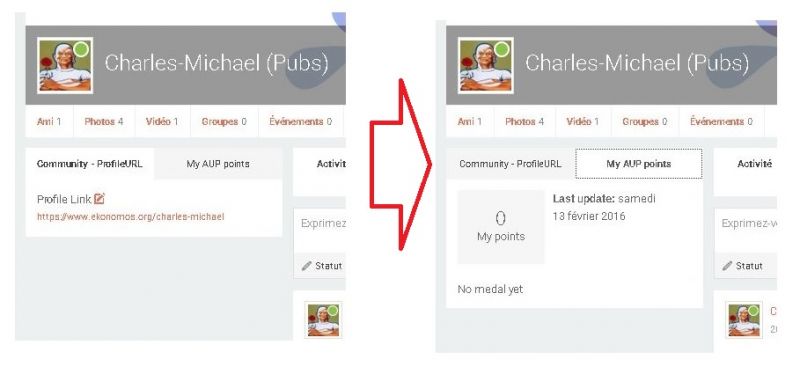
Many Thanks for your Help
Jomsocial 4.1.6
Joomla 3.4.8
HI, Arnaud.
There is no such a parameter.
Tabs for plugins are created in order - first created is first, second become second tab and so on.
So try to remove first plugin... and add it again.
- Instead of saying: 'it's not working', explain the problem in detail.
- Screenshots with the URL visible in them and the problem marked are more than welcome.
- Tell us how to replicate the problem, we can't fix it if we can't find it.
- Make sure that your site/server meets JomSocial System Requirements
- Make sure to setup JomSocial Cron Job
- Always provide us with access details to the backend and ftp. We need it to debug problems.
- If you have a similar problem, but a solution you found isn't working, open a new thread instead of 'merging' with an existing one.
- Use the "Thank You" feature on any post that helped you
-
Topic Author - ARNAUD FRERET
- Offline
- Fresh Boarder
- Posts: 61
- Thank you received: 2
Licenses:
JomSocial Active Socialize Expired
I have removed the plugin (+ the component of the plugin) and the SQL database of the extension.
But when i reinstall it, it stay in fist position
May you help me
Many Thanks
Arnaud
Hi, Arnaud.
I assign developer to this thread.
- Instead of saying: 'it's not working', explain the problem in detail.
- Screenshots with the URL visible in them and the problem marked are more than welcome.
- Tell us how to replicate the problem, we can't fix it if we can't find it.
- Make sure that your site/server meets JomSocial System Requirements
- Make sure to setup JomSocial Cron Job
- Always provide us with access details to the backend and ftp. We need it to debug problems.
- If you have a similar problem, but a solution you found isn't working, open a new thread instead of 'merging' with an existing one.
- Use the "Thank You" feature on any post that helped you
-
Topic Author - ARNAUD FRERET
- Offline
- Fresh Boarder
- Posts: 61
- Thank you received: 2
Licenses:
JomSocial Active Socialize Expired
Ok Thanks
Because i would like to know which core modification i must do to change the plugin who is displayed in front..
Best Regards
-
- Dimas
- Visitor
- Thank you received: 0
Licenses:
Hi,
You should remove all applications on edit my page configuration, and then add new app, add "My AUP Points" first and then add the rest.
I hope it will help
thank you!
-
Topic Author - ARNAUD FRERET
- Offline
- Fresh Boarder
- Posts: 61
- Thank you received: 2
Licenses:
JomSocial Active Socialize Expired
There is no solution less destructive, because i have many plugins already installed with infos.. ?
Many Thanks for your help
Best Regards
Arnaud
-
- Dimas
- Visitor
- Thank you received: 0
Licenses:
Hi Arnaud,
I am sorry this not possible, we cant change this behavior for now :(
thank you for your understanding