Notice

The forum is in read only mode.

Support Forum

Welcome! Support Forums have been reactivated
Welcome the Technical Support section. Help us in assisting you by providing us with a concise and descriptive elaboration of your issues. Be specific and if possible, provide us with a step-by-step instruction in replicating your problem.

Reset all User Points

10 years 7 months ago
  • David's Avatar
    Topic Author
  • David
  • Offline
  • Junior Boarder
  • Posts: 154
  • Thank you received: 0
Licenses:
JomSocial Active Publisher Active AdAgency Expired Socialize Expired

Greetings Pro's,
I am using the JomSocial UserPoints that comes with the User Points that I have renamed on my site to "Score" and I use this so my members can see there MADD Talent profile score. I use this scoring method as a means of giving away various prizes on our site. The member with the highest score, wins. Pretty simple and this is a beautiful module you all have designed. None-the-less, we will be giving away our first prize valued at around $5,000.00 dollars in April. After we announce the winner, we will then begin a new contest and I was wondering, is there a way that I can reset all the member points to "0"? By this, I mean is there like a batch file I can run that will go into my system and reset all my members scores to "0" or will I need to do this one by one until I have reset them all to "0"?

David

10 years 7 months ago
Licenses:

Hi,

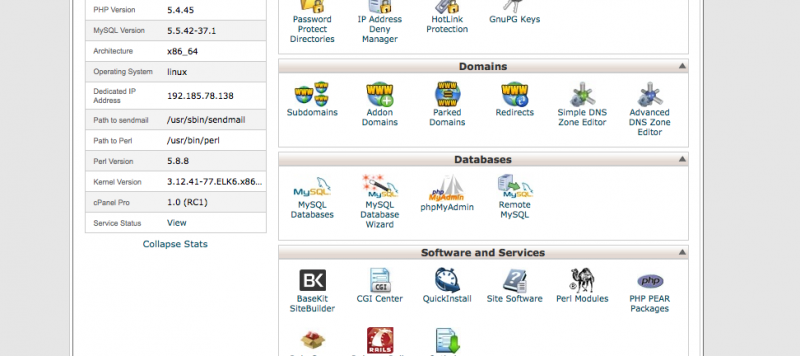
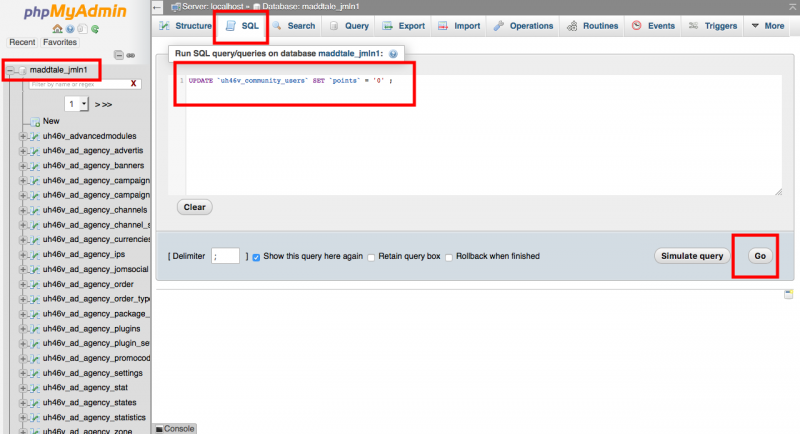
you can execute this query from phpmyadmin/database manager at you hosting Cpanel.

UPDATE `uh46v_community_users` SET `points` = '0' ;

Regards

10 years 7 months ago
  • David's Avatar
    Topic Author
  • David
  • Offline
  • Junior Boarder
  • Posts: 154
  • Thank you received: 0
Licenses:
JomSocial Active Publisher Active AdAgency Expired Socialize Expired

Albertus,
Thank you again for this information. Please, if you don't mind, would you give me some detailed instructions on how to do this. I promise I will save them to a file I have created for all these questions I ask you Pro's so I won't need to ask you again. I just need to know exactly where to go and what to do to execute this batch file.

Thanks,

David

10 years 7 months ago
Licenses:

Hi,

please open your site cpanel. and open phpmyadmin at there, select your dabatase, click SQL tab and execute that query.
please keep in mind, the changes not able to revert back. please be careful with it.


Regards

Attachments:
Moderators: Piotr Garasiński
Powered by Kunena Forum

Join 180,000 websites creating Amazing communities

JomSocial is the most complete, easy-to-use addon that turns Joomla CMS into a
full -fledged, social networking site

TRY NOW BUY NOW