Support Forum
Activity Stream module not showing activities unless logged in

ISSUE SUMMARY: My activity stream module is only showing old activities while viewing the site as the public. But all posts do show when viewing the site as a logged in user.
EDIT - When the site is viewed by the public there is only 1 particular user that is visible in the stream module. When logged in all users are visible. I dont see any settings that are affecting it.
STEPS TO REPLICATE:
1View stream while not logged in - older activities
2 View stream while logged in - all activities are showing
3
4
5
RESULT Only old activities are showing
EXPECTED RESULT Should show all
BROWSER Firefox and Chrome
HI, Scott.
Server not found:
i.imgur.com/CouqEZ0.png
- Instead of saying: 'it's not working', explain the problem in detail.
- Screenshots with the URL visible in them and the problem marked are more than welcome.
- Tell us how to replicate the problem, we can't fix it if we can't find it.
- Make sure that your site/server meets JomSocial System Requirements
- Make sure to setup JomSocial Cron Job
- Always provide us with access details to the backend and ftp. We need it to debug problems.
- If you have a similar problem, but a solution you found isn't working, open a new thread instead of 'merging' with an existing one.
- Use the "Thank You" feature on any post that helped you
HI, Scott.
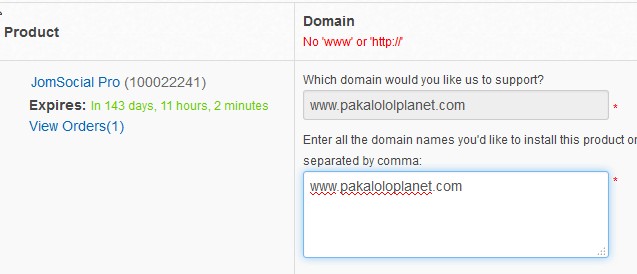
I fixed your domain name.
You've set activity stream module to display only TWO activities.
Now, take a closer look on main activity stream items when you're logged in:
i.imgur.com/N0lr0OI.png
Marked icon indicates that certain post is "Members only".
So they WON'T be displayed for guests.
That's why in module you see only two (module is set to display only two) activities that are public. "members only activities are skipped and not displayed.
If you want to display certain activity make sure it's public - need to have globe icon instead two heads.
- Instead of saying: 'it's not working', explain the problem in detail.
- Screenshots with the URL visible in them and the problem marked are more than welcome.
- Tell us how to replicate the problem, we can't fix it if we can't find it.
- Make sure that your site/server meets JomSocial System Requirements
- Make sure to setup JomSocial Cron Job
- Always provide us with access details to the backend and ftp. We need it to debug problems.
- If you have a similar problem, but a solution you found isn't working, open a new thread instead of 'merging' with an existing one.
- Use the "Thank You" feature on any post that helped you
Hi, Scott.
This depends from user and global privacy settings.
When user set his profile to be "Members only" (in Frontend -> Profile -> Privacy -> General) all status posts will have this privacy setting.
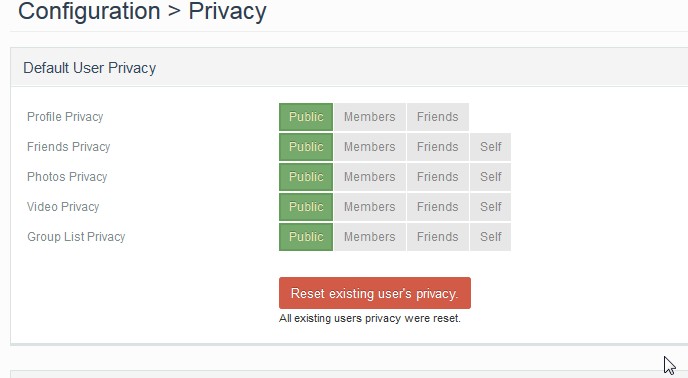
You may reset users privacy here: Backend -> Components -> JomSocial -> Settings -> Privacy
You need to set Profile to Public, save, and click
i.imgur.com/HJeimUV.png
- Instead of saying: 'it's not working', explain the problem in detail.
- Screenshots with the URL visible in them and the problem marked are more than welcome.
- Tell us how to replicate the problem, we can't fix it if we can't find it.
- Make sure that your site/server meets JomSocial System Requirements
- Make sure to setup JomSocial Cron Job
- Always provide us with access details to the backend and ftp. We need it to debug problems.
- If you have a similar problem, but a solution you found isn't working, open a new thread instead of 'merging' with an existing one.
- Use the "Thank You" feature on any post that helped you
Unfortunately that is not the fix. I have reset the privacy settings to public and it still remains the same. Plus, I want the posts to be viewed publicly in the stream module but not their profile page. It is that way for the member whose posts keep showing on the home page "msaloha". That member's settings are the same as the others so I cannot figure out why it is happening. Any other suggestions?
The site is not active yet so you are welcome to adjust the settings if you want. Just keep me informed of the changes.
Thank you...
Hi, Scott.
Setting "Profile Privacy" to public is not enough - you still need to reset user settings.
Also you can't set post to be "public" in module but "members only" in profile.
Setting reset will apply only to NEW status posts - it won't change privacy settings for old posts.
Status posts follow profile privacy settings as they belong strictly to profile.
So they can be "public" OR "members only" wherever they appear.
- Instead of saying: 'it's not working', explain the problem in detail.
- Screenshots with the URL visible in them and the problem marked are more than welcome.
- Tell us how to replicate the problem, we can't fix it if we can't find it.
- Make sure that your site/server meets JomSocial System Requirements
- Make sure to setup JomSocial Cron Job
- Always provide us with access details to the backend and ftp. We need it to debug problems.
- If you have a similar problem, but a solution you found isn't working, open a new thread instead of 'merging' with an existing one.
- Use the "Thank You" feature on any post that helped you