Notice

The forum is in read only mode.

Support Forum

Welcome! Support Forums have been reactivated
Welcome the Technical Support section. Help us in assisting you by providing us with a concise and descriptive elaboration of your issues. Be specific and if possible, provide us with a step-by-step instruction in replicating your problem.

Publihser Pro Logo Size and Position

10 years 8 months ago
  • David's Avatar
    Topic Author
  • David
  • Offline
  • Junior Boarder
  • Posts: 154
  • Thank you received: 0
Licenses:
JomSocial Active Publisher Active AdAgency Expired Socialize Expired

Good day Pro's,
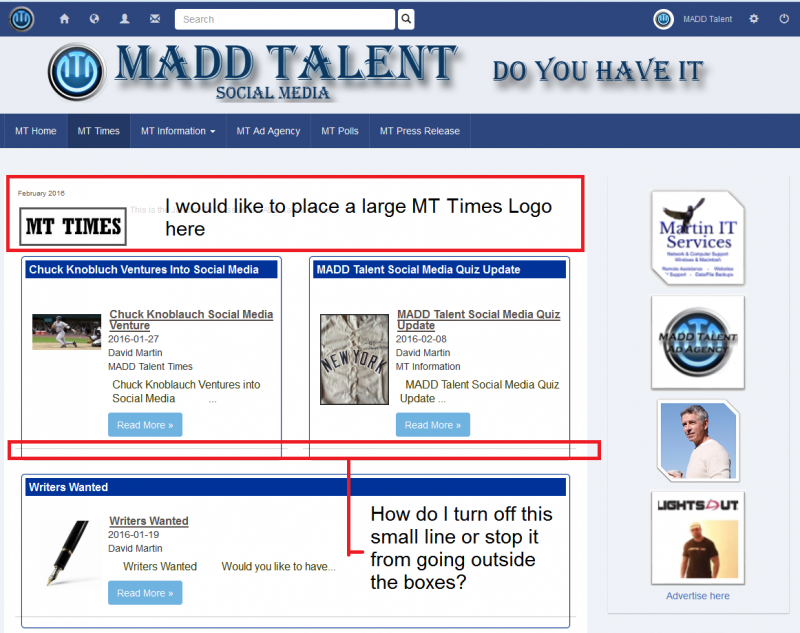
I just re-purchased Publisher Pro and I am very excited to finally have this package on my site. Thank you for sticking with me to work all the issues out so I could finally use it. Now, I have my first issue or question. If you look at my publication for February: madd-talent.com/mt-times/issues/mtt , you will notice that the MT Times Logo is tiny and stays just to the left side. Is it possible to have this top zone or section available for me to design a nice logo that goes across the whole page or can I make this one logo custom and much larger than it keeps appearing?

One more minor issue. If you look at the attached image, you will see the above mentioned note, plus a second one that I can't seem to get to go away. There is this very thin line that appears on the bottom of all the zones in every issue and this lines runs outside the zone border. Can I fix this?

Thanks,

David

Attachments:
10 years 8 months ago
  • Dimas's Avatar
  • Dimas
  • Visitor
  • Thank you received: 0
Licenses:

Hi,

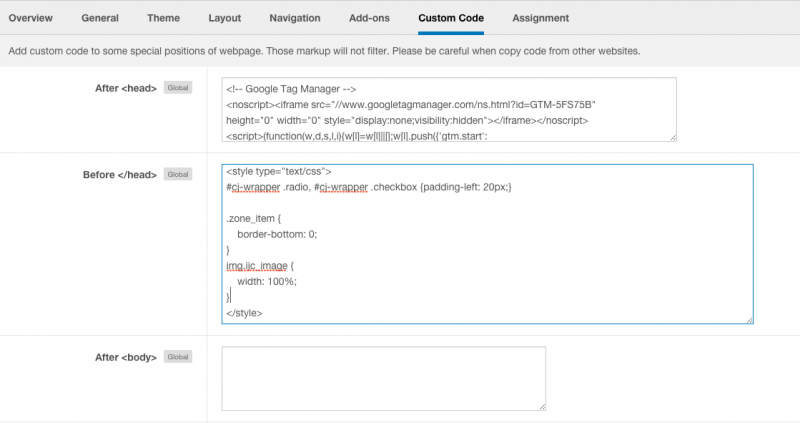
To fix it you can use this css code :

.zone_item {
    border-bottom: 0;
}
img.ijc_image {
    width: 100%;
}

but you should change your logo to the bigger image, because it too small, it will pixeled then.

thank you!

10 years 7 months ago
  • David's Avatar
    Topic Author
  • David
  • Offline
  • Junior Boarder
  • Posts: 154
  • Thank you received: 0
Licenses:
JomSocial Active Publisher Active AdAgency Expired Socialize Expired

Dimas,
This sounds like exactly what I am looking for. Would you mind please telling me where exactly I add this CSS Code? I am sorry, but I don't know where to place it and I know you do.

Thanks,

David

10 years 7 months ago
  • Dimas's Avatar
  • Dimas
  • Visitor
  • Thank you received: 0
Licenses:

Hi David,

For any css changes I suggest you put it on socialize configuration->custom code


thank you!

Attachments:
10 years 7 months ago
  • David's Avatar
    Topic Author
  • David
  • Offline
  • Junior Boarder
  • Posts: 154
  • Thank you received: 0
Licenses:
JomSocial Active Publisher Active AdAgency Expired Socialize Expired

Dimas,
Thank you so much for showing me where to include this code. I will make a note of this thread in case I need to refer back to in, but most importantly, thank you for just adding the code for me. Now, all I need to do is create a nice logo that I can place in this location and it will look exactly as I want it to look. I have to tell you that I really appreciate all the help I get from all your pro's. You and Albertus have been exspecially helpful and I really appreciate it.

Thanks,

David

Moderators: Piotr Garasiński
Powered by Kunena Forum

Join 180,000 websites creating Amazing communities

JomSocial is the most complete, easy-to-use addon that turns Joomla CMS into a
full -fledged, social networking site

TRY NOW BUY NOW