Support Forum
Index Page Center Zone

Greetings Pro's,
Okay, this time I think I have a good one for you. I am currently getting thousands of visitors a day to my site,
www.madd-talent.com
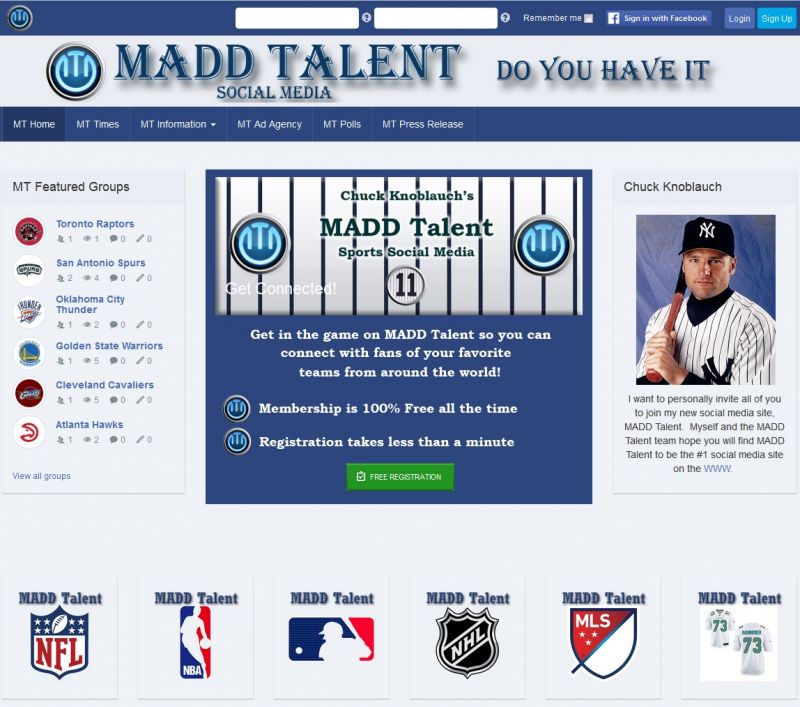
. However, I am getting very few to become members. From some of the comments and questions I have asked, the main reason is that the index or home page, does not let them know very much. I just purchased the latest version of JomSocial and I believe there is a new feature that will allow me to add or customize zones on the home page. I am attaching a screen shot of something simple I would like to add that would make my home page look like the attached picture. Can you please tell me if this is possible and how I do it if it is?
Thanks,
David
Hi,
you need to create new override this template file:
/components/com_community/templates/jomsocial/layouts/frontpage/guest.php
and create new HTML + CSS on that file. but you must be know about HTML + CSS, right?
Regards
Albertus,
Thank you for more information on this and no, I don't know html or CSS. LOL! I have done all of what is on my site with a lot of help from JomSocial Pro's like yourself. LOL! I will go and read all you shared with me to see if I can figure this out. I did go into the back-end of JomSocial, Theme-Designer- General and played with the setting there. I set "Enable Log-In Area" to no, but the picture and everything went away. I want the picture and if I could just get that large white log in area do turn off and leave the picture, I would design a new picture that has all the information I want. Is it possible to just turn off that login area in the main body. The log in information still shows that is located on the top bar and that's all I really need.
If that will not work, is there someone I can hire to do what I sent you yesterday in graphic I attached. I just need this one thing and my site is finally ready to be released and I can begin earning money. If it's not too much to ask, would one of you pro's be able to go into my site and set up this new zone for me so I can just add things to it. I only need this zone to work on the home page and that is all. The rest of the site is just perfect the way it is with the Socialize template I am using. Please just tell me the best way to get this new zone on my homepage. MY visitors come to my site and have really no idea what to do with the standard JomSocial and Socialize layout. Nothing is available to encourage them to join.
Thanks,
David Martin
Albertus,
One of you pro's doing this is absolutely the best solution to this. I can't thank of anyone that knows your software better than you all do. I am attaching the image for you to use and this only needs to appear on one page,
www.madd-talent.com
and that is all. Everything else can stay exactly as you all have made it.
Thank you so very much and to show you how thankful I am, I would love to give you some free advertising on my site for the next 12 months.
Take care,
David

Hi David,
seem we misunderstanding here. could you please send me the "raw" format for that image. it would be great in PSD format.
I need the layering image. for build new design I need logo ONLY, background image (the grey on) Only with out "get connected" and "logo".
Regards

Hi,
the images same like prev post. strange :(
could you please send it to my email: This email address is being protected from spambots. You need JavaScript enabled to view it.
one more thing, if can, i need bigger image.
Regards
Albertus,
I emailed you both images, the Photoshop layered image and the PNG of that image. You wanted me to make it larger. If you have a specific size in mind, please tell me and I will reformat it now and send you both images again.
Thanks,
David

Albertus,
You are now the greatest of all the Pro's on JomSocial. THANK YOU THANK YOU THANK YOU!!! I am going to personally call Merav and let her know you are the best.
Thanks, so much,
Oh, how do I change this image. LOL
Albertus,
Thanks again and yes I will close this thread, but can you please tell me what is the name of this new zone or how I can change this image if I want. Also, I purchased the newest version of JomSocial. If I load it, will it kill this work you just did?
Thanks,
David
Hi,
the image still change able from jomsocial backend > theme designer > general.
and I put new override at:
/templates/socialize/css/custom.css
/templates/socialize/css/logo-list.png
and
/templates/socialize/html/com_community/layouts/frontend/guest.php
please backup that location if you want to do socialize reinstall or update (if any).
Regards