Support Forum
Toolbar broken on PC, fine on Android
ISSUE SUMMARY:
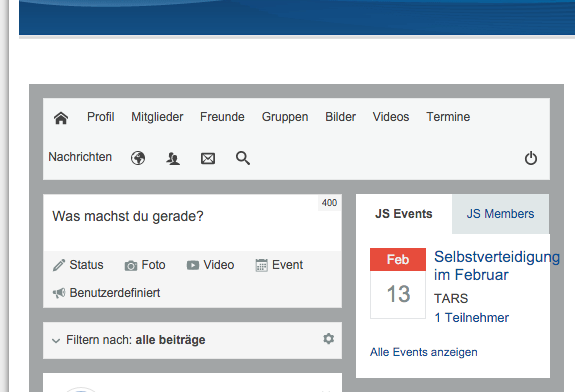
After fresh installing Jomsocial and adding some test content I noticed that the toolbar is not showing propperly on Win10 but perfectly fine on my android phone. On my Joomla Site I am running a self build Artisteer theme
STEPS TO REPLICATE:
1 open Site on Webbrowser
2 compare with mobile appearance
3
4
5
RESULT Broken on PC - OK on Mobile
EXPECTED RESULT to be also OK on PC
BROWSER FF or Chrome
-

- Dimas
- Visitor
- Thank you received: 0
Licenses:
hi,
This issue related with this file li code from this /templates/tars_2015_1/css/template.css, the eg.. the arrow image is coming from this class :
.art-postcontent ul>li:before, .art-post ul>li:before, .art-textblock ul>li:beforethere is so much conflict, I cant tell you one by one.. if you have good knowladge with CSS you can investigate it by yourself.
thank you
Unfortunately I am a total Noob when it comes to programming. I managed to get the arrow away, but thats all. When I resize my Browser to really small size, the responsive design seems to kick in and then the menu is shown correct. If you could do a step by step description, that would be really awesome.
Well, I managed to have the toolbar looking OK by disabeling the dropdown positions in the menue. Now the Links from the "House" Symbol up to Notification are working just fine. last Problem I have are the 4 last Symbols (Globe, People, Envelope and Magnifying Glass)
If I click on them nothing happens, if I rightclick and "open in new window" they show just fine. Any advise on how to fix that?
-
- Dimas
- Visitor
- Thank you received: 0
Licenses:
Hi Sascha,
This issue caused by this code form your /templates/tars_2015_1/css/template.css:
.art-postcontent ul>li, .art-post ul>li, .art-textblock ul>li
{
  overflow-x: visible;
  overflow-y: hidden;
}
and this code :
content: url('../images/postbullets.png');I suggest you delete that block code.
thank you!