Notice

The forum is in read only mode.

Support Forum

Welcome! Support Forums have been reactivated
Welcome the Technical Support section. Help us in assisting you by providing us with a concise and descriptive elaboration of your issues. Be specific and if possible, provide us with a step-by-step instruction in replicating your problem.

JS login keeps poping up

10 years 8 months ago
Licenses:

Hi,

it can be. please turn it off first, and clear your browser cookie + cache.

Regards

10 years 7 months ago
  • Colin's Avatar
    Topic Author
  • Colin
  • Offline
  • Fresh Boarder
  • Posts: 11
  • Thank you received: 3
Licenses:
JomSocial Expired

Hi Albertus, Soory for being such a pain in the arse, but I have been working alot in JS and that darn login window is popping up quite often.

I have turned varnish off, cleared the browser cookie and cache, and still seems to pop up.

I can only turn off vanish for longer periods, when working late nights as the site is just too slow without it. I will get up extra early on saturday and work with it off, and see what happens.

There is no way to clear the gantry template cache as it is needed for it to work.
Have you tried surfing around our community for awhile? Click on some of the stream posts? Maybe leave an extra browser window open for a few hours?
Is there any sort of tool/browser add on that might give some more insight?

Only just over 100 days left for support here. I do not want to have to go to easysocial, as a solution to this issue.

Many thanks Albertus!

10 years 7 months ago
Licenses:

Hi,

your session setting only 60 minutes (at joomla global configuration).
I increased it to 600 minutes.

please make a test again. so far no issue here.

Regards

10 years 7 months ago
  • Colin's Avatar
    Topic Author
  • Colin
  • Offline
  • Fresh Boarder
  • Posts: 11
  • Thank you received: 3
Licenses:
JomSocial Expired

Hi Albertus, hope you had a great easter!
Still getting popup, trying to find out an instance where it always pops up and have found.
If I log out, then try to do anything, (access photos from the wall, a gallery, etc), the login pops up. If I leave it for a minute or two, I can do things again.

I have created an account for you so you can test it.
jstest
jstest

Happens on both varnish and non varnish versions of the site.
So if this means it is a cache issue, how can we fix it?

Thanks again for helping with this!!

10 years 6 months ago
Licenses:

Hi,

please edit your first post at this topic. and provide me FTP access detail.

Regards

10 years 6 months ago
  • Colin's Avatar
    Topic Author
  • Colin
  • Offline
  • Fresh Boarder
  • Posts: 11
  • Thank you received: 3
Licenses:
JomSocial Expired

Details added

Thanks again Albertus!

10 years 6 months ago
Licenses:

Hi,

there is no issue with the code. your server using Suhosin. Suhosin is a security module.
ref:
docs.joomla.org/How_to_add_CSRF_anti-spoofing_to_forms

please try to turn off Suhosin first. if cant, please asking your hosting support to make changing on Suhosin settings.

Regards
10 years 6 months ago
  • Colin's Avatar
    Topic Author
  • Colin
  • Offline
  • Fresh Boarder
  • Posts: 11
  • Thank you received: 3
Licenses:
JomSocial Expired

Thank you Albertus.
I will contact them and see what they say..

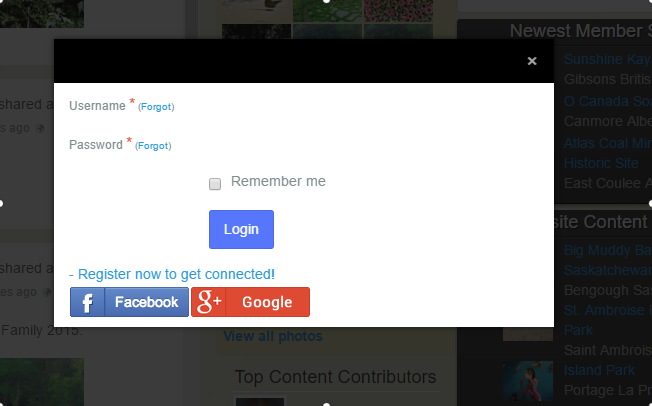
Did you make any changes, today i logged in and the popup came up right away, but the form to add the login and pass are not there. Screenshot attached

I also see the same on the JS homepage login

Attachments:
10 years 6 months ago
Licenses:

Hi,

I did not make changes. please let me know after Suhosin has been turned off.

Regards

The following user(s) said Thank You: Colin
10 years 6 months ago
  • Colin's Avatar
    Topic Author
  • Colin
  • Offline
  • Fresh Boarder
  • Posts: 11
  • Thank you received: 3
Licenses:
JomSocial Expired

Hi Albertus,

Suhosin has been turned off. Still pops up, when wall image clicked after logging our, but clearing the browser cache now seems to stop it. But members won't know to do that.

The form issue is fixed, it was due to a css change to fix something else.

10 years 6 months ago
  • Dimas's Avatar
  • Dimas
  • Visitor
  • Thank you received: 0
Licenses:

this is really cache issue... can you try to disable "Zend OPcache" on your server configuration? or disable any cache module on your server, and if you wanna use cache you can use 3rd party cache from Joomla component like JotCache

10 years 6 months ago
  • Colin's Avatar
    Topic Author
  • Colin
  • Offline
  • Fresh Boarder
  • Posts: 11
  • Thank you received: 3
Licenses:
JomSocial Expired

Looks like that may be the issue, turned off OP Cache and did not get the popup, turned it back on and the popup came back. So what to do about it as the site is considerably slower with it turned off. 3 sec enabled. 4.7 with disabed. We use varnish so, a joomla cache probably would not work. Can JS and OP cache make friends and work together?

10 years 6 months ago
  • Colin's Avatar
    Topic Author
  • Colin
  • Offline
  • Fresh Boarder
  • Posts: 11
  • Thank you received: 3
Licenses:
JomSocial Expired

Looks like that may be the issue, turned off OP Cache and did not get the popup, turned it back on and the popup came back. So what to do about it as the site is considerably slower with it turned off. 3 sec enabled. 4.7 with disabed. We use varnish so, a joomla cache probably would not work. Can JS and OP cache make friends and work together?

10 years 6 months ago
Licenses:

Hi,

the issue at OP cache it self. please report this issue to your hosting support.
maybe they can changing the op cache configuration, or there is abug with op cache it self.

this is server issue.

Regards

Moderators: Piotr Garasiński
Powered by Kunena Forum

Join 180,000 websites creating Amazing communities

JomSocial is the most complete, easy-to-use addon that turns Joomla CMS into a
full -fledged, social networking site

TRY NOW BUY NOW