Support Forum
My google ads not shown

ISSUE SUMMARY:
STEPS TO REPLICATE:
Hi there
1 Google adsense no display any ads
2 just placed the responsive ads code and not show ads, on,y a blank space
3
4
5
RESULT
EXPECTED RESULT
BROWSER google chrome
Hi, Romulo.
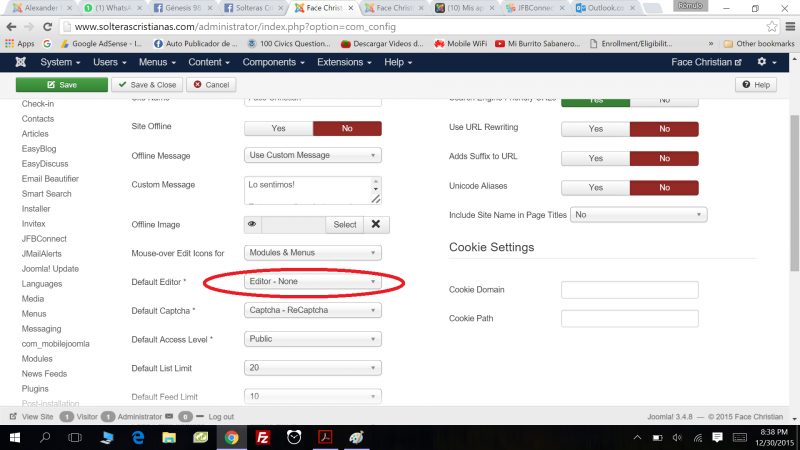
Then you probably pasted it in wrong way.
Or your editor cleared it off.
Anyway, this issue is not related with JomSocial but rather with Joomla! administration.
- Instead of saying: 'it's not working', explain the problem in detail.
- Screenshots with the URL visible in them and the problem marked are more than welcome.
- Tell us how to replicate the problem, we can't fix it if we can't find it.
- Make sure that your site/server meets JomSocial System Requirements
- Make sure to setup JomSocial Cron Job
- Always provide us with access details to the backend and ftp. We need it to debug problems.
- If you have a similar problem, but a solution you found isn't working, open a new thread instead of 'merging' with an existing one.
- Use the "Thank You" feature on any post that helped you
Hi, Romulo.
I can't view your profile as I get: "No tiene autorización para ver este recurso.".
I'll need access to your account to check your profile settings regarding Google Ads.
Please, edit your first post here and provide your account credentials.
- Instead of saying: 'it's not working', explain the problem in detail.
- Screenshots with the URL visible in them and the problem marked are more than welcome.
- Tell us how to replicate the problem, we can't fix it if we can't find it.
- Make sure that your site/server meets JomSocial System Requirements
- Make sure to setup JomSocial Cron Job
- Always provide us with access details to the backend and ftp. We need it to debug problems.
- If you have a similar problem, but a solution you found isn't working, open a new thread instead of 'merging' with an existing one.
- Use the "Thank You" feature on any post that helped you
Hi, Romulo.
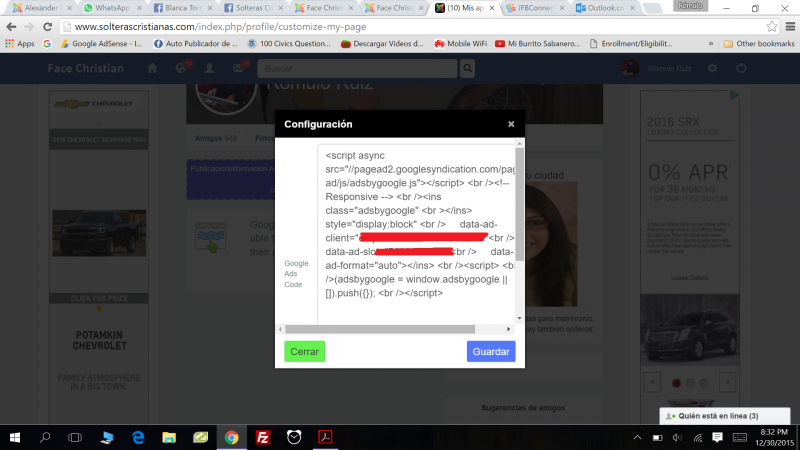
Code entered there is corrupted... damaged:
<script async src="//pagead2.googlesyndication.com/pagead/js/adsbygoogle.js"></script> <br /><!-- Responsive --> <br /><ins class="adsbygoogle" <br ></ins> style="display:block" <br /> data-ad-client="ca-pub-3039544434770255" <br /> data-ad-slot="7096659505" <br /> data-ad-format="auto"></ins> <br /><script> <br />(adsbygoogle = window.adsbygoogle || []).push({}); <br /></script>
Please, copy genuine Google code to a txt file and upload it here.
- Instead of saying: 'it's not working', explain the problem in detail.
- Screenshots with the URL visible in them and the problem marked are more than welcome.
- Tell us how to replicate the problem, we can't fix it if we can't find it.
- Make sure that your site/server meets JomSocial System Requirements
- Make sure to setup JomSocial Cron Job
- Always provide us with access details to the backend and ftp. We need it to debug problems.
- If you have a similar problem, but a solution you found isn't working, open a new thread instead of 'merging' with an existing one.
- Use the "Thank You" feature on any post that helped you
Hi Michal,
The code is good, that's the one placed in my site in different module position, mobile and desktop, I compared it with the original of google adsense and is ok, then i tested with another code and work fine, the problem is that the plugin don not recognize responsive code. could be great if you guys solve this issue.
Best Regards
Romulo
Once again i was testing and realized that the adsense code work on other position like js_profile_side, any code work on that position even responsive code, responsive don't work only on profile main.
Hi, Romulo.
I'm sorry but code is wrong:
<script async src="//pagead2.googlesyndication.com/pagead/js/adsbygoogle.js"></script> <br /><!-- Responsive --> <br /><ins class="adsbygoogle" <br ></ins> style="display:block" <br /> data-ad-client="ca-pub-3039544434770255" <br /> data-ad-slot="7096659505" <br /> data-ad-format="auto"></ins> <br /><script> <br />(adsbygoogle = window.adsbygoogle || []).push({}); <br /></script>
Take a closer look to opening and closing tags:
This is fine:
<script async src="//pagead2.googlesyndication.com/pagead/js/adsbygoogle.js"></script>
Next we have <br /> which is also fine.
Then is comment:
<!-- Responsive -->
And another break
<br />
Then is:
<ins class="adsbygoogle" <br ></ins>
Which is inserted code.
And now is:
style="display:block"
but it's not inside any code. style need to be applied to something, to an object. I guess it should be inside inserted part.
Then after some code we have </ins> closing tag which doesn't apply to anything as <ins. that was before was already closed.
I used your code on my site:
i.imgur.com/aZMz7ae.png
Result is the same as on your.
So I cleared the code from spared breaks <br> and mismatched </ins> and it works:
<script async src="//pagead2.googlesyndication.com/pagead/js/adsbygoogle.js"></script><!-- Responsive --><ins class="adsbygoogle" style="display:block" data-ad-client="ca-pub-3039544434770255" data-ad-slot="7096659505" data-ad-format="auto"></ins><script>(adsbygoogle = window.adsbygoogle || []).push({}); </script>
i.imgur.com/ge4BwFw.png
And on your site too:
i.imgur.com/BGAMtC1.png
So it wasn't JomSocial issue but code that you pasted...
- Instead of saying: 'it's not working', explain the problem in detail.
- Screenshots with the URL visible in them and the problem marked are more than welcome.
- Tell us how to replicate the problem, we can't fix it if we can't find it.
- Make sure that your site/server meets JomSocial System Requirements
- Make sure to setup JomSocial Cron Job
- Always provide us with access details to the backend and ftp. We need it to debug problems.
- If you have a similar problem, but a solution you found isn't working, open a new thread instead of 'merging' with an existing one.
- Use the "Thank You" feature on any post that helped you