Welcome the Technical Support section. Help us in assisting you by providing us with a concise and descriptive elaboration of your issues. Be specific and if possible, provide us with a step-by-step instruction in replicating your problem.
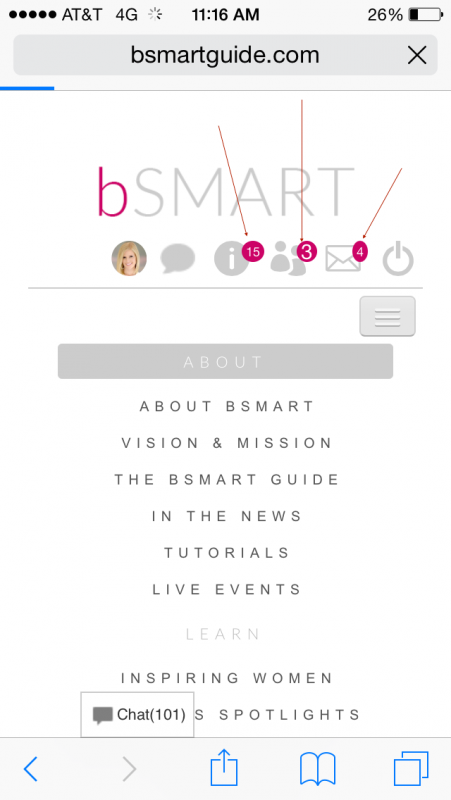
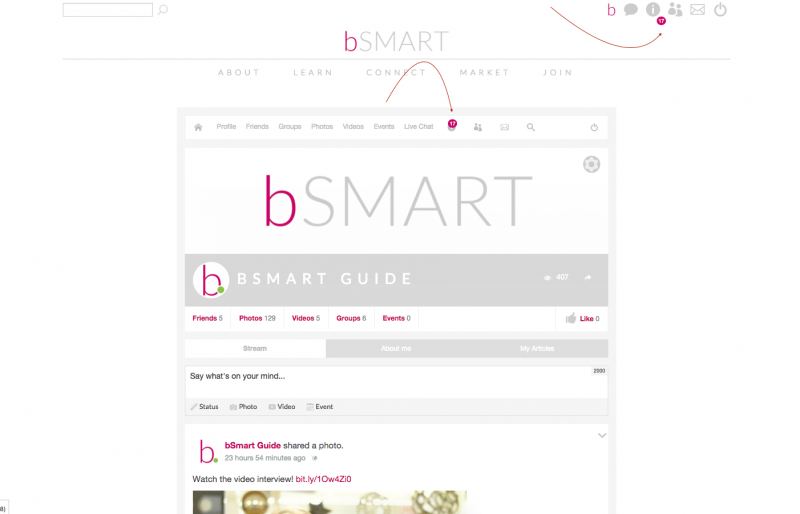
Notification icons: Count displays below icon + numbers are different sizes

ISSUE SUMMARY:
In Chrome, the notification count (numbers) display at the bottom of the icons in my custom module placed in the upper right of my website. How can I have the notification number count be at the top of the icon?
In all browsers, the notification number count and circle sizes are different. See attached images for examples of both. How can the number and circle be the same size.
STEPS TO REPLICATE:
1 Login to your account on Chrome / mobile.
2 See the different number size, number placement, and circle size.
3
4
5
RESULT The numbers are below the icon, the numbers are different sizes, the circles are different shapes.
EXPECTED RESULT Number count above the icon, numbers are the same size, circles are the same shape.
BROWSER Chrome for number count below icons. All browsers for different number size and circle shapes.
this issue is not coming from jomsocial, but from your Joomla template.. please you contact your developer who created this template, because I see your developer try to fix the mobile issue, but the new issue appear on desktop version.
Hello,
I was able to fix the issue with the notification numbers appearing below the icon in Chrome. There was a missing 'top' declaration which only affected Chrome for some reason.
Can you explain in more detail what is causing the problem of different size text, and shapes with the notifications numbers?
Dimas wrote: Hi,
this issue is not coming from jomsocial, but from your Joomla template.. please you contact your developer who created this template, because I see your developer try to fix the mobile issue, but the new issue appear on desktop version.