Support Forum
after upgrade jomsocial, how to change customize template?

hi
i have a question
my customize template :
domain.com/template/html/comunity , ...... / style.rtl.css
i have not problem with customize css
but
if upgrade jomsocial, for example, 4.1.3 to 4.1.4 or 4.2.0 , in jomsocial template, is new version style.css
----
how to copy css from jomsocial , to my customize template?
after every upgarde must copy form jomsocial to customize template?
I got a copy (all css) from jomsocial (4.1.0) template , to customize template
again i copy (all css) ?
Hi,
RTL css at your site, that CSS only valid for jomsocial 3.3.
for any CSS customization, I suggest you to using custom CSS at joomla site template side, every site template having they own way to do that.
the reason for that, custom CSS from joomla site template will be loaded at the end from all loaded CSS. so any changes will be applied.
Regards
I think you have not noticed
i create custom template in (template joomla) :
domain.com/template/name template/html/community/ ....../ style.css or style.rtl.css
i have not problem, and good working
but
you created new template, and giving update version
I'll update jomsocial ----> if in template jomsocial , after update (style.css or style.rtl.css ) , exist new <<Class>> and this <<Class>> no exist my template (joomla template/html/community /......)
I must again <<Class>> copy from jomsocial template , to joomla template (html/comunity /....) ??
after every update jomsocial , I have to do?
Hi,
you can put this code at your style-rtl.css override.
@import url("../../../../../components/com_community/templates/jomsocial/assets/css/style-rtl.css");if you not put that import code you need to copy that css file from jomsocial template to joomla template every update
Regards
I got copy (@import url) , and working and no problem
but
i have a big problem
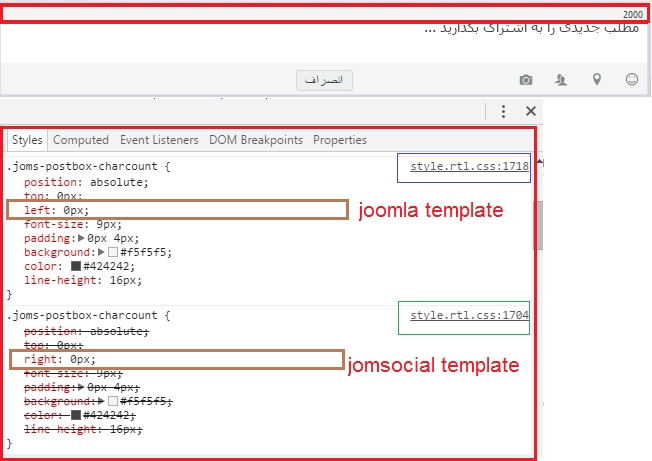
Some <<Class css>> Overlapping (jomsocial template and joomla template)
for example (Class .joms-postbox-charcount) :
in jom social template : ( right: 0px;)
  position: absolute;
  top: 0px;
  right: 0px;
  font-size: 9px;
  padding: 0px 4px;
  background: #f5f5f5;
  color: #424242;
  line-height: 16px; }
in joomla template : (remove right: 0px; and write left: 0px;)
  position: absolute;
  top: 0px;
  left: 0px;
  font-size: 9px;
  padding: 0px 4px;
  background: #f5f5f5;
  color: #424242;
  line-height: 16px;
after import URL in joomla template ----> final cod css <<Class>> :
  position: absolute;
  top: 0px;
  right :0px
  left: 0px;
  font-size: 9px;
  padding: 0px 4px;
  background: #f5f5f5;
  color: #424242;
line-height: 16px; image (before import URL) :

image (after import URL) :

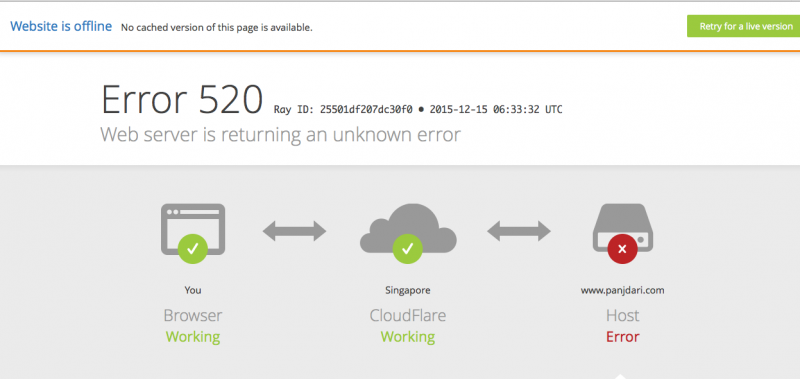
this is cloud flare
my site is on cloud flare
refresh page, or A few minutes see
i insert cod (import url) in joomla template again
please clear chash your browser
please see front page.
please see for example : my images that sent.
or button (share post), in stream post , ....
Hi,
at /templates/panjdari4/html/com_community/assets/css/style.rtl.css line 1728 please changing:
.joms-postbox-charcount {
  background: #f5f5f5 none repeat scroll 0 0;
  color: #424242;
  font-size: 9px;
  left: 0;
  line-height: 16px;
  padding: 0 4px;
  position: absolute;
  top: 0;
}.joms-postbox-charcount {
background: #f5f5f5 none repeat scroll 0 0;
color: #424242;
font-size: 9px;
left: 0;
line-height: 16px;
padding: 0 4px;
position: absolute;
top: 0;
right: auto;
}I marked this topic as confirmed bug, so next release will not have this issue any more.
Regards