Welcome the Technical Support section. Help us in assisting you by providing us with a concise and descriptive elaboration of your issues. Be specific and if possible, provide us with a step-by-step instruction in replicating your problem.
Greetings Pro's,
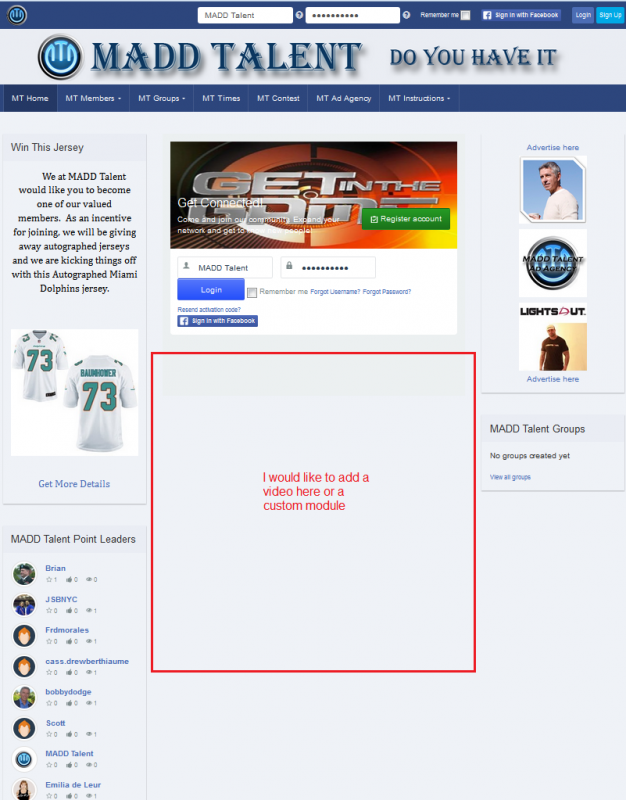
I have asked this question once, but I don't think I understood the question prior to closing the thread. I would like to place a custom module on my home or index page. I would like this module to be placed directly below my "Sign In With Facebook" button, but not so low that it spreads out across the whole page. I would like it to be located just as it's indicated in the red box on the attached screen shot. When this question was answered for me last time he sent me a URL that I could use and when I used this URL it would show me the names of the zones on my web pages.
I did use this, but the indicated zones that showed up with colored text where not in my list of zones that where available for selection within my template. It may be that I was simply not looking at the correct zone names. To make this easier, here is the URL I used to see the zones.
If possible, I would like to place this custom module in this zone: Position: js_side_top [ Style: none outline] js_side_top , but that zone is no where in my drop down list when I try to tell it where to place the module. I was hoping you might be able to explain what I don't understand here so I can place a zone between the right and left columns just below the Facebook button on my home page.