Welcome the Technical Support section. Help us in assisting you by providing us with a concise and descriptive elaboration of your issues. Be specific and if possible, provide us with a step-by-step instruction in replicating your problem.
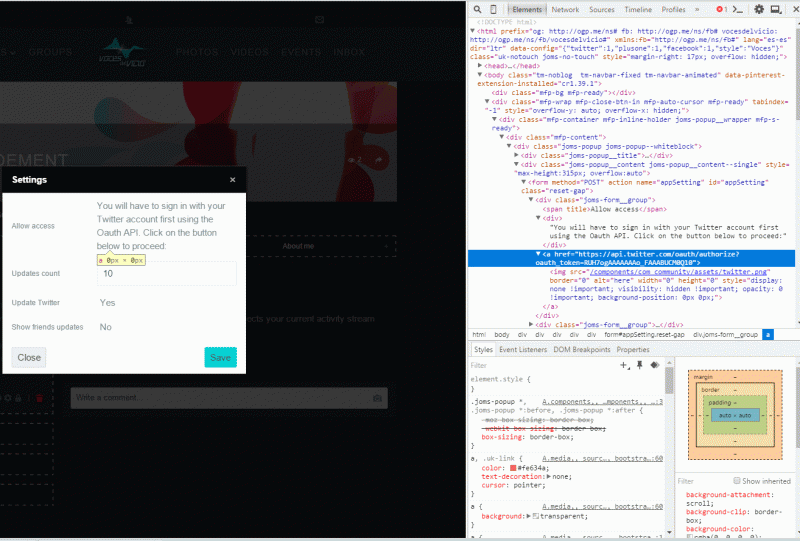
ISSUE SUMMARY: Oauth API Button in Twitter app is not appearing, it's there though, as you can find it through code view and copy/pasting link in browser does work, but not all users will be doing this ;)
STEPS TO REPLICATE:
1. Publich twitter update plugin
2. Put it in a profile and click settings.
3
4
5
RESULT: no Oauth button
EXPECTED RESULT: Visible Oauth button
BROWSER: Chrome
Please, do a test and switch your current template with Joomla! default template.
Is button visible now?
If yes, then it means that issue is caused by your template.
I'm sorry, I can't test it myself as your site credentials doesn't work.
- Instead of saying: 'it's not working', explain the problem in detail.
- Screenshots with the URL visible in them and the problem marked are more than welcome.
- Tell us how to replicate the problem, we can't fix it if we can't find it.
- Make sure that your site/server meets JomSocial System Requirements
- Make sure to setup JomSocial Cron Job
- Always provide us with access details to the backend and ftp. We need it to debug problems.
- If you have a similar problem, but a solution you found isn't working, open a new thread instead of 'merging' with an existing one.
- Use the "Thank You" feature on any post that helped you