Welcome the Technical Support section. Help us in assisting you by providing us with a concise and descriptive elaboration of your issues. Be specific and if possible, provide us with a step-by-step instruction in replicating your problem.
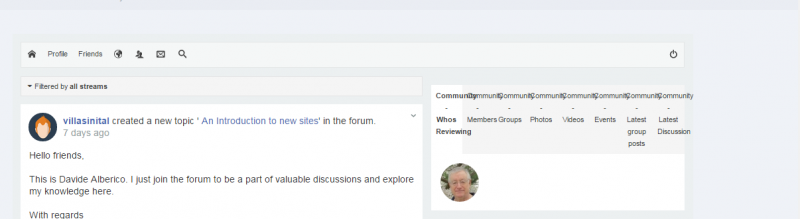
JS 4 - community module links & images on JS main page not working

please turn off Optimization setting from socialize template manager > General. this is T3 framework feature, but not always compatible with all scripts.
Turning OFF the Optimization setting helped with several issues. The module link tabs are now working however there is still no header image for each specific tab (although the tabs are now working).
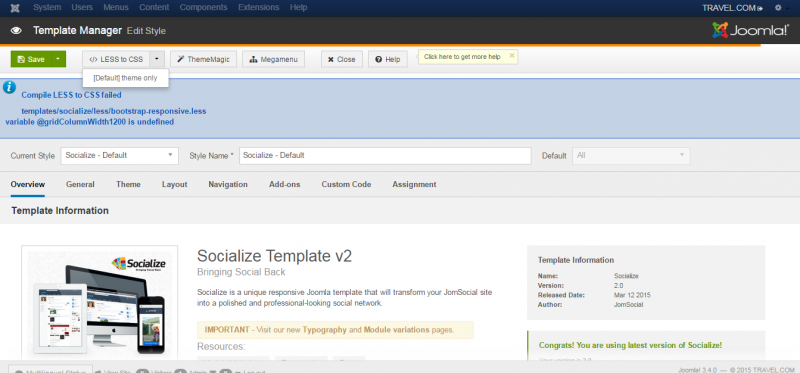
Also, I still am unable to compile "LESS TO CSS" for which I get the error message in the attachment below.
there is no header image at module tabs.
FYI:
you can changing the tabs name by changing the modules title from joomla module manager.
and the tabs are too crowded, you can split it into other positions.
documentation.jomsocial.com/wiki/Built-in_Module_Positions
about socialize issue, you can try it again. if still fail, please open new topic about it.
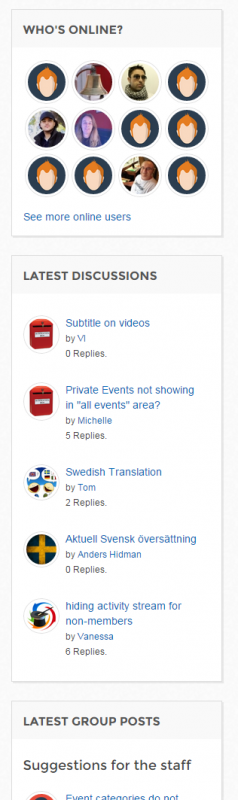
I guess that the best solution would be to go back to the vertical stacking of modules as you do on
www.jomsocial.com/community
(as also shown in the attachment).
Is there a setting that specifies that layout as I'm not finding it?