Welcome the Technical Support section. Help us in assisting you by providing us with a concise and descriptive elaboration of your issues. Be specific and if possible, provide us with a step-by-step instruction in replicating your problem.
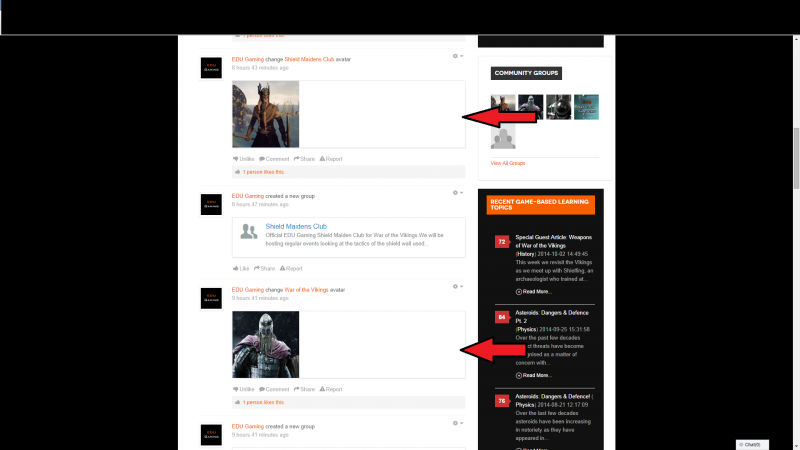
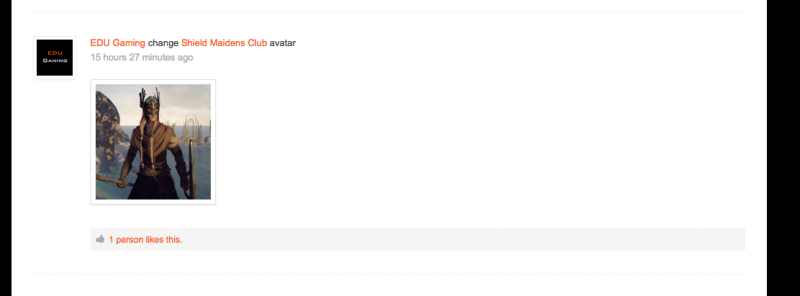
I am having issues with the activity stream module showing the boarders of avatars incorrectly. The boarder is extending to the full width of the page rather than just encasing the avatar image. See image below for reference.
You probably looked at our production server where indeed the avatar boarders do show correctly. This is because currently on our production server we are using the jomsocial home page on our website home page. When this function is used then everything is displayed correctly.
However, due to the makeup of our site with the right column on the home page everything becomes a bit cramped when you navigate to a jomsocial group or profile as you get the activity stream on the left, a jomsocial column in the middle of the page and the webpage column on the right. In addition this means you also get the slider at the top of the page appearing whenever you navigate to a page within jomsocial forcing users to scroll down every time they click to a new page in jomsocial.
To overcome this issue we have moved the jomsocial homepage to a different page on the website and we are looking to use the activity stream module on our website homepage. That way, when a user clicks on a group, for example, they are navigated away from the website home page to a page that only shows jomsocial content.
However, we are getting the problem with the avatar boarders when trying to use the activity stream module.
I have created an additional page on our production server so you can see the problem with the activity stream module. Please see below: