Support Forum
Redirected to Community Registration.
-

Topic Author - Karl Johan
- Offline
- Fresh Boarder
- Posts: 2
- Thank you received: 0
Licenses:
JomSocial ActiveHi, Installed Jomsocial but it seems it has taken over the regular registration routine. Where can I enable and disable that feature? Reason is that after JomSocial 'took over' the registration the registration does not complete and hence no user can sign up and no emails are sent to the admins. Keep in mind the site is not for the public but this is URGENT as the site cannot accept any new users and we were supposed to roll it out tomorrow :-(
-
- Dimas Tekad Santosa
- Visitor
- Thank you received: 0
Licenses:
Hi Karl,
I need your confirmation first, so do you want redirect jomsocial register to joomla registration or from joomla registration to jomsocial registration?
If you have issue from jomsocial please let me know the detail.
Thx
-
Topic Author - Karl Johan
- Offline
- Fresh Boarder
- Posts: 2
- Thank you received: 0
Licenses:
JomSocial ActiveI guess I want only one registration that handles both the Joomla account (with password change) and the profile. I also want to retain the administration email that warns you of a new registration and the email that informs the user that they have been improved. After installing Jomsocial none of it is working and no one can sign up. So if you can fix that so JomSocial manages all of that it would be ideal, so people do not have to fill out two accounts and profiles.
-
- Dimas Tekad Santosa
- Visitor
- Thank you received: 0
Licenses:
Hi Karl,
1. please you install this plugin for signup page redirection
extensions.joomla.org/extensions/extensi...ial-extensions/19320
2. Do you want your new members need to be approved by admin? or actiaved by them self? anyway can you update your jomsocial to the newest version please? maybe this issue will be fine there.
thank you
-
Topic Author - Karl Johan
- Offline
- Fresh Boarder
- Posts: 2
- Thank you received: 0
Licenses:
JomSocial Active
1. Installed the plugin and Updated Jomsocial to the latest version.
2. I want the ADmin to approve. I also want the user to confirm their email and receive a second email after the admin has approved them to let them know they con log in now.
But for now even after the updates and plugin install the registration form is still not working:
a. If you try to fill out the form when you click submit it shows the community page but ask you to log in. Actualy I want them to see the page a regular Joomla registratin show which is "Your registration is complete, we will now send you and email to confirm your email address...."
b. No new user has been created and hence no notification to the admin or confirmation email to the user.
-
- Dimas Tekad Santosa
- Visitor
- Thank you received: 0
Licenses:
Hi Karl ,
I need your FTP access, so I can inspect this directly.
thank you
-
Topic Author - Karl Johan
- Offline
- Fresh Boarder
- Posts: 2
- Thank you received: 0
Licenses:
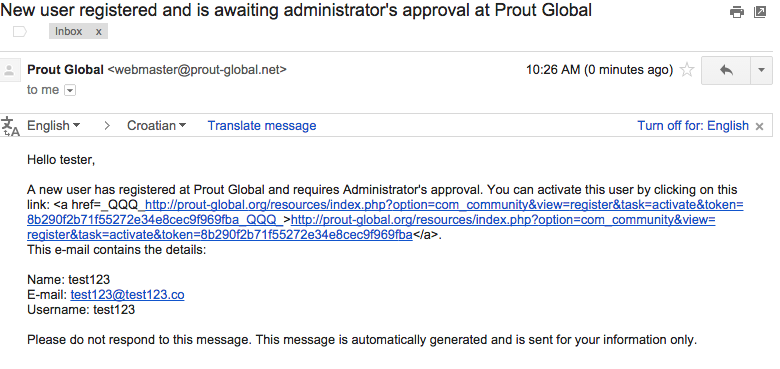
JomSocial ActiveSee below
-
- Dimas Tekad Santosa
- Visitor
- Thank you received: 0
Licenses:
but anyway, I found the QQQ error code on your email.. which that is valid bug..
-
Topic Author - Karl Johan
- Offline
- Fresh Boarder
- Posts: 2
- Thank you received: 0
Licenses:
JomSocial Active
Now the registration form is working but there are still several issues:
1. When the admin receive the email to Activate the newly registered user and you click on that link it goes to a 403 and the user is NOT activated.
2. After activation by the admin through the Joomla cpanel the new user does not receive a confirmation email that they have been approved and can log in.
-
- Dimas Tekad Santosa
- Visitor
- Thank you received: 0
Licenses:
Hi Karl,
that is valig bug, i already added to our bug list.
thank you
-
Topic Author - Karl Johan
- Offline
- Fresh Boarder
- Posts: 2
- Thank you received: 0
Licenses:
JomSocial Active
Hmm, that is not acceptable. How do I reverse the JomSocial "takeover" of the registration routine and revert it to the standard Joomla registration?
Maybe later when you have sorted out this fundamental bug we can think of using the Jomsocial routine.
-
- Dimas Tekad Santosa
- Visitor
- Thank you received: 0
Licenses:
Hi Karl,
I am sorry for that, but if this issue fixed I will let you know.
For time being you can disabled this plugin "Redirect Registration for JomSocial Plugin" and then modify this file component/com_community/templates/default/frontpage.guests.php, find this :
<?php echo CRoute::_( 'index.php?option=com_community&view=register' , false ); ?>change to :
<?php echo CRoute::_( 'index.php?option=com_users&view=registration' , false ); ?>thank you
-
- Dimas Tekad Santosa
- Visitor
- Thank you received: 0
Licenses:
Hi Karl,
this is the patch for QQQ issue, please you open this file language/en-GB/en-GB.com_community.ini, find this code :
COM_COMMUNITY_USER_REGISTERED_NEEDS_APPROVAL="Hello %s,\n\nA new user has registered at %s and requires Administrator's approval. You can activate this user by clicking on this link: <a href=_QQQ_%s_QQQ_>%s</a>. \nThis e-mail contains the details:\n\nName: %s\nE-mail: %s\nUsername: %s\n\nPlease do not respond to this message. This message is automatically generated and is sent for your information only."replace to :
COM_COMMUNITY_USER_REGISTERED_NEEDS_APPROVAL="Hello %s,\n\nA new user has registered at %s and requires Administrator's approval. You can activate this user by clicking on this link: <a href='%s'>%s</a>. \nThis e-mail contains the details:\n\nName: %s\nE-mail: %s\nUsername: %s\n\nPlease do not respond to this message. This message is automatically generated and is sent for your information only."thank you