Support Forum
Keeping CSS and formatting for members module options

Jomsocial version 3.2
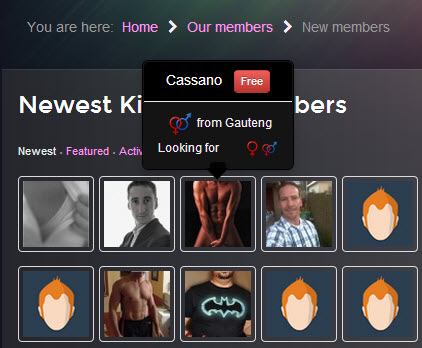
I have made some changes to the Community members module, specifically with regards to changing the display results of latest members. You can see the new design layout, with a popup tooltip etc in the attached image (modified layout)
Note this this was achieved by modifying the tmpl/default.php file. No CSS styling was changed.
It works fine on the initial (default) display.
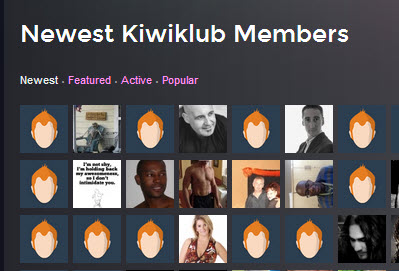
However, if I select one of the other options (featured, popular, active) then the layout revert to the original layout. It stays the same if I go back to Newest members via the ajax links.
Where can I find the template/view that is used to display the other member views?
Or which files must I modify to make the ajax views display the same way as the default one does?
Hi, Marc.
I'm afraid it can't be done this way.
Avatar list is reloaded and recalculated by this scrip: ROOT/components/com_community/assets/script-1.2.min.js
And script is minified so can't be edited without damaging it...
Maybe try to rebuild module or display only first "Newest" tab?
Always you could ask developer for help:
www.jomsocial.com/jomsocial-developers
- Instead of saying: 'it's not working', explain the problem in detail.
- Screenshots with the URL visible in them and the problem marked are more than welcome.
- Tell us how to replicate the problem, we can't fix it if we can't find it.
- Make sure that your site/server meets JomSocial System Requirements
- Make sure to setup JomSocial Cron Job
- Always provide us with access details to the backend and ftp. We need it to debug problems.
- If you have a similar problem, but a solution you found isn't working, open a new thread instead of 'merging' with an existing one.
- Use the "Thank You" feature on any post that helped you
Thanks Michal
I was hoping that this wasn't the case, but I suppose the more we push the boundaries, the more likely we are to encounter situations such as these, where we are using the modules in ways that were never envisaged in the original design.
For now, its probably easiest for me to simply add a parameter into the module setting to select one display option ( newest, popular, active, featured) and modify the default.php to select different options depending on the selected setting.
We can then simply create a new module instance for each as required.
Okay....the basic style code problem can be resolved by simply editing frontpage.latestmember.list
(remember tho that this page code is used elsewhere, so whatever you change here will potentially impact other pages)
However, in my case I am also using a plugin (nonumber tooltips plugin) to generate specialised tooltips.
The plugin doesn't reload when the ajax call is made to switch options.
Any idea of how we can force the plugin to reload?
Hi, Marc.
You'll be disappointed with my answer - I know :)
Please, read our support policy:
www.jomsocial.com/support
Changing the current functionality - JomSocial is delivered as is. All of its functions have been tested to work in common Joomla environments.
Changing the current functionality to achieve different behavior is not something we recommend. We don’t support it.
The only thing I can advise you is to try display module in tabs. There is smart way to do it by adding alternative layout feature to module:
mod_community_members
mod_community_members.php (line 39)
+ replace: require( JModuleHelper::getLayoutPath('mod_community_members') );
+ with: require( JModuleHelper::getLayoutPath('mod_community_members', $params->get('layout', 'default')) );
mod_community_members.xml (line 24)
+ add:
<fieldset name="advanced">
<field name="layout" type="modulelayout" label="JFIELD_ALT_LAYOUT_LABEL" description="JFIELD_ALT_MODULE_LAYOUT_DESC" />
</fieldset>
This mod will let you to choose alternative module layout. Just create override folder in ROOT/templates/your_template/html/mod_community_members and rename default.php to newest_users.php, featured_users.php and so on. Then copy module in backend and in Advanced tab look for alternative layout dropdown and select layout for that certain module.
Now only place those few modules in tabs. You can use an additional extension to do it... or use bootstrap feature :D
- Instead of saying: 'it's not working', explain the problem in detail.
- Screenshots with the URL visible in them and the problem marked are more than welcome.
- Tell us how to replicate the problem, we can't fix it if we can't find it.
- Make sure that your site/server meets JomSocial System Requirements
- Make sure to setup JomSocial Cron Job
- Always provide us with access details to the backend and ftp. We need it to debug problems.
- If you have a similar problem, but a solution you found isn't working, open a new thread instead of 'merging' with an existing one.
- Use the "Thank You" feature on any post that helped you