Notice

The forum is in read only mode.

Support Forum

Welcome! Support Forums have been reactivated
Welcome the Technical Support section. Help us in assisting you by providing us with a concise and descriptive elaboration of your issues. Be specific and if possible, provide us with a step-by-step instruction in replicating your problem.

How to remove Name & email criterias in from the advance search list

12 years 4 months ago
Licenses:
JomSocial Expired Socialize Expired

Hi,
Joomla : v3.3.0
JomSocial:v3.2.0.5
Socialize:v1.2.7
Cant find't out how to remove in the advance search criteria list the two last ones "Name" & "Email"
Cheers,
L

12 years 4 months ago
Licenses:

Hi There,

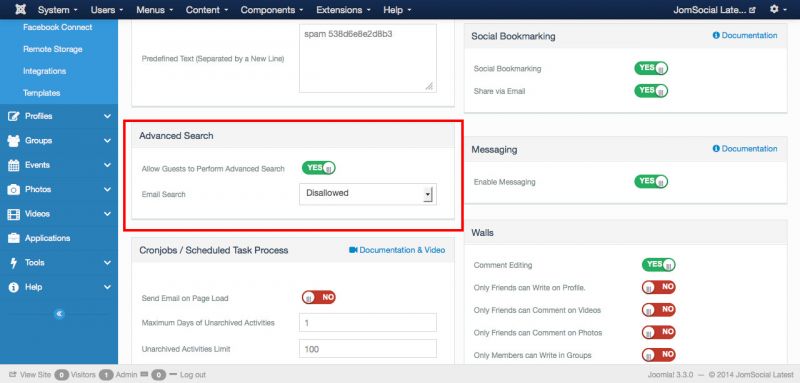
for email you can disable it from jomsocial backend - configuration -site: Advanced Search section


and for name you must disable it from code. /components/com_community/libraries:
line 35:
from
$nameOptGroup->visible = 1;

to 
$nameOptGroup->visible = 0;
line 44:
from
$obj->visible = 1;

to
$obj->visible = 0;

Regards,
Albert

Attachments:
The following user(s) said Thank You: SAS Coeurs de Breizh
12 years 4 months ago
Licenses:
JomSocial Expired Socialize Expired

Hi,
great, thank you for your help.
Cheers,
L

Moderators: Piotr Garasiński
Powered by Kunena Forum

Join 180,000 websites creating Amazing communities

JomSocial is the most complete, easy-to-use addon that turns Joomla CMS into a
full -fledged, social networking site

TRY NOW BUY NOW