Notice

The forum is in read only mode.

Support Forum

Welcome! Support Forums have been reactivated
Welcome the Technical Support section. Help us in assisting you by providing us with a concise and descriptive elaboration of your issues. Be specific and if possible, provide us with a step-by-step instruction in replicating your problem.

MainMenu disappears when selecting JS Community

12 years 6 months ago
  • Jürgen's Avatar
    Topic Author
  • Jürgen
  • Offline
  • Fresh Boarder
  • Posts: 39
  • Thank you received: 0
Licenses:
JomSocial Expired

Hi,

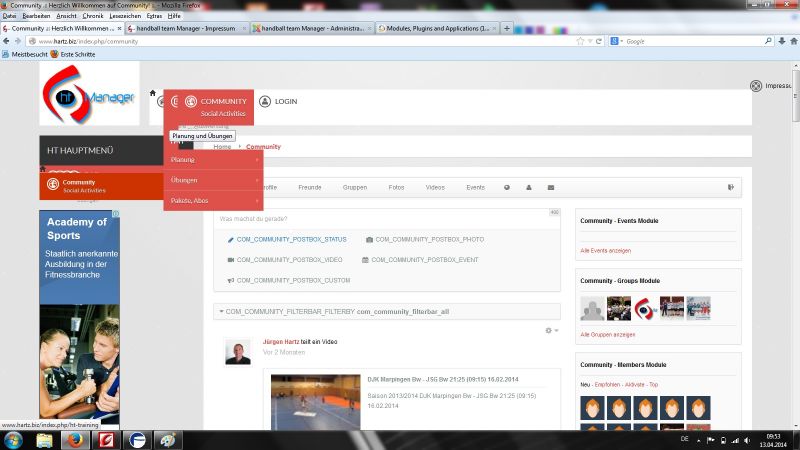
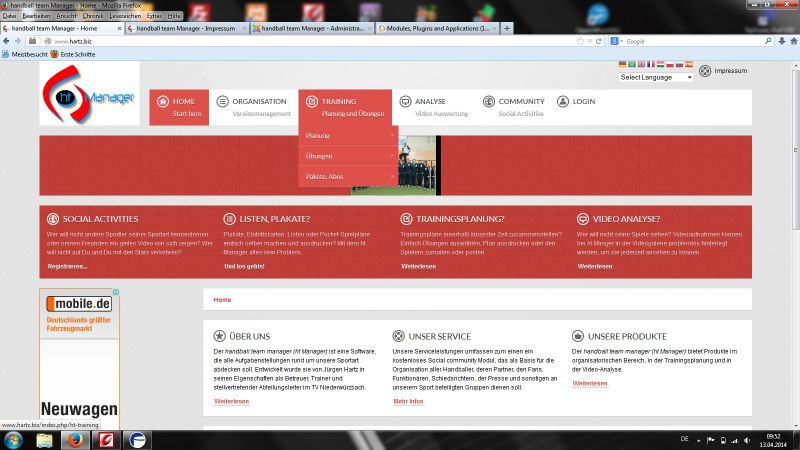
after upgrading my testserver www.hartz.biz to JS 3.2 there are some problems with my site.

The main menu disappears and you only see the commnunity field but not at the right place. It comes up at first place covering the other entries.

Where can I change this to appear correctly?

There are also some constants which are not displayed correctly.

Best regards,

Juergen
Attachments:
12 years 6 months ago
Licenses:
JomSocial Expired GURU Expired Publisher Expired AdAgency Expired iSEO Expired Socialize Expired

Hi Jürgen Hartz,
I have noted the site backend and I like you to install back the version 3.1.1.
Let me know then the problem still is there on not.
Thanks

12 years 6 months ago
  • Jürgen's Avatar
    Topic Author
  • Jürgen
  • Offline
  • Fresh Boarder
  • Posts: 39
  • Thank you received: 0
Licenses:
JomSocial Expired

Hi Ashraf,

I installed version 3.1.0.4 and there is the same result.

12 years 6 months ago
Licenses:
JomSocial Expired GURU Expired Publisher Expired AdAgency Expired iSEO Expired Socialize Expired

Hi Jürgen Hartz,
As I am seeing you are using different admin template and the plugin was creating the problem "System - JSN PowerAdmin".
I have disabled the plugin and now it is working fine.
Thanks

12 years 6 months ago
  • Jürgen's Avatar
    Topic Author
  • Jürgen
  • Offline
  • Fresh Boarder
  • Posts: 39
  • Thank you received: 0
Licenses:
JomSocial Expired

Hi Ashraf,

where did you disable the plugin? Under www.hartz.biz there is still the same problem. I can't see no difference with the plugin disabled.

Juergen

12 years 6 months ago
Licenses:
JomSocial Expired GURU Expired Publisher Expired AdAgency Expired iSEO Expired Socialize Expired

Hi Jürgen Hartz,
Yeah, I have disabled there and now again checked and still the menu is now working and I am attaching a screenshot of the
disabled plugin status.
Thanks

Attachments:
12 years 6 months ago
  • Jürgen's Avatar
    Topic Author
  • Jürgen
  • Offline
  • Fresh Boarder
  • Posts: 39
  • Thank you received: 0
Licenses:
JomSocial Expired

Hi Ashraf,
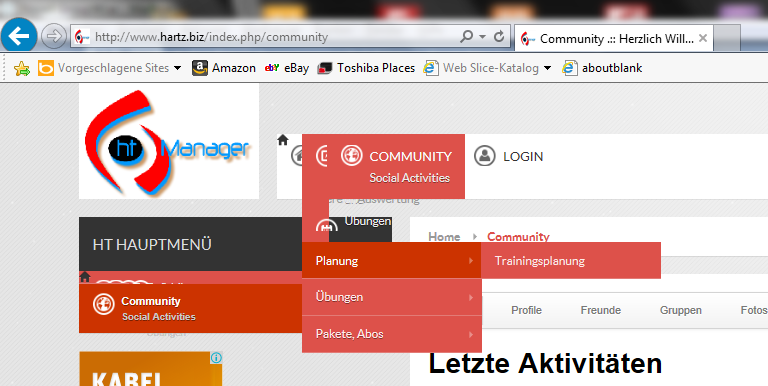
I see that the plugin is disabled but in my browsers, IE and FireFox, the website is shown as in the picture that I attached.
Is there something wrong with the pixlels?
Best regards,
Juergen

Attachments:
12 years 6 months ago
Licenses:
JomSocial Expired GURU Expired Publisher Expired AdAgency Expired iSEO Expired Socialize Expired

Hi
There is a css conflict with the current template. I have fixed at your site at current template "template.css" but here the code

div.jsn-modulecontainer ul.menu-mainmenu li{
    width: auto;
    background: none;
}
Thanks

12 years 6 months ago
  • Jürgen's Avatar
    Topic Author
  • Jürgen
  • Offline
  • Fresh Boarder
  • Posts: 39
  • Thank you received: 0
Licenses:
JomSocial Expired

Hi Ashraf,

thank you very much for fixing the code.
One last question: The code that you fixed resides in the area Menu - Mainmenu?

/* =============== MENU - MAIN MENU =============== */
/*


GENERAL
*/
div.jsn-modulecontainer ul.menu-mainmenu {
margin: 0;
padding: 0;
clear: both;
}
div.jsn-modulecontainer ul.menu-mainmenu li {
// margin: 0;
// padding: 0;
// float: left;
// position: relative;
// list-style-type: none;
width: auto;
background: none;
}

Is that correct? Because I still have to update the 'real site' www.htmanager.de

Best regards,

Juergen

12 years 6 months ago
Licenses:
JomSocial Expired GURU Expired Publisher Expired AdAgency Expired iSEO Expired Socialize Expired

Hi Jürgen Hartz,
The code, I have placed at root/templates/current_template/css/template.css
Please go to bottom of the file and find the code.
Thanks

The following user(s) said Thank You: Jürgen
12 years 6 months ago
  • Jürgen's Avatar
    Topic Author
  • Jürgen
  • Offline
  • Fresh Boarder
  • Posts: 39
  • Thank you received: 0
Licenses:
JomSocial Expired

Hi Ashraf,

there is the same problem with mainmenu in module 'left', I think. You see it in the picture, which I attached.
Can you fix it too?
Best regards,

Juergen

12 years 6 months ago
Licenses:
JomSocial Expired GURU Expired Publisher Expired AdAgency Expired iSEO Expired Socialize Expired

Hi Jürgen Hartz,
I have updated again with the below fix.

#jsn-pos-left .menu-treemenu.menu-iconmenu.menu-richmenu li{
    width: 100%;
    background: none;
  height:auto;
}
Please check at your site.
It should work fine now.
Thanks

12 years 6 months ago
  • Jürgen's Avatar
    Topic Author
  • Jürgen
  • Offline
  • Fresh Boarder
  • Posts: 39
  • Thank you received: 0
Licenses:
JomSocial Expired

Hi Ashraf,

thank you very much, it works fine.

Juergen

12 years 5 months ago
  • Jürgen's Avatar
    Topic Author
  • Jürgen
  • Offline
  • Fresh Boarder
  • Posts: 39
  • Thank you received: 0
Licenses:
JomSocial Expired

Hi Ashraf,
also the impressum section moves to the right. Can you see it? How can this be fixed?

Many thanks in advance,

Juergen

Moderators: Piotr Garasiński
Powered by Kunena Forum

Join 180,000 websites creating Amazing communities

JomSocial is the most complete, easy-to-use addon that turns Joomla CMS into a
full -fledged, social networking site

TRY NOW BUY NOW