Support Forum
Login Place Holder Text

Hi, Scott.
Thank you for contacting us.
Nearly any text in Joomla! can be changed using Joomla! language override feature.
Please, read this documentation to find how to do that:
documentation.jomsocial.com/wiki/Changin...gle_Sentence_or_Word
- Instead of saying: 'it's not working', explain the problem in detail.
- Screenshots with the URL visible in them and the problem marked are more than welcome.
- Tell us how to replicate the problem, we can't fix it if we can't find it.
- Make sure that your site/server meets JomSocial System Requirements
- Make sure to setup JomSocial Cron Job
- Always provide us with access details to the backend and ftp. We need it to debug problems.
- If you have a similar problem, but a solution you found isn't working, open a new thread instead of 'merging' with an existing one.
- Use the "Thank You" feature on any post that helped you
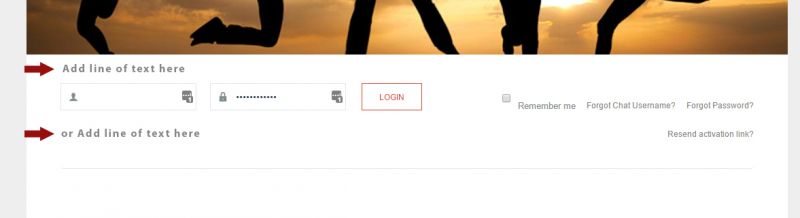
Hi, Scott.
Yes, you may do that by customizing this layout:
ROOT/components/com_community/templates/jomsocial/layouts/frontpage/guest.php
Copy that file to:
ROOT/templates/your-template/html/com_community/layouts/frontpage (if you don't have those folders - feel free to create them)
Then add your text above line 39 and below 105
- Instead of saying: 'it's not working', explain the problem in detail.
- Screenshots with the URL visible in them and the problem marked are more than welcome.
- Tell us how to replicate the problem, we can't fix it if we can't find it.
- Make sure that your site/server meets JomSocial System Requirements
- Make sure to setup JomSocial Cron Job
- Always provide us with access details to the backend and ftp. We need it to debug problems.
- If you have a similar problem, but a solution you found isn't working, open a new thread instead of 'merging' with an existing one.
- Use the "Thank You" feature on any post that helped you
Ok great thank you....I was trying to add just a simple label to the login box...i acutally entered my text on line 46
I was able to achieve what i was after...not sure if completely correct for html markup

Im just curious, since im new to Joomla...how do i find out what page i need to edit...like this guest.php...How could i found out that i needed to edit guest.php to add a label to login box?
Im always unsure if its a joomla or jomsocial or template edit
Best
HI, Scott.
Your html markup is correct ;)
There is only one way to know which file need to edit... Firebug a FireFix plugin. You check certain html element and look for som characteristic parts e.g class name. Then use text search that could search INSIDE of files for certain expression. You scan whole folder of JomSocial (on your local computer) and that's all ;) If you're on component page then you have 95% chance that you should look for certain code in that component package. Other chances are modules and Joomla! itself (or rather Joomla! template).
Some practice and you'll be master in searching necessary files ;)
- Instead of saying: 'it's not working', explain the problem in detail.
- Screenshots with the URL visible in them and the problem marked are more than welcome.
- Tell us how to replicate the problem, we can't fix it if we can't find it.
- Make sure that your site/server meets JomSocial System Requirements
- Make sure to setup JomSocial Cron Job
- Always provide us with access details to the backend and ftp. We need it to debug problems.
- If you have a similar problem, but a solution you found isn't working, open a new thread instead of 'merging' with an existing one.
- Use the "Thank You" feature on any post that helped you