Support Forum
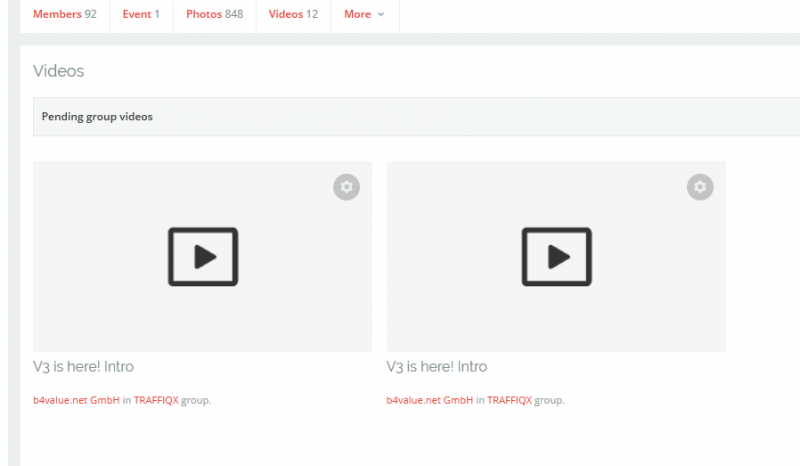
After Update to Joomla 3.6.0 uploaded videos are not published in group

ISSUE SUMMARY:
Entering a YouTube-Link as a video, everything works fine. But when uploading a video file I see two errors:
1. Full-HD-Video file with about 340 MB starts uploading, process bar stops in the middle and begins again, then I get the error message "Undefined error".
2. Reducing the file size (here 42 MB) works, but the video ist still in the pending videos area. I can start playing it, ffmpeg works, thumbnail can be generated, too - but it never gets published to the group it was uploaded to.
- Cron job works, email with info that the video has been processed is received
- Upload limits are set to 1 GB
- TimeOut is up to one hour for testing
STEPS TO REPLICATE:
1 upload a video
2 wait until email is received that video is ready
3 see that no preview is posted to the group
4
5
RESULT
EXPECTED RESULT - normal post of a new video in group
BROWSER - all common browsers at PC/Mac
Hi, Alexander.
Thank you for contacting us and reporting this issue.
I assign developer to your thread for further investigation.
He'll contact you ASAP.
- Instead of saying: 'it's not working', explain the problem in detail.
- Screenshots with the URL visible in them and the problem marked are more than welcome.
- Tell us how to replicate the problem, we can't fix it if we can't find it.
- Make sure that your site/server meets JomSocial System Requirements
- Make sure to setup JomSocial Cron Job
- Always provide us with access details to the backend and ftp. We need it to debug problems.
- If you have a similar problem, but a solution you found isn't working, open a new thread instead of 'merging' with an existing one.
- Use the "Thank You" feature on any post that helped you
Hi,
mostly this issue related with server configurations. I need to access your site backend, and I need FTP access detail.
please re-check your credentianls information by editing your first post.
right now I cant access your site backend. always redirect to frontend.
Regards
Hi. I tested the credentials I offered in the first post. They worked fine. Now I deactivated the htaccess security phrase as long as you handle this. Please try again and don´t forget to change (..)/administrator/?(..) to the right spelling of the first post. Thank you!
Hi,
the FFMPEG that installed at your server still using old version 0.7.11
please upgrade it to latest version:
ffmpeg.org/
you can asking your hosting support to do that.
Regards