Support Forum
Cronjob problem
-

Topic Author - Victor Hugo
- Offline
- Fresh Boarder
- Posts: 1
- Thank you received: 0
Licenses:
JomSocial Active
ISSUE SUMMARY:
When I try to trigger the cronjob.. I get an error:
portales.inder.gov.co/intranet/index.php..._community&task=cron
I get this error:
This page contains the following errors:
error on line 2 at column 1: Extra content at the end of the document
Below is a rendering of the page up to the first error.
I read this post...
www.jomsocial.com/forum/installation/323...onjob-problem#156267
but it didnt helped... it says something about an XML.. but it dont specify where I can find it...
-
- Dimas
- Visitor
- Thank you received: 0
Licenses:
Hi Victor,
It caused by warning error, to fix it you can modify Joomla configuration, and set error reporting to none.
I hope it will help.
Hi,
this is permission issue at your server. if you browse all files or folders at your site, the permission group not as www-data, but vistorarango
please asking your server support to changing that all files and folders to www-data group.
and set www-data as default group. so all new created files and folders will be www-data
Regards
-
Topic Author - Victor Hugo
- Offline
- Fresh Boarder
- Posts: 1
- Thank you received: 0
Licenses:
JomSocial Active
Hi Albertus...
I already did the changes.. but still the cronjob doesnt work
Please help
-
- Dimas
- Visitor
- Thank you received: 0
Licenses:
Hi Victor,
Can you provide me FTP or cPanel access, please? your current FTP access is not working for me.
thank you
-
Topic Author - Victor Hugo
- Offline
- Fresh Boarder
- Posts: 1
- Thank you received: 0
Licenses:
JomSocial Active
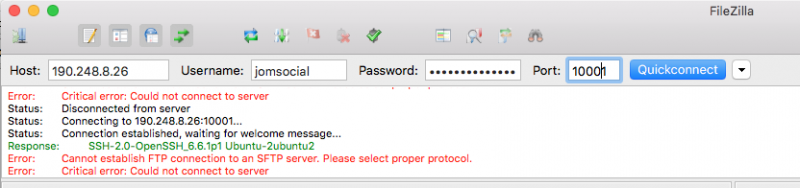
Be sure you copy and paste....
the ftp access is via sftp... not normal ftp.... port and IP number as I tell you in the first post...
-
Topic Author - Victor Hugo
- Offline
- Fresh Boarder
- Posts: 1
- Thank you received: 0
Licenses:
JomSocial ActiveLike I said in the last message.. (I dont want to sound rude).... please conect via SFTP... not FTP... see that the error message told you that you are trying to connect via FTP to an SFTP server....
-
- Dimas
- Visitor
- Thank you received: 0
Licenses:
You are missing index.html on this profile image folder /var/www/html/intranet/images/cover/profile/1069/ please you add index.html manually, I cant do it by myself since i dont have permission on it.
the index.html file can be copy from this folder /var/www/html/intranet/images/cover/profile/1064/
-
Topic Author - Victor Hugo
- Offline
- Fresh Boarder
- Posts: 1
- Thank you received: 0
Licenses:
JomSocial ActiveI did it.. but is that related with the problem?
-
- Dimas
- Visitor
- Thank you received: 0
Licenses:
yes, on another profile images folder they have the index.html, only profile 1069 which doesnt have it.. you can try it.. and let me know how it goes..