Notice

The forum is in read only mode.

Support Forum

Welcome! Support Forums have been reactivated
Welcome the Technical Support section. Help us in assisting you by providing us with a concise and descriptive elaboration of your issues. Be specific and if possible, provide us with a step-by-step instruction in replicating your problem.

Change the cover high

10 years 7 months ago
Licenses:
JomSocial Expired iSEO Expired Socialize Expired

ISSUE SUMMARY:
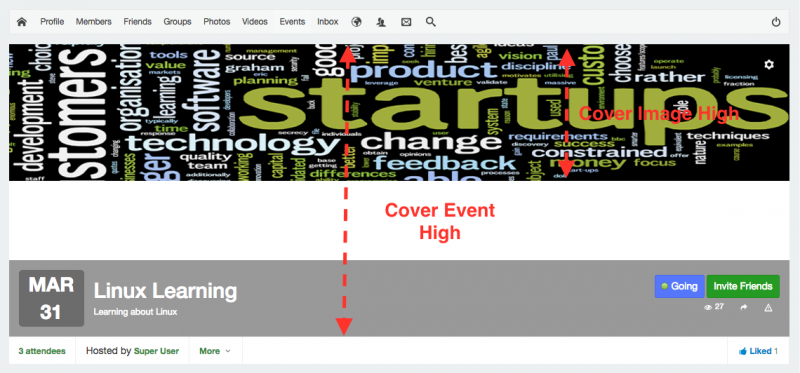
I tried to change the event cover high by change the cover image high.
But I got that the cover high is not follow the cover image high. Please see the attachment.
Can you tell me how to change the vent cover high through edit the css, please?


STEPS TO REPLICATE:
1
2
3
4
5
RESULT
EXPECTED RESULT
BROWSER

Attachments:
10 years 7 months ago
Licenses:

Hi,

please put this CSS at:
/templates/clouderhub_com/css/custom.css (create this file if not there)

.joms-focus__cover::before, .joms-hcard__cover::before {
  padding-top: 17.5%;
}

Regards

The following user(s) said Thank You: Muhammad
10 years 7 months ago
Licenses:
JomSocial Expired iSEO Expired Socialize Expired

You are the man!

I tried to follow this customizing using style.css but it wasn't success.

documentation.jomsocial.com/wiki/Customizing_Template

Is it the same way creating JOOMLA/templates/yourTemplateName/html/com_community/css/style.css file and creating /templates/clouderhub_com/css/custom.css file?

10 years 7 months ago
Licenses:

Hi,

for CSS changing, the best way is to do it from site template custom CSS. because site template custom CSS always loaded at the end.

Regards

The following user(s) said Thank You: Muhammad
Moderators: Piotr Garasiński
Powered by Kunena Forum

Join 180,000 websites creating Amazing communities

JomSocial is the most complete, easy-to-use addon that turns Joomla CMS into a
full -fledged, social networking site

TRY NOW BUY NOW