Support Forum
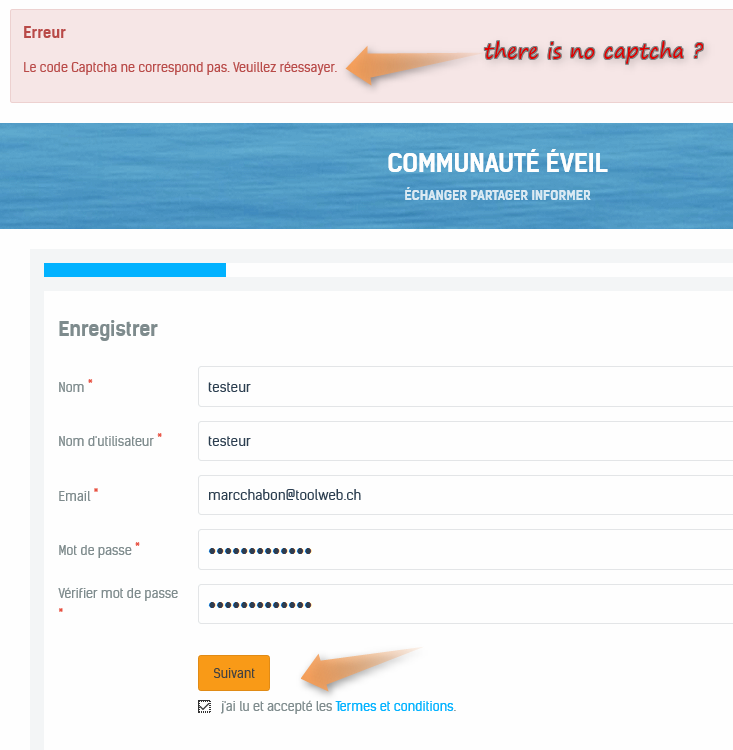
Captcha code on JS account creation
Hi, Alain.
It seems that issue is caused by caching.
You have caching enabled in your template, Joomla! (I disabled it) and jch_optimize.
Captcha appear after you reload page:
i.imgur.com/CkRPm8y.png
Try to disable caching and check again.
- Instead of saying: 'it's not working', explain the problem in detail.
- Screenshots with the URL visible in them and the problem marked are more than welcome.
- Tell us how to replicate the problem, we can't fix it if we can't find it.
- Make sure that your site/server meets JomSocial System Requirements
- Make sure to setup JomSocial Cron Job
- Always provide us with access details to the backend and ftp. We need it to debug problems.
- If you have a similar problem, but a solution you found isn't working, open a new thread instead of 'merging' with an existing one.
- Use the "Thank You" feature on any post that helped you
Hi Michal,
I tried with FF and Chrome and if I click on the button to create a new account the form appear without captcha. For the captcha to appear I have to reload the page, which is not what members want.
And if I have to disable Joomla caching and JCH Optimise, it is useless and non-sens.
HI, Alain.
I assign developer to this thread.
- Instead of saying: 'it's not working', explain the problem in detail.
- Screenshots with the URL visible in them and the problem marked are more than welcome.
- Tell us how to replicate the problem, we can't fix it if we can't find it.
- Make sure that your site/server meets JomSocial System Requirements
- Make sure to setup JomSocial Cron Job
- Always provide us with access details to the backend and ftp. We need it to debug problems.
- If you have a similar problem, but a solution you found isn't working, open a new thread instead of 'merging' with an existing one.
- Use the "Thank You" feature on any post that helped you
-

- Dimas
- Visitor
- Thank you received: 0
Licenses:
Hi Alain,
Your nocaptha is not showing, I am not sure why. Did you modify the Jomsoical code before? would you mind provide me FTP access, please? so I can check this directly.
thank you!
Hi Dimas,
ftp provided. As far as I know I didn't modify the Jomsocial code. Except the translations.
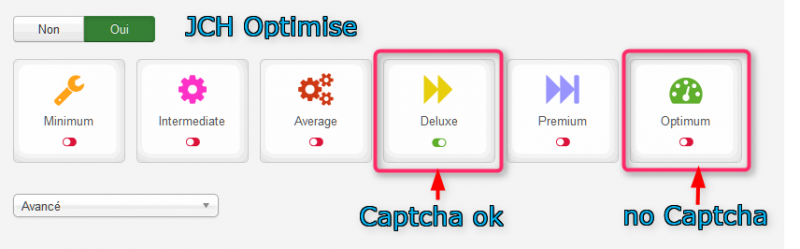
I just changed the JCH Optimise settings and the captcha seams to works.
But the Captcha in contact form works flawlessly with JCH optimum settings so there must be a bug somewhere in Jomsocial
www.eveil.me/contact
-
- Dimas
- Visitor
- Thank you received: 0
Licenses:
Ah as I thought it can be caused by cache 3rd party, we cant do anything for this cache issue.. I suggest you keep the configuration to Deluxe On and ask to JCH developer if you wanna still keep the Optimum On as well