Support Forum
Zone Percentage and Size
Greetings Pro's,
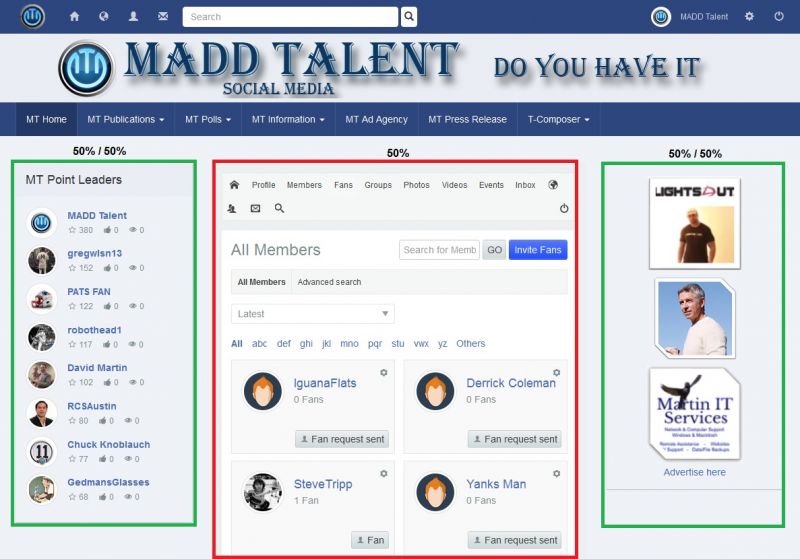
I have another one that I suspect is very simple, but I just can't remember where these settings are. I you look at my screen shot, you will see 3 boxes, 2 green and 1 red. When I set all of this up, I saw these settings that allowed me to change the percentage of space that the Red and Green zones would take up on the screen. I played with this and it worked fine, but in the end, left it at 50% for Red and 50% for the Green.
What I would now like to do and saw this in there also, is after you set up the main percentage from the red to the green, you could also set up a percentage for each of the green boxes. Currently I believe this is set to 50%/50% and I would like to play with this so that the right side is a bit smaller so that my modules that appear in the right zone will be about 150 px in width. I don't know what the percentage of that will be, but I will play with this until I get it, I just don't remember where those settings are located. Could you please tell me where I go to find these settings? I looked in the template settings and in Socialize settings, but I can't seem to find it. Please let me know.
Thanks,
David
-

- Dimas
- Visitor
- Thank you received: 0
Licenses:
Hi,
You can play with this class
.t3-sidebar-1 for left bar
t3-sidebar-2 for right bar
.t3-content for the main content
you can add your custom css by modify the width percentage.
thank you
Dimas,
Thank you again and I am sorry to ask, but where to I find these Dimas's Avatar .t3-sidebar-1 for left bar, t3-sidebar-2 for right bar and .t3-content for the main content?
Thanks,
David
-
- Dimas
- Visitor
- Thank you received: 0
Licenses:
Hi David,
You can override those class, you can create your custom css file or you put the code inside "Custom code" on socialize configuration.
I can thelp you too much for this, because I need check some current stylesheet and this is beyond our support.
thank you
Dimas,
Again, thank you for putting so much thought into this. I thought I remembered a simple settings page that was inside the Socialize of JomSocial Templates that simply allowed me to go in and change the zone percentages. Center 50% and Left and Right combined for the other 50%. After setting those, you then set the percentage of the Left and right zones to be a percentage of the total 50% that the first set provided them. In my case, I let them sit at 50% each of the overall page percentage of 50%.
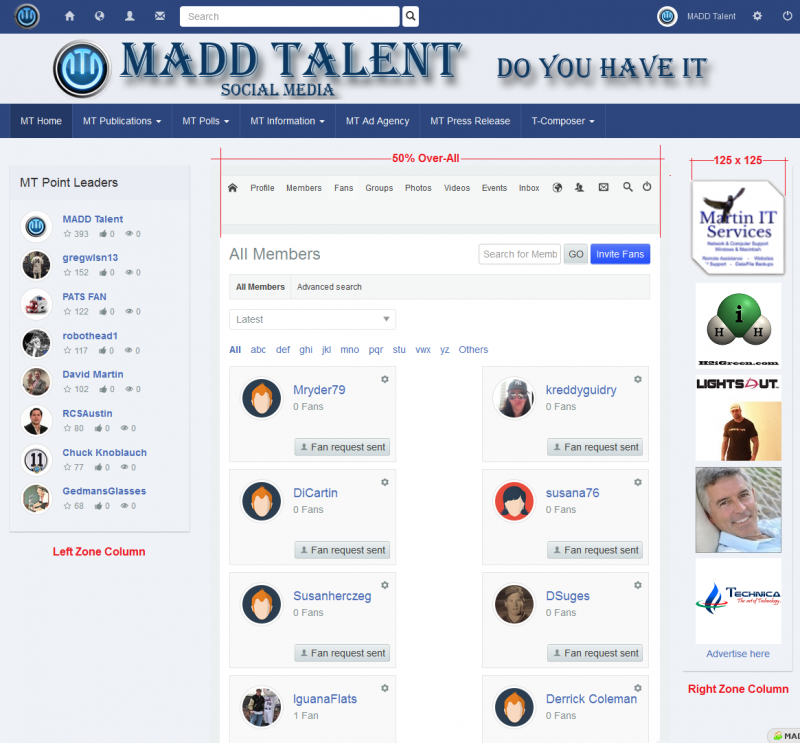
If this is not how I did all of that, than I really don't remember how I set all of that up. What I would like is the center to pretty much stay the same as what it currently is, 50% overall of the whole page. The Left zone or column, I would like to be bigger and the right zone smaller. I don't know what percentage they would be be exactly, but I plan to use the left zone for my Ad Agency ads that will always be 125 x 125 pixels. So if we add in padding of 2 pixels on each side and then padding on the zone column itself of 2 pixels on each side, it would come out to be about 133 pixels in width. So if this left zone could be set to 135 pixels, but in the appropriate percentage of the 50% the left and right will split, it should be fine I think.
If you plan to just set this up yourself, that would be great as I know you will do it perfectly, but if you don't mind, would you mind telling me exactly what you added for custom coding and where it's located so I can change this if needed without bothering you with this again in the future? I have attached a screen shot that I have modified to look somewhat like what I want when it's all adjusted. Bear in mind, that I did this with MS Paint, so I know this is not very accurate but it will give you a better idea of what I am looking to do.
Thanks,
David
-
- Dimas
- Visitor
- Thank you received: 0
Licenses:
Hi David,
I see the ad agency module is dissappear on your righ bar, did you find the solution for this?
I tried to change the sidebar width as you want, but that is not a simple solution. there ise much css code to be changed, especially for resposive issue. I am sorry I cant help you this issue further (this time)
thank you
Dimas,
Thank you again for looking into this. No, my Ad Agency Module is still there. I don't know what you mean by "I see the ad agency module is dissappear on your righ bar", as it's still there. Should I ask a tech. support person about this size issue from Socialize?
Thanks,
David
-
- Dimas
- Visitor
- Thank you received: 0
Licenses:
Hi David,
I already assigned to Alin for ad agency issue.
Well, I afraid if you wanna make the ad agency smaller will break some of element width, I already played with it and tried make it happens, and that is not simple as you and I thought.
I can't achive your request.. Im sorry for this time..
you need ask help to the Css master for this, and our css developer is full on important task now..
thank you for your undestanding
Dimas,
Thank you kindly for spending as much time as you have on this. There is something else I can do that may be more attractive to advertisers and make all the blank space go away. I can just increase these ad sized to 250 x 250 pxs. Please don't worry about this any longer. I have taken enough of your time on this already, but thank you for being so diligent in looking for a solution.
Take care,
David