Support Forum
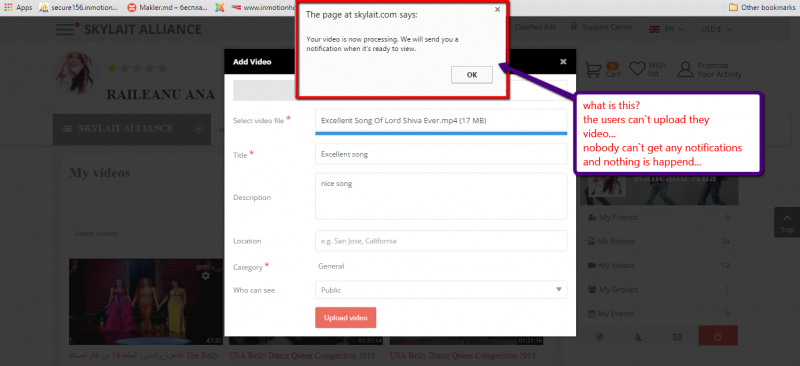
Users can`t upload VIDEO
-

- Dimas
- Visitor
- Thank you received: 0
Licenses:
Hi,
Please read the doc here
documentation.jomsocial.com/wiki/Uploading_Video
You should install FFMPEG on your site and then setup the cron job
documentation.jomsocial.com/wiki/Setting_up_Cron_Job
thank you
-
- Dimas
- Visitor
- Thank you received: 0
Licenses:
Hi,
I suggest you contact your sys-admin for install FFMPEG, and let me know the FFMPE path then
thank you!
-
- Dimas
- Visitor
- Thank you received: 0
Licenses:
Hi Gabriela,
You are using inmotion hosting right? please you read this
www.inmotionhosting.com/support/communit...te/installing-ffmpeg
Ffmpeg can be installed on VPS and Dedicated servers. Unfortunately, there is a cost of $25 dollars to install Ffmpeg. To install the software yourself, you will need to have root access. Unfortunately, we do not have any knowledge base for installations done as root. If you want root access, you can get it set up through the Account Management Panel. Please see the following link.
thank you!
When i will get that installed - i can come back for cheking?
but why - previous version was working fine - why so many complications???
really in previous versions we had no problems with that....
-
- Dimas
- Visitor
- Thank you received: 0
Licenses:
I am not sure, maybe you share the video before, not upload the video.. because your FFMPEG configuration path is empty on your Video Setting, can you ask your sys-admin for the FFMPEG path please?
also have you setup cron job before?
In prevous jomsocial versions was not so many complications - just uplaoded and it was runing...
i have not setuped cron jobs - just simply upload and run.... now get stuked here - please help with the same.
thanks
-
- Dimas
- Visitor
- Thank you received: 0
Licenses:
Impossible to convert uploaded video without cronjob and FFMPEG...
ok..
- now please you setup FFMPEG by asking your sys-admin / hosting provider support
www.inmotionhosting.com/support/communit...te/installing-ffmpeg
, let me know the FFMPEG path then
- setup the cron job
documentation.jomsocial.com/wiki/Setting_up_Cron_Job
thank you!
-
- Dimas
- Visitor
- Thank you received: 0
Licenses:
this is default behavior, every photo should be generated to mp4 extension, and getting the thumbs on each videos