Support Forum
Same Joomla! 3.4.8 Core Update Login Redirect Bug to Profile Info Page
Hey guys,
I am experiencing the same login redirect problem I had a couple of weeks ago after updating Core Joomla! version.
I use the JS Hello Me module on a different landing home page on my site to allow users to login to my site and the same login redirect bug to profile info page is happening again after updating core Joomla! version to the new v3.4.8.
I understand it is the holiday season, but if you guys get a chance to take a look at my site and see what went wrong again I'd appreciate the help.
For some reason the fix you guys posted to all users last time didn't work for my site and now I am having the same issue.
The issue is just with Hello Me module login so for right now I unpublished my home landing page.
Native JS login form works properly as well as the top-header community toolbar module.
Whenever you guys get a chance I'd appreciate it.
Thanks and Happy Holidays from here in San Francisco.
-

- Dimas
- Visitor
- Thank you received: 0
Licenses:
Hi,
You have 2 options for fixing this
- apply this temporary patch
www.jomsocial.com/forum/installation/310...-this-problem#150565
- enable jomsocial redirect plugin
thank you!
Okay thanks!
I'm unfamiliar with the jomsocial redirect plugin :P
Care to explain what it can do for me and which option would be better in terms of efficiency once I get a lot of users?
So from the looks of it I can have successful login redirect to ANY menu item page I'd like vs. just the JS main page "front page" or profile page or videos, events, groups etc which is the only options in JS back-end under site configuration.
So with JS redirect plugin it looks like I can have successful login redirect to the main JS "front page," failed login redirect to another custom page, and logout redirect to a custom logout page.
I like this a lot better than my previous setup so thanks for sharing :)
Now I can make two more custom pages it looks like, one for failed login page attempt and another simple custom page for logout thanking my visitors for using my site vs. logout just redirecting back to my "home" page.
Without even realizing I could use this plugin luckily logouts were redirecting to my "home" landing page and not just a logged out version of "front page" or even worse another random page like that profile details bug other users such as myself have been experiencing :P
So just to clarify - JS redirect plugin can allow for redirect of the previously mentioned three pages: "front page" as usual and then two new ones that would have to be menu items "incorrect login attempt" and then a custom "thank you" logout page - is my understanding correct?
Also, while on the topic, I have tried to implement JS HelloMe module as login module using both JoomlaShine Page builder component and blank component with instances of custom html JSN Page Builder component and it looks good with a background parallax image and animated headers in between animated HelloMe module and have also tried to execute my landing page with the JA Social II template using the layout in their documentation for the "home" page and JA ACM to achieve the "home" page and have run into some problems making it look as good as their demo site.
I know a little out of your support scope, but lets just say I wanted a simple landing page that had a background video with a transparent red background and then instance of Hello Me module why would this be so hard to execute?!
In JA forum I am trying to get help on how to use JA Uber and JA ACM Hero style 4 which is a background video and transparent color (in my case red) with header text, but only for my case I want JS HelloMe module on top!
I am told this is not possible :(
In JA forum they told me it would be possible to use JA Social II and instead of background image I could create a custom html module which would be the video and then through some custom css styling I could add the red transparent background and then publish JS HelloMe module on top of everything.
So question for you guys - how hard or difficult is it to just customize JS HelloMe module as is to achieve a landing page standing alone as a published instance of a module in a top block position such as "home-wide" right underneath "top-header" which would be the community toolbar module and will you guys provide different versions of this JS HelloMe module in future releases of JS versions that way users can have a few different versions and themes to pick from when executing a "home" landing page???
Because I think this would be a good idea :)
Also, Hello Me module should maybe just stay the same as is because it looks good in JS "front page" as well as in user profiles at the top as I currently have it published (I have two instances of JS HelloMe module one for front page and profiles and then the other for my "home" landing page), but you guys should provide support for a new "login module" which I would like to have and use right now :P
And last question for now and I remember asking this a while ago, but would it be possible to copy the block and layout of the Socialize "top-header" postiotn that is used for the community toolbar module and publish this module in JA Social II template since they both run off of the same T3 framework or is there some custom code in Socialize template that allows the community toolbar to only work for the Socialize template???
Thank you for your time!
-
- Dimas
- Visitor
- Thank you received: 0
Licenses:
Hi,
yes your right, its simple right? i think you can do it by yourself :) I suggest you create the menu to redirect the page decided to..So just to clarify - JS redirect plugin can allow for redirect of the previously mentioned three pages: "front page" as usual and then two new ones that would have to be menu items "incorrect login attempt" and then a custom "thank you" logout page - is my understanding correct?
anyway regarding hellome issue, well you explain the long explanation without the screenshoot or image, so we hard to understand it.. I suggest you provide me the screenshoot what do you want to do..
thank you
I forgot you guys aren't great with English :P
Yes, I will create new menu for each new page "failed login attempt" and "thank you for visiting" as well as for my "home" landing page.
So to clarify my question about the Socialize template and "top-header" block position within T3 and the community toolbar module I was just wondering if I could copy this block position and add it to the templateDetails.xml file for JA Social II template and then publish the community toolbar module in this template.
Would this be possible or does this community toolbar module only work with Socialize 2 template?
Is there hidden code in Socialize 2 template to make the community toolbar module work properly?
The reason I ask is because JA Social II is built off of JA ACM and new T3 framework as well as one of their popular templates JA Uber.
After Uber which was made entirely of JA ACM (advanced custom module) they decided to make all future T3 based templates off of JA ACM.
The only problem I ran into, however, would be that JA Social II although it uses JA ACM - it only supports certain styles of JA ACM and not others.
They are working to allow JA ACM to work in all T3 templates, but some of the code of each individual template only allows for certain versions because each style of JA ACM has completely different code and the template you use has to support it.
I am worried community toolbar module only works with Socialize template, but just figured I'd ask and clarify :)
Now about the Hello Me Module I see that it can be used as a login module and like I was describing I have two instances of the the Hello Me module one for JS front page + user profiles and the other for my "home" landing page since they are assigned to different pages and different positions.
If you are familiar with JA Social II home page I am replicating that right now and also am making a different home page using Joomlashine page builder just to see which one gives better results.
Besides using JA Social II and JA ACM's or JSN Page Builder - my question to you guys would be how difficult would it be to style the Hello Me module so I could publish this as a module and have that be my "home" landing page.
I am starting to think the less complicated the better.
Or instead of using JS Hello Me for login module I am thinking to just use the "top-header" community toolbar module as my login/register form and then underneath that just use the JA ACM Hero style 4 module for a background video with transparent background color.
I feel as though this would look the most professional and modern for a tech startup.
The only problem I have run into with this approach would be the fact that it is not possible to publish JS Hello Me module on top of this module as I had originally planned on doing :P
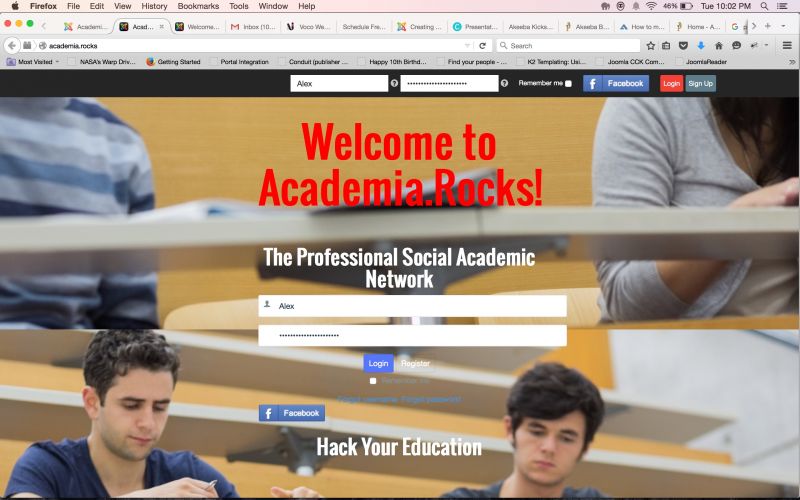
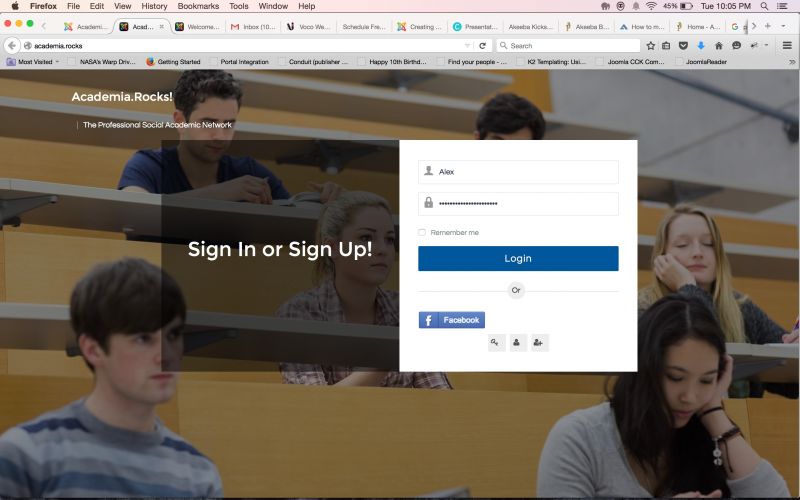
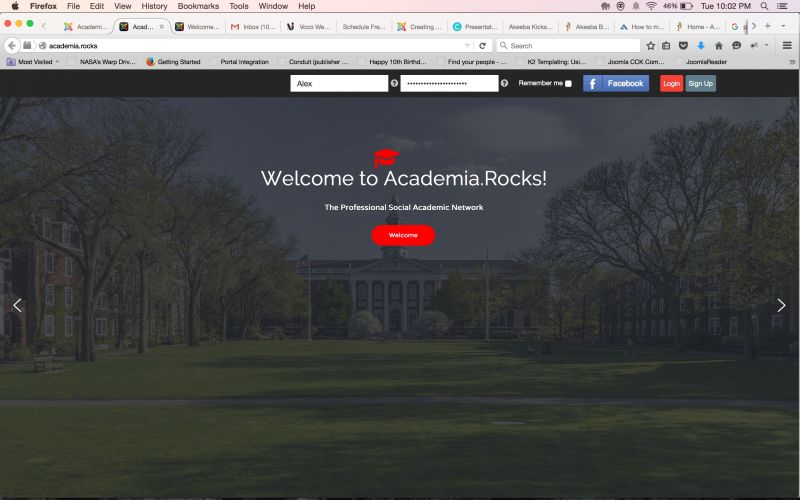
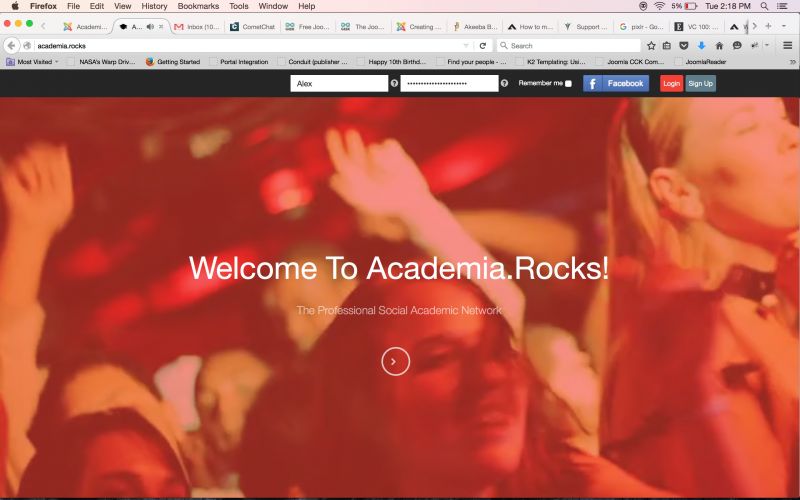
Here's a few screen shots to show you what I'm trying to describe :)
-
- Dimas
- Visitor
- Thank you received: 0
Licenses:
Ah I see, the quick answer :
1. socialize toolbar only will work for socialize template
2. hellome cant be used vertically like socialize toolbar, except you modify the hellome template :)
The first picture is me using JSN Page Builder with animated header text and animated JS Hello Me module with a background image and parallax effect.
Surprisingly it looks pretty good and am happy with how it looks.
JSN PB also claims to support video background with parallax effect and Joomla! module on top, but when I tried to publish JS Hello Me on top of background video JS Hello Me module did not publish properly :(
The second picture is me replicating JA Social II home landing page with their "features-intro" style which they say to use in documentation.
I followed their documentation closely, but still ran into a few problems :(
I am currently tech supporting with them to figure out why it doesn't look the same as their demo.
The last picture is an instance of Smart Slider 3 component which is pretty cool, but feel as though instead of having multiple slides I just want one cool block to be a video background with red transparent color background and then JS Hello Me module on top.
Like I described in previous post I can use JA ACM Hero style 4 to do this, but can't have JS Hello Me module on top properly :(
I am thinking I can just scrap using the JS Hello Me as a login module all together and just stick with the top-header community toolbar module as my login/register gateway, however, a more professional look would require having this form also be in the middle of the background video I am describing.
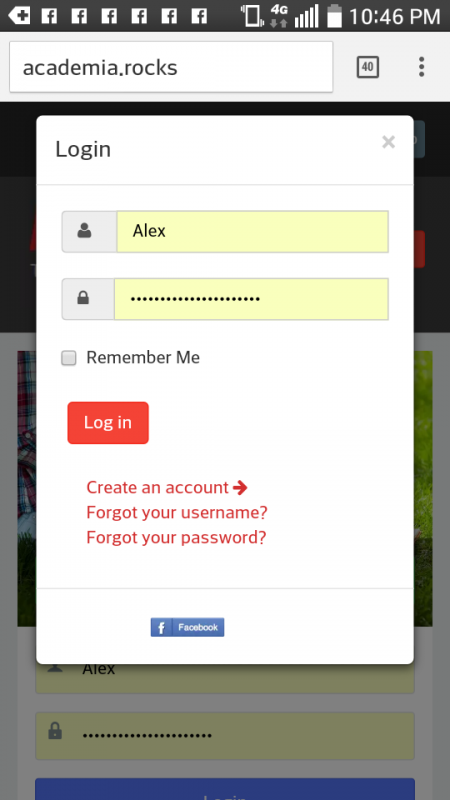
One idea I had would be to just have a button in the JA ACM Hero Style 4 background video module that would then pop out the login/register form that is used frequently in the mobile view of website and sometimes used in desktop version when login has timed out and you are still on website.
This pop out form is another quick solution.
Also, like I was saying earlier a good idea would be to keep Hello Me module the way it is once logged in, but you guys should consider making a JS login module that has different styles that way making a custom landing page would be a breeze :)
Any hints, tips, ideas, or suggestions???
Thanks!
-
- Dimas
- Visitor
- Thank you received: 0
Licenses:
I am sorry Alex, we cant help you too much with this customization, this is really tricky you need create some trick on CSS,HTML and javascript.. plus you integrate with another extensions, we cant help you too much :(.. I suggest you hire the 3rd party to achive this..
thank you for your understanding
Okay, thanks for clarifying my question about Socialize toolbar :)
That's what I thought.
So now I have to decide if I should stick with Socialize template and try to get JA ACM Hero style 4 to work with video background and transparent color and then try to publish JS Hello Me module on top or just stick with Socialize toolbar for login gateway and forget worrying about trying to publish Hello Me module on top of JA ACM Hero style 4 module.
Although, this would be perfect if I could get it to work right :P
I can still keep testing out JSN PB at the same time and see if I can get that to work with background video, but my idea to have a button in JA ACM Hero style 4 to pop out that login form that you see in mobile view a lot and when login times out on website would also be perfect :)
Do you guys know how I could trigger this login/register form to popout upon button click???
Thanks :)
-
- Dimas
- Visitor
- Thank you received: 0
Licenses:
here is the button trigger code :
<button type="button" class="btn btn-sm btn-primary" data-toggle="modal" data-target="#modal-login">
				<i class="fa fa-sign-in"></i>
				Login			</button>
Okay thanks for providing me with button trigger code :)
Now if you could just help me place this trigger code in JA ACM Hero Style 4 module code I would be very happy :P
Here is code for css style of JA ACM Hero style 4:
.acm-hero.style-4 {
overflow: hidden;
}
@media screen and (max-width: 1199px) {
.acm-hero.style-4.full-screen {
height: auto !important;
}
.acm-hero.style-4.full-screen .hero-content {
padding-top: 0 !important;
position: absolute;
left: 0;
right: 0;
top: 50%;
-webkit-transform: translate(0px, -50%);
transform: translate(0px, -50%);
}
}
@media screen and (max-width: 767px) {
.acm-hero.style-4.full-screen .hero-content {
line-height: 1;
padding-bottom: 0;
}
.acm-hero.style-4.full-screen .hero-content .hero-heading {
font-size: 24px;
}
}
.acm-hero.style-4 .video-wrapper {
height: 0;
padding-bottom: 56.25%;
padding-top: 0;
position: relative;
}
.acm-hero.style-4 .video-wrapper:before {
content: "";
position: absolute;
background-color: #F44336;
top: 0;
left: 0;
right: 0;
bottom: 0;
z-index: 2;
opacity: 0.6;
filter: alpha(opacity=60);
-webkit-transition: opacity 0.5s;
-o-transition: opacity 0.5s;
transition: opacity 0.5s;
}
@media screen and (max-width: 767px) {
.acm-hero.style-4 .video-wrapper:before {
display: none;
}
}
.acm-hero.style-4.mask-off .video-wrapper:before {
opacity: 0;
filter: alpha(opacity=0);
display: none;
}
.acm-hero.style-4.mask-off .hero-content {
opacity: 0;
filter: alpha(opacity=0);
}
.acm-hero.style-4 iframe {
height: 100%;
left: 0;
position: absolute;
top: 0;
z-index: 1;
width: 100%;
}
.acm-hero.style-4 .hero-content {
text-align: center;
position: absolute;
left: 0;
right: 0;
z-index: 3;
padding-right: 26px;
padding-left: 26px;
-webkit-transition: opacity 0.5s;
-o-transition: opacity 0.5s;
transition: opacity 0.5s;
}
.acm-hero.style-4 .hero-content .hero-heading {
font-size: 32px;
font-weight: 400;
}
@media screen and (max-width: 767px) {
.acm-hero.style-4 .hero-content .hero-heading {
margin-bottom: 0;
}
}
@media screen and (min-width: 992px) {
.acm-hero.style-4 .hero-content .hero-heading {
font-size: 45px;
}
}
@media screen and (min-width: 1200px) {
.acm-hero.style-4 .hero-content .hero-heading {
font-size: 56px;
}
}
@media screen and (max-width: 767px) {
.acm-hero.style-4 .hero-content .hero-btn-actions {
margin-top: 0;
}
}
.acm-hero.style-4 .hero-content .btn-rounded {
border-radius: 50%;
height: 52px;
line-height: 48px;
padding: 0 !important;
width: 52px;
border-width: 3px;
opacity: .7;
}
.acm-hero.style-4 .hero-content .btn-rounded:hover {
box-shadow: none;
opacity: 1;
}
I changed the value of transparent background color on top of video on here to - background-color: #F44336 - and see that the button style is also in this code.
Is there a way to copy the red login button style that you see in mobile view as in my previous screen shot and then trigger the popout event?
So I am guessing first I would have to place code for red login button style in this above css style code for this module and then somehow link the login popout code in another file for this module in order perform the event of login popout when user clicks on red login button.
Can you help me figure out how I could place this red login button style into above code and then where to place popout trigger event code in the module?
I would really appreciate the help and don't think it would be too crazy difficult to achieve :P
Also, for all users it would be a good idea to have text saying something like "or login/sign up with:" bellow sign in form that way user knows they can click on fb login button to login using jfbconnect or sign up using jfbconnect.
Also, real quick for now jfbconnect supports multiple social connect integrations such as Google+ and twitter etc but for now just want to keep it simple and use fb button.
Is there a way to make this button bigger?
Would this be done somewhere in popout login code for JS or would this be in css style of jfbconnect.
I know in jfbconnect you can change the style of the social login buttons and make it whatever you want, but as for the size I feel as though this would be done on JS Socialize template code somewhere.
Am I correct?
And once I locate the code for the style of this popout login form I can copy and paste red button make fb button bigger and then the last step would be able to figure out how to connect the popout trigger code that works with current setup and add this feature and behavior to JA ACM Hero Style 4 code.
So end goal is to have the red login button on my home landing page with background video JA ACM and then have the click of button trigger login popout form that was edited to make fb button bigger for mobile at least (looks really small on mobile view) and then add text after line break that says something like "or login/sign up with:" for social login just so users know this is an option and what button is for :P
Please help me! :P
-
- Dimas
- Visitor
- Thank you received: 0
Licenses:
Hi Alex,
I am sorry, your request is going far away from our support policy, and now you ask about the costumzation, this is really tricky and beyond our support. I think my latest solution is enough, if you wanna further help I suggest you hire the 3rd party developer.
thank you
Lol please help me!
I appreciate the help so far.
Thank you for providing popout code :)
So besides making the fb connect button bigger on mobile view for popout login/register can you please help me find file I need to look into in order to add some custom text such as "or login/sign up with:" because right now there is just a line separating top and bottom and I want users to know they can use fbconnect button to login quickly and register quickly.
With out providing this text users will not know what the fb button is for.
And without getting into step by step details which I don't expect you to do for me can you at least guide me theoretically as to how I could add the red button style into css code and then how to add the popout login/register form code to trigger the popout in the module?
How difficult would this be and do I need to be looking in the module html and php code for the ACM Hero Style 4???
Any help would be appreciated and of course I don't expect you to do this customization for me.
Is it not a function I can just quickly call?
And even for the top-header socialize toolbar module would it be easy to add text next to username and password fields before the fbconnect button for not logged in view?
If you hover over fbconnect button it says login with facebook, but I want this option to be very clear to my new potential users so they know they can use this option to quickly register and sign in in the future after setting up account.
I am afraid a lot of new potential users will click the sign up button because they are new and will automatically be drawn to this most logical option.
With more text guidance explaining that fbconnect is easier and more quick most users will probably choose this option.
I actually have thought about removing manual registration process completely and getting rid of this sign up button option from the top-header socialize toolbar module.
And if for now just keeping the sign up button there once user gets to registration form page I want to be able to publish jfbconnect fblogin and register button again.
I am good with knowing how to assign modules to certain menu item pages in Joomla!, but since the registration form page is not it's own menu item I can not just publish the jfbconnect login module with button and custom text letting new potential user know this is a quicker and easier option.
Once new user is registered they can always fill in and update all of their details later, but it is very important to make sure registration process is as quick and smooth as possible.
So in order to play around with manual registration page I feel as though I would have to hard code call this module into this page that is somewhere in all of JS code :(
How difficult would it be to edit this manual registration form page and add some text and this module?
I feel like adding text to top-header socialize toolbar module would be a more simple solution for now.
Thank you for the help so far :)