Support Forum
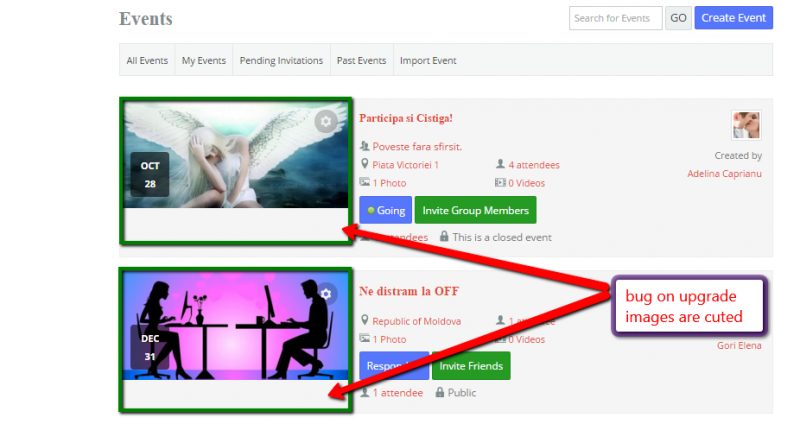
The events image is cuted after upgrade

Hi, Gabriela.
They are not cut. Their height is just defined to 140px.
You may make it higher by adding this:
.joms-list--card .joms-list__cover {
height: 190px !important;
}
Add it to your current template main css file.
- Instead of saying: 'it's not working', explain the problem in detail.
- Screenshots with the URL visible in them and the problem marked are more than welcome.
- Tell us how to replicate the problem, we can't fix it if we can't find it.
- Make sure that your site/server meets JomSocial System Requirements
- Make sure to setup JomSocial Cron Job
- Always provide us with access details to the backend and ftp. We need it to debug problems.
- If you have a similar problem, but a solution you found isn't working, open a new thread instead of 'merging' with an existing one.
- Use the "Thank You" feature on any post that helped you
Hi, Gabriela.
I already helped you explaining the issue and providing a solution.
You don't need to be a developer to add this code to css file :)
This is rather customization as you want your site to be "pixel perfect". We don't support customizations, what can you read in our Support Policy:
www.jomsocial.com/support
But this is just styling. Try to add it yourself - you'll learn something and you'll be independent in future ;)
- Instead of saying: 'it's not working', explain the problem in detail.
- Screenshots with the URL visible in them and the problem marked are more than welcome.
- Tell us how to replicate the problem, we can't fix it if we can't find it.
- Make sure that your site/server meets JomSocial System Requirements
- Make sure to setup JomSocial Cron Job
- Always provide us with access details to the backend and ftp. We need it to debug problems.
- If you have a similar problem, but a solution you found isn't working, open a new thread instead of 'merging' with an existing one.
- Use the "Thank You" feature on any post that helped you
HI, Gabriela.
This is really easy to do :0
Just connect your server using FTP.
Find this file on your server: ROOT/templates/sj_market/css/template-tangerine.css
Edit it.
Scroll down to file bottom and paste my code I provided above.
Save it and upload to server.
Job's done :)
I guess it's good time to break your fear - there is nothing to fear of. If you want to be site admin - you need to know at leas basics.
There are a lot of resources in the web that may help you.
Doing this trivial thing for you now... and you'll be asking us to do it all the time.
I gave you a "fishing rod" - now you need to "catch fish" yourself... or you'll be asking for "fish" all the time. Do you get my point? :)
- Instead of saying: 'it's not working', explain the problem in detail.
- Screenshots with the URL visible in them and the problem marked are more than welcome.
- Tell us how to replicate the problem, we can't fix it if we can't find it.
- Make sure that your site/server meets JomSocial System Requirements
- Make sure to setup JomSocial Cron Job
- Always provide us with access details to the backend and ftp. We need it to debug problems.
- If you have a similar problem, but a solution you found isn't working, open a new thread instead of 'merging' with an existing one.
- Use the "Thank You" feature on any post that helped you
Hi, Gabriela.
No this is not caused by update. Just take a closer look at printscreen:
i.imgur.com/7YhWZMz.png
Do you see how many lines do have 1st and 2nd event?
That's why it may give impression that image is cut of.
But it's not.
Take a look on group list pages. Images have the same height.
If you want to change that - use code I provided.
This is not OUR code, this is simple css code... a walkaround.
Simply add it to file.
I won't do this as you may have different high (I set 190px when originally is 140px... but you need to try what heigh is the best for you).
I'm sorry but you need to this by yourself. Believe me it's a breeze... give it a try.
- Instead of saying: 'it's not working', explain the problem in detail.
- Screenshots with the URL visible in them and the problem marked are more than welcome.
- Tell us how to replicate the problem, we can't fix it if we can't find it.
- Make sure that your site/server meets JomSocial System Requirements
- Make sure to setup JomSocial Cron Job
- Always provide us with access details to the backend and ftp. We need it to debug problems.
- If you have a similar problem, but a solution you found isn't working, open a new thread instead of 'merging' with an existing one.
- Use the "Thank You" feature on any post that helped you