Support Forum
Profile menu - have different view - as normal profile

ISSUE SUMMARY:
So as default we have one menu in jomsocial toolbar - Named profile
I don`t know why and what was happend as that replicate many views:
For example we asign on the profile section right bloks on some profile sections are seen on others not.
Alsoo after inspections we can see follow there was created 2 type of links for profile:
1)
prefermarket.com/en/jomsocial/615-dumitrita/profile
2)
STEPS TO REPLICATE:
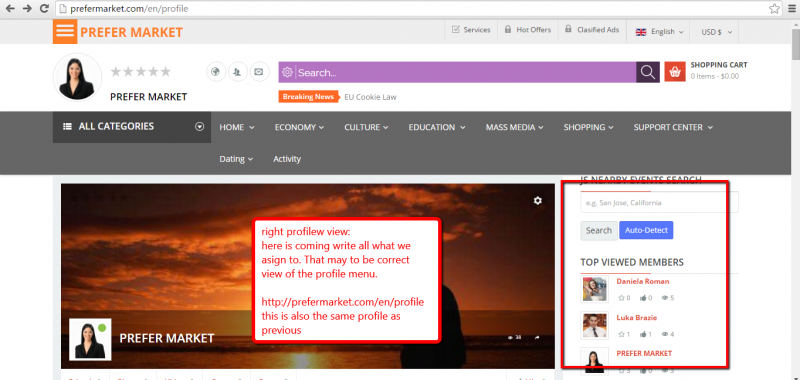
1 After login you will see right view of the profile menu:
prefermarket.com/en/profile
(with roght blok)
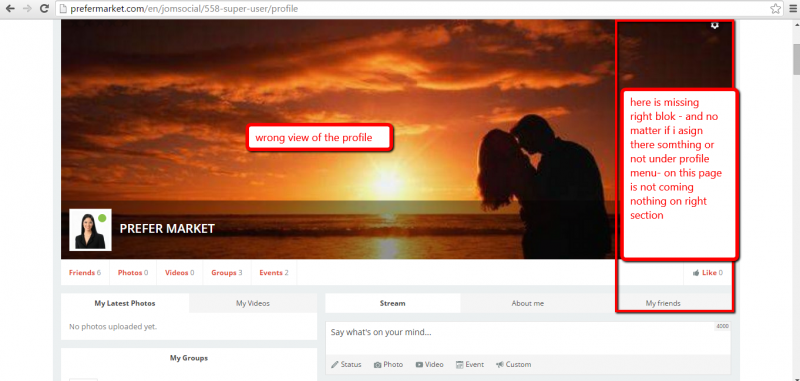
2 If will push on header - there is redesigned hello me module (please carefull to not broke the style) - it come alsoo in the profile asoo but with wrong link:
prefermarket.com/en/jomsocial/558-super-user/profile
3
4
5
RESULT we may as on pushing on profile - to be showed default menu view - as in our case may to be profile page with right blok.
EXPECTED RESULT
BROWSER
Hi, Gabriela.
It's because you assigned those modules to profile menu item in JomSocial toolbar. This won't work as those menu items doesn't have own menu item ID. And in a fact you assign modules to menu item IDs. So should use JS built-in module positions:
documentation.jomsocial.com/wiki/Built-in_Module_Positions
Or Advanced Module manager extension :
extensions.joomla.org/extension/advanced-module-manager
that will allow you to assign modules event o URL with wildcard.
- Instead of saying: 'it's not working', explain the problem in detail.
- Screenshots with the URL visible in them and the problem marked are more than welcome.
- Tell us how to replicate the problem, we can't fix it if we can't find it.
- Make sure that your site/server meets JomSocial System Requirements
- Make sure to setup JomSocial Cron Job
- Always provide us with access details to the backend and ftp. We need it to debug problems.
- If you have a similar problem, but a solution you found isn't working, open a new thread instead of 'merging' with an existing one.
- Use the "Thank You" feature on any post that helped you
But that was workable previous - if we asigned on position right (that is template position) and asigned to profile there was only one view - now they get dublicate.
for the same menu profile come 2 links:
prefermarket.com/en/profile
prefermarket.com/en/jomsocial/558-super-user/profile
Previously the profile menu propagated only one link, now there are coming 2 in depend from wich page we acces profile...
we need that profile to come as default no matter from wich page we acces them to be only one: prefermarket.com/en/profile
Hi, Gabriela.
No, It was always like that.
This link: prefermarket.com/en/profile is used when YOU view your own profile
This one when someone else is viewing it: prefermarket.com/en/jomsocial/558-super-user/profile
You can't view other profiles under: prefermarket.com/en/profile as profiles need to have unique URL to avoid navigation/display issues.
Please, read this:
documentation.jomsocial.com/wiki/Toolbar_Explained
especially "Common mistakes" chapter.
- Instead of saying: 'it's not working', explain the problem in detail.
- Screenshots with the URL visible in them and the problem marked are more than welcome.
- Tell us how to replicate the problem, we can't fix it if we can't find it.
- Make sure that your site/server meets JomSocial System Requirements
- Make sure to setup JomSocial Cron Job
- Always provide us with access details to the backend and ftp. We need it to debug problems.
- If you have a similar problem, but a solution you found isn't working, open a new thread instead of 'merging' with an existing one.
- Use the "Thank You" feature on any post that helped you
And how to be in this case
If we need to see on link ,,when others see the profile" to show modules on position ,,right" template position?
How to do that and how to manage the same menu profile - view - for both cases?
Hi, Gabriela.
Read manual of Advanced Menu Manager :)
After installing extension new tab will appear when editing module "Assignments". look for position "URL".
There you may define URl for certain pages:
i.imgur.com/rouxpi3.png
Or use regular expression.
You should contact with extension developer if you have further questions.
- Instead of saying: 'it's not working', explain the problem in detail.
- Screenshots with the URL visible in them and the problem marked are more than welcome.
- Tell us how to replicate the problem, we can't fix it if we can't find it.
- Make sure that your site/server meets JomSocial System Requirements
- Make sure to setup JomSocial Cron Job
- Always provide us with access details to the backend and ftp. We need it to debug problems.
- If you have a similar problem, but a solution you found isn't working, open a new thread instead of 'merging' with an existing one.
- Use the "Thank You" feature on any post that helped you