Notice

The forum is in read only mode.

Support Forum

Welcome! Support Forums have been reactivated
Welcome the Technical Support section. Help us in assisting you by providing us with a concise and descriptive elaboration of your issues. Be specific and if possible, provide us with a step-by-step instruction in replicating your problem.

Cannot upgrade iJoomla components

11 years 1 week ago
  • Max's Avatar
    Topic Author
  • Max
  • Offline
  • Fresh Boarder
  • Posts: 11
  • Thank you received: 3
Licenses:
JomSocial Expired Socialize Expired

Hi,

As in your newsletter I tried to upgrade JomSocial and all other iJoomla components.
I cannot find any upgrade services on Joomla extension upgrade but I find them in the iJoomla installer. But here: after I entered my license code and push "upgrade" a new - maybe broken - site shows up and nothing happens.

Can you please help out?
Cheers,
Max

11 years 1 week ago
Licenses:

Hi,

I assign this topic to billing support staff. maybe there is an issue with your license.
for for temporary you can download newest packages from jomsocial.com and ijoomla.com
you can upgrade/install it from joomla extension manager.

Regards

11 years 1 week ago
  • Max's Avatar
    Topic Author
  • Max
  • Offline
  • Fresh Boarder
  • Posts: 11
  • Thank you received: 3
Licenses:
JomSocial Expired Socialize Expired

Hi Albertus,

All my iJoomla licenses (iSEO, AdAgency, JomSocial) are active and valid.
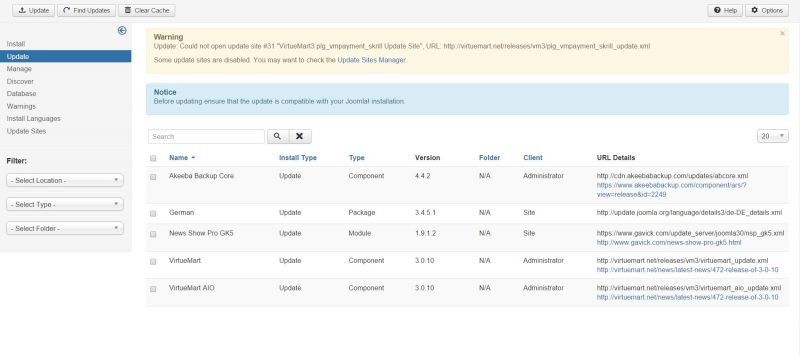
I cannot find the upgrades for iJoomla extensions in Joomla's upgrade manager. (see picture)

Cheers,
Max

Attachments:
11 years 1 week ago
Licenses:

Hi,

for temporary please do this steps for upgrade:
1. visit www.jomsocial.com/component/digistore/licenses and www.ijoomla.com/my-downloads43/licenses/42
2. download the packages and uzip first
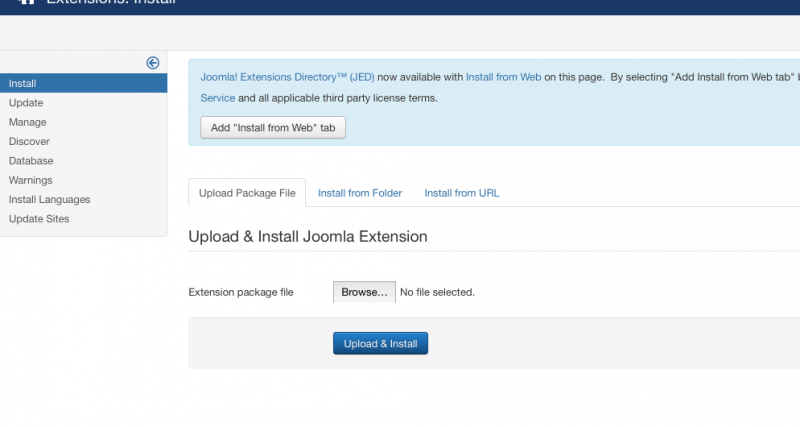
3. goto joomla extensions > manage, upload package file:


4. click upload and install.

do it for each packages. with this steps is same with upgrade process because the components installed already.
FYI: if dont know what latest version is. you can download that package first. after unzip it, you can see the package name. package name containing version number.

Regards

Attachments:
11 years 1 week ago
  • Max's Avatar
    Topic Author
  • Max
  • Offline
  • Fresh Boarder
  • Posts: 11
  • Thank you received: 3
Licenses:
JomSocial Expired Socialize Expired

Thanks!
What will happen to all settings. Can you guarantee that they will be kept after upgrade through this way?

11 years 5 days ago
Licenses:

Hi

the setting will stay.

Regards

The following user(s) said Thank You: Max
11 years 5 days ago
  • Max's Avatar
    Topic Author
  • Max
  • Offline
  • Fresh Boarder
  • Posts: 11
  • Thank you received: 3
Licenses:
JomSocial Expired Socialize Expired

Found the solution:
iJoomla installer was old. So I unpacked the latest version out of the JomSocial installation package, uploaded it and now the iJoomla installer runs properly.

Moderators: Piotr Garasiński
Powered by Kunena Forum

Join 180,000 websites creating Amazing communities

JomSocial is the most complete, easy-to-use addon that turns Joomla CMS into a
full -fledged, social networking site

TRY NOW BUY NOW