Notice

The forum is in read only mode.

Support Forum

Welcome! Support Forums have been reactivated
Welcome the Technical Support section. Help us in assisting you by providing us with a concise and descriptive elaboration of your issues. Be specific and if possible, provide us with a step-by-step instruction in replicating your problem.

after 4.1 upgrade long Status Messages still overlap input box

11 years 3 weeks ago
Licenses:
JomSocial Expired

ISSUE SUMMARY:
Upgraded development site to 4.1
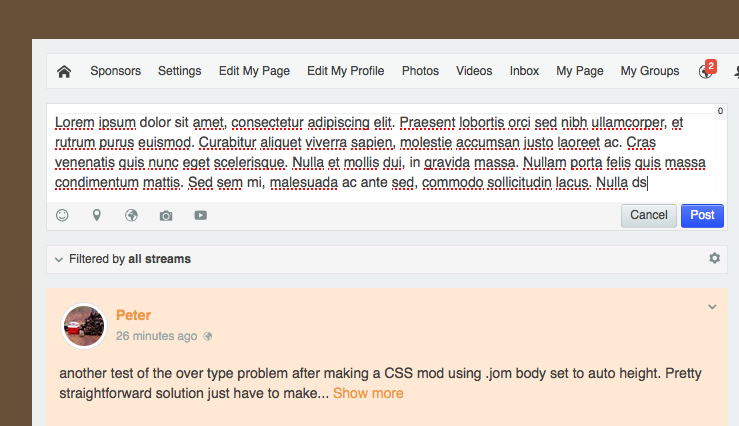
User inputs status message that exceeds the limit of the input box, text begins to overlap icons below the box

STEPS TO REPLICATE:
1login as user
2 post status message of 300 characters or more
3
4
5
RESULT input will overlap icons below input box instead of scrolling input box
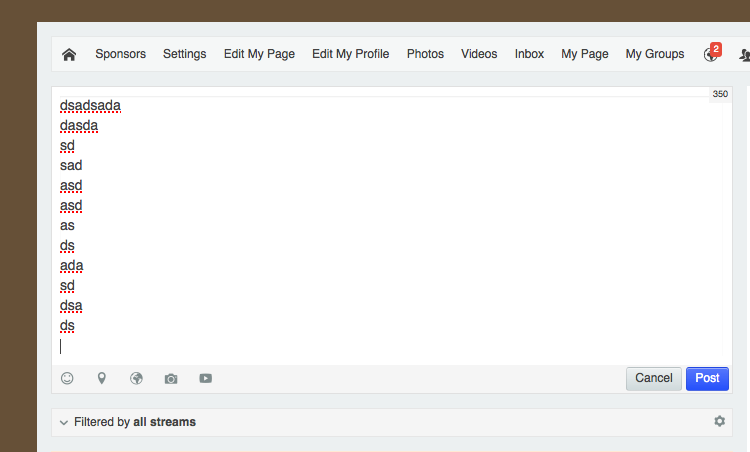
EXPECTED RESULT input box should scroll to allow input within text box
BROWSER Safari

11 years 3 weeks ago
Licenses:

Hi,

there is CSS conflict from purity_iii template CSS, plase put this CSS at purity_iii custom CSS

.joms-body .inputbox {
  height: auto;
}

please asking that template provider about how to put custom CSS at they template.

Regards
The following user(s) said Thank You: P. Irion
11 years 3 weeks ago
Licenses:
JomSocial Expired

mod'ing the template with some custom CSS is pretty straight forward, I'll give it a go and report back shortly

thanks

11 years 3 weeks ago
Licenses:
JomSocial Expired

template.css or com_community.css ?? or other?

also, did you debug with developer console or the like? just wondering...the auto height thing makes sense

11 years 3 weeks ago
Licenses:
JomSocial Expired

modified template.css
flushed cache, checked everything back in
tested on Safari and Chrome
not fixed

I remember this was a known issue in version 3.x with a fix planned.

11 years 3 weeks ago
Licenses:
JomSocial Expired

Create a file called custom.css in /templates/purity_iii/templates

Add code listed above

Solved

11 years 3 weeks ago
Licenses:

Hi,

here the screenshot:


maybe I missing something. please elaborate more

Regards

Attachments:
The following user(s) said Thank You: P. Irion
11 years 3 weeks ago
Licenses:
JomSocial Expired

Nope, you are not missing anything, it's fixed. Made the correct change a few minutes ago.

My mistake was to try to modify template.css or com_community.css.
The solution was to create the file custom.css in the subdir /templates/purity_iii and add the code you specified.

Works great!

As always, thanks for the great support.

The following user(s) said Thank You: Albertus
Moderators: Piotr Garasiński
Powered by Kunena Forum

Join 180,000 websites creating Amazing communities

JomSocial is the most complete, easy-to-use addon that turns Joomla CMS into a
full -fledged, social networking site

TRY NOW BUY NOW