Notice

The forum is in read only mode.

Support Forum

Welcome! Support Forums have been reactivated
Welcome the Technical Support section. Help us in assisting you by providing us with a concise and descriptive elaboration of your issues. Be specific and if possible, provide us with a step-by-step instruction in replicating your problem.

Some css Bugs

11 years 4 weeks ago
  • Thomy's Avatar
    Topic Author
  • Thomy
  • Offline
  • Fresh Boarder
  • Posts: 99
  • Thank you received: 6
Licenses:
JomSocial Active

here some bugs in your css files (jomsocial template):

style.css:

you use tags for input files that change the settings for it global eg:

.inputbox

please change it to:
.joms-main .inputbox

there are some items thats override the joomla template css (remember sometimes wie load the css files from jomsocial also on other joomla sites)

Another thing: can you make it possible that there is a hand cursor when we mousover the file upload icon or the upload a photo icon (in comment box and in pm)

Regards Thomy

11 years 4 weeks ago
  • Dimas's Avatar
  • Dimas
  • Visitor
  • Thank you received: 0
Licenses:

Hi Thomy,

May I know in which page and css file you get that class? because our default inbox class name is .joms-input

thank you!

11 years 4 weeks ago
  • Thomy's Avatar
    Topic Author
  • Thomy
  • Offline
  • Fresh Boarder
  • Posts: 99
  • Thank you received: 6
Licenses:
JomSocial Active

com_community/templates/jomsocial/assets/style.css
eg aoround line 1631 you see some .inputbox

11 years 4 weeks ago
  • Dimas's Avatar
  • Dimas
  • Visitor
  • Thank you received: 0
Licenses:

May I know the page, please? I am afraid this is only on css which our dev forgot to remove it

11 years 4 weeks ago
  • Thomy's Avatar
    Topic Author
  • Thomy
  • Offline
  • Fresh Boarder
  • Posts: 99
  • Thank you received: 6
Licenses:
JomSocial Active

Sorry I have no page because I changed this lines to work for me....

When include jomsocial style.css and show joomlas search-page you can see eg the searchbox without a border and the seleced-boxes (eg ordering) have large witdh (componente div width)

11 years 4 weeks ago
  • Thomy's Avatar
    Topic Author
  • Thomy
  • Offline
  • Fresh Boarder
  • Posts: 99
  • Thank you received: 6
Licenses:
JomSocial Active

There ist also very old code included in the sites:

<!--[if IE 7.0]>
				<link rel="stylesheet" href="/themes/default/style.css" type="text/css" />
				<![endif]-->
<!--[if lte IE 6]>
				<link rel="stylesheet" href="/themes/default/style.css" type="text/css" />
				<![endif]-->

11 years 3 weeks ago
  • Dimas's Avatar
  • Dimas
  • Visitor
  • Thank you received: 0
Licenses:

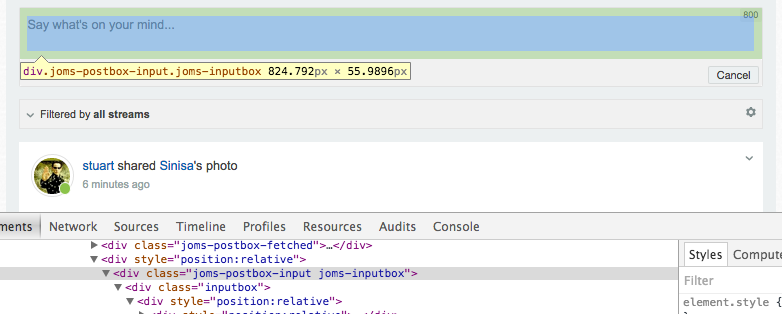
I just searched, and seems we dont use that class anymore in frontend, the developer will remove it in the future
11 years 3 weeks ago
  • Thomy's Avatar
    Topic Author
  • Thomy
  • Offline
  • Fresh Boarder
  • Posts: 99
  • Thank you received: 6
Licenses:
JomSocial Active

You can't simply remowed it you used it eg. to hide border around inputbox in statusbox :-)

11 years 3 weeks ago
  • Dimas's Avatar
  • Dimas
  • Visitor
  • Thank you received: 0
Licenses:

its using "joms-postbox-input joms-inputbox" on status box, not inputbox, you can see there is a prefix "joms-"

Attachments:
11 years 3 weeks ago
  • Thomy's Avatar
    Topic Author
  • Thomy
  • Offline
  • Fresh Boarder
  • Posts: 99
  • Thank you received: 6
Licenses:
JomSocial Active

and what is in the next line in your image? a prefix "imputbox"

When you change the css to my tipp on first post allthing is ok but when I delite it is a border arrount ".imputbox" so we have to rename it

11 years 3 weeks ago
  • Dimas's Avatar
  • Dimas
  • Visitor
  • Thank you received: 0
Licenses:

something wrong with my eyes :D, got it now.

Moderators: Piotr Garasiński
Powered by Kunena Forum

Join 180,000 websites creating Amazing communities

JomSocial is the most complete, easy-to-use addon that turns Joomla CMS into a
full -fledged, social networking site

TRY NOW BUY NOW
