Notice

The forum is in read only mode.

Support Forum

Welcome! Support Forums have been reactivated
Welcome the Technical Support section. Help us in assisting you by providing us with a concise and descriptive elaboration of your issues. Be specific and if possible, provide us with a step-by-step instruction in replicating your problem.

Settings links not working

11 years 1 month ago
  • John's Avatar
    Topic Author
  • John
  • Offline
  • Fresh Boarder
  • Posts: 46
  • Thank you received: 1
Licenses:
JomSocial Active


ISSUE SUMMARY:
Joomla 3.4.4
Jomsocial 4.0.9 and 4.1
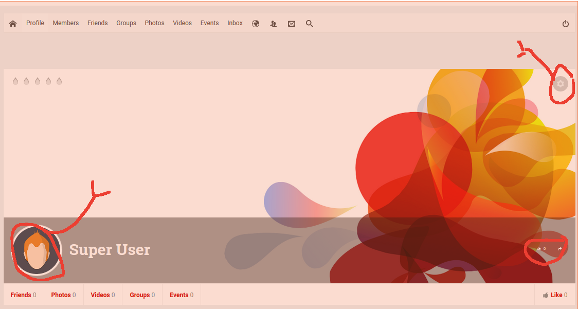
Profile favicon or settings controls do not work.

STEPS TO REPLICATE:
1Open Jomsocial profile
2 Click on image favicon to change image
3 Click on settings favicon to change background image or settings
4 Click on other favicons.
5
RESULT
These action are not operative and do not work as in past editions
EXPECTED RESULT
It seems that I am missing a setting somewhere but am unable to find it. I have deleted and reinstalled fresh packages but with the same result. I do not see the problem with others so I must be over looking something.

BROWSER
Opera
Netscape
Chrome

Attachments:
11 years 1 month ago
Licenses:

Hi,

please check it, you need to turn off javascript optimizer at template manager.
that optimizer not 100% works

Regards

Moderators: Piotr Garasiński
Powered by Kunena Forum

Join 180,000 websites creating Amazing communities

JomSocial is the most complete, easy-to-use addon that turns Joomla CMS into a
full -fledged, social networking site

TRY NOW BUY NOW