Support Forum
Upload Video
-

- Dimas
- Visitor
- Thank you received: 0
Licenses:
great, so please you configure it, make sure the server is same with our requirments, sorry we dont support any server configuration :)
-
- Dimas
- Visitor
- Thank you received: 0
Licenses:
each configuration item on documentation.jomsocial.com/wiki/Video_L..._Upload_Requirements
i already create phprc with below configuration:
max_execution_time = 9000
max_input_time = 9000
memory_limit = 128M
post_max_size = 105M
upload_max_filesize = 100M
Where i can create the
my.cnf
wait_timeout = 120
connect_timeout = 120
and also do these setting?
Disable safe_mode and open_basedir
Some hosting providers have safe_mode and openbase_dir enabled. In order for the photo/video upload to work, you have to disable them. If your webhosting provider allows you to override the Apache’s configuration, you need to override the vhost configuration.
php_admin_flag safe_mode off
php_admin_value open_basedir none
If your webhost allows for .htaccess override, locate your .htaccess file in the root Joomla directory and add these lines into it:
php_admin_flag safe_mode off
php_admin_value open_basedir none
Really sorry dimas for troubling you :( im newbie.... so im totally lost
-
- Dimas
- Visitor
- Thank you received: 0
Licenses:
post_max_size still 105M, it should 1024M
upload_max_filesize still 100M, it should 1024M
regarding my.cf, you should change it from mysql configuration..
You need ask to hosting provider for more help..
cheers!
Hello Dimas...
all configuration been set according to this article
documentation.jomsocial.com/wiki/Video_L..._Upload_Requirements
and its done by my webhosting.
I still can't see the uploaded movie from the front end :)
-
- Dimas
- Visitor
- Thank you received: 0
Licenses:
Can you try to run this code on your server terminal please ?
/usr/bin/ffmpeg -y -i 'THE_VIDEO_FILE' -vcodec libx264 -strict -2 -crf 23 -s 400x300 'THE_VIDEO_OUTPUT.mp4'let me know how it goes..
i got this msg:
ffmpeg version 0.8.17-4:0.8.17-0ubuntu0.12.04.1, Copyright (c) 2000-2014 the Lib av developers
built on Mar 16 2015 13:26:50 with gcc 4.6.3
The ffmpeg program is only provided for script compatibility and will be removed
in a future release. It has been deprecated in the Libav project to allow for
incompatible command line syntax improvements in its replacement called avconv
(see Changelog for details). Please use avconv instead.
THE_VIDEO_FILE: No such file or directory
-
- Dimas
- Visitor
- Thank you received: 0
Licenses:
:) anyway, change 'THE_VIDEO_FILE' to your full video path file, eg '/home/var/www/images/sample.avi'
ok i made this:
/usr/bin/ffmpeg -y -i /home/azri445/cubejunction.com/videos/videos/993/GwL8fiL3pS2.mp4 -vcodec libx264 -strict -2 -crf 23 -s 400x300 'THE_VIDEO_OUTPUT.mp4'
RESULT:
ffmpeg version 0.8.17-4:0.8.17-0ubuntu0.12.04.1, Copyright (c) 2000-2014 the Lib av developers
built on Mar 16 2015 13:26:50 with gcc 4.6.3
The ffmpeg program is only provided for script compatibility and will be removed
in a future release. It has been deprecated in the Libav project to allow for
incompatible command line syntax improvements in its replacement called avconv
(see Changelog for details). Please use avconv instead.
Input #0, mov,mp4,m4a,3gp,3g2,mj2, from '/home/azri445/cubejunction.com/videos/v ideos/993/GwL8fiL3pS2.mp4':
Metadata:
major_brand : isom
minor_version : 512
compatible_brands: isomiso2avc1mp41
creation_time : 2015-09-23 13:30:58
encoder : Lavf53.21.1
Duration: 00:29:34.19, start: 0.000000, bitrate: 43 kb/s
Stream #0.0(und): Video: h264 (Main), yuv420p, 800x600 [PAR 4:3 DAR 16:9], 9 kb/s, 6 fps, 6 tbr, 6 tbn, 12 tbc
Metadata:
creation_time : 2015-09-23 13:30:58
Stream #0.1(und): Audio: aac, 22050 Hz, mono, s16, 31 kb/s
Metadata:
creation_time : 2015-09-23 13:30:58
[buffer @ 0x1f518a0] w:800 h:600 pixfmt:yuv420p
[scale @ 0x1f4ce80] w:800 h:600 fmt:yuv420p -> w:400 h:300 fmt:yuv420p flags:0x4
[libx264 @ 0x1f4f620] using SAR=4/3
[libx264 @ 0x1f4f620] using cpu capabilities: MMX2 SSE2Fast SSSE3 FastShuffle SS E4.2 AVX XOP FMA4 SSEMisalign LZCNT
[libx264 @ 0x1f4f620] profile Main, level 2.1
[libx264 @ 0x1f4f620] 264 - core 120 r2151 a3f4407 - H.264/MPEG-4 AVC codec - Co pyleft 2003-2011 -
www.videolan.org/x264.html
- options: cabac=1 ref=3 de block=1:0:0 analyse=0x1:0x111 me=hex subme=7 psy=1 psy_rd=1.00:0.00 mixed_ref=0 me_range=16 chroma_me=1 trellis=1 8x8dct=0 cqm=0 deadzone=21,11 fast_pskip=1 chr oma_qp_offset=-2 threads=1 sliced_threads=0 nr=0 decimate=1 interlaced=0 bluray_ compat=0 constrained_intra=0 bframes=3 b_pyramid=0 b_adapt=1 b_bias=0 direct=1 w eightb=0 open_gop=1 weightp=2 keyint=250 keyint_min=6 scenecut=40 intra_refresh= 0 rc_lookahead=40 rc=crf mbtree=1 crf=23.0 qcomp=0.60 qpmin=0 qpmax=69 qpstep=4 ip_ratio=1.25 aq=1:1.00
Output #0, mp4, to 'THE_VIDEO_OUTPUT.mp4':
Metadata:
major_brand : isom
minor_version : 512
compatible_brands: isomiso2avc1mp41
creation_time : 2015-09-23 13:30:58
encoder : Lavf53.21.1
Stream #0.0(und): Video: libx264, yuv420p, 400x300 [PAR 4:3 DAR 16:9], q=-1- -1, 6 tbn, 6 tbc
Metadata:
creation_time : 2015-09-23 13:30:58
Stream #0.1(und): Audio: libvo_aacenc, 22050 Hz, mono, s16, 200 kb/s
Metadata:
creation_time : 2015-09-23 13:30:58
Stream mapping:
Stream #0.0 -> #0.0
Stream #0.1 -> #0.1
Press ctrl-c to stop encoding
frame=10645 fps= 85 q=23.0 Lsize= 8194kB time=1774.00 bitrate= 37.8kbits/s
video:839kB audio:6930kB global headers:0kB muxing overhead 5.470179%
frame I:43 Avg QP: 6.58 size: 15789
[libx264 @ 0x1f4f620] frame P:2641 Avg QP:22.06 size: 26
[libx264 @ 0x1f4f620] frame B:7961 Avg QP:23.00 size: 14
[libx264 @ 0x1f4f620] consecutive B-frames: 0.0% 0.8% 0.0% 99.2%
[libx264 @ 0x1f4f620] mb I I16..4: 61.3% 0.0% 38.7%
[libx264 @ 0x1f4f620] mb P I16..4: 0.0% 0.0% 0.0% P16..4: 0.3% 0.0% 0.0% 0.0% 0.0% skip:99.7%
[libx264 @ 0x1f4f620] mb B I16..4: 0.0% 0.0% 0.0% B16..8: 0.1% 0.0% 0.0% direct: 0.0% skip:99.9% L0:70.6% L1:29.4% BI: 0.0%
[libx264 @ 0x1f4f620] coded y,uvDC,uvAC intra: 40.3% 54.4% 54.1% inter: 0.0% 0.0% 0.0%
[libx264 @ 0x1f4f620] i16 v,h,dc,p: 87% 2% 10% 0%
[libx264 @ 0x1f4f620] i4 v,h,dc,ddl,ddr,vr,hd,vl,hu: 30% 17% 17% 4% 6% 7% 6% 6% 6%
[libx264 @ 0x1f4f620] i8c dc,h,v,p: 64% 14% 19% 4%
[libx264 @ 0x1f4f620] Weighted P-Frames: Y:0.0% UV:0.0%
[libx264 @ 0x1f4f620] ref P L0: 45.8% 0.0% 41.3% 12.8%
[libx264 @ 0x1f4f620] ref B L0: 77.9% 22.1%
[libx264 @ 0x1f4f620] kb/s:3.87
[ps468004]$ ffmpeg version 0.8.17-4:0.8.17-0ubuntu0.12.04.1, Copyright (c) 2000-2014 the Lib av developers
-bash: syntax error near unexpected token `('
[ps468004]$ built on Mar 16 2015 13:26:50 with gcc 4.6.3
compatible_brands: isomiso2avc1mp41
crea-bash: built: command not found
tion_time : 2015-09-23 13:30:58
encoder : Lavf53.21.1
Duration: 00:29:34.19, start: 0.000000, bitrate: 43 kb/s
Stream #0.0(und): Video: h264 (Main), yuv420p, 800x600 [PAR 4:3 DAR 16:9], 9
-
- Dimas
- Visitor
- Thank you received: 0
Licenses:
I see, the FFMPEG is working fine.. but when run the cron job its showing internal server error, I am not sure where its coming from.. can you investigate it?
I already ran the cron, and please look the error log (investigate it with your hosting provider) on my time
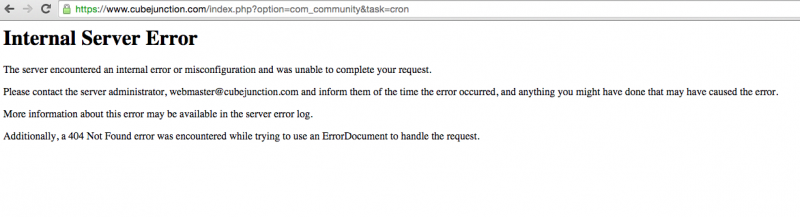
I think this is caused by the setting is not ok with your server, please you increase the value of each variable item in php.ini
max_execution_time = 9000; Maximum execution time of each script, in seconds.
max_input_time = 9000; Maximum amount of time each script may spend parsing request data.
memory_limit = 1024M; Maximum amount of memory a script may consume.
post_max_size = 1024M; Maximum size of POST data that PHP will accept.
upload_max_filesize = 1024M; Maximum allowed size for uploaded files.