Support Forum
Changes to the Blue toolbar

Hello,
I've recently received assistances for Hiding the main menu display using this css trick : t3-mainnav{display : none}
Now moving forward..
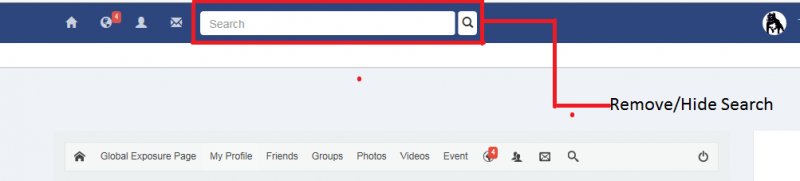
Can you help me make some changes to the Blue toolbar on the top. When you login to my website on the front end you will see it.
- Remove / Hide: Search option
- Remove / Hide: White/Blue option tab directly under blue toolbar.
My Goal: Blue toolbar will only be used for:
- Home Icon
- Notifications
- Invite Friends
- Messages
- Setting
- Logout
I don't plain to use or display additional add on menu options.
My Goal: Jomsocial toolbar will be the primary sources to see menu options.
Also I agree for you to make these changes on my behalf.
Thanks.

Hi,
please check it. here what I did:
1. I put custom css at /templates/socialize/css/custom.css
.t3-has-navbar .module-ct { padding: 0; }2. I remove the following code at:
/templates/socialize/html/com_community_toolbar/default-20150515-223950.php-old
<form class="navbar-form navbar-left" role="search" name="search" id="cFormSearch" method="get" action="<?php echo CRoute::_('index.php?option=com_community&view=search');?>">
				<div class="form-group form-group--search">
					<input type="text" class="form-control" placeholder="Search" id="keyword" name="q">
				</div>
				<button type="submit" class="btn btn-default">
					<span class="glyphicon glyphicon-search"></span>
				</button>

				<input type="hidden" name="option" value="com_community" />
				<input type="hidden" name="view" value="search" />
</form><button type="button" class="btn btn-sm btn-primary toggle-button toggle-no-header" data-toggle="collapse" data-target=".t3-navbar-collapse">
<i class="fa fa-bars"></i>
</button>Regards
Hello,
Can you please apply the ccs code on my behalf to changes the blue toolbar black to normal again?
You can review Albertus message on this process.
Thanks again for making these changes.