Support Forum
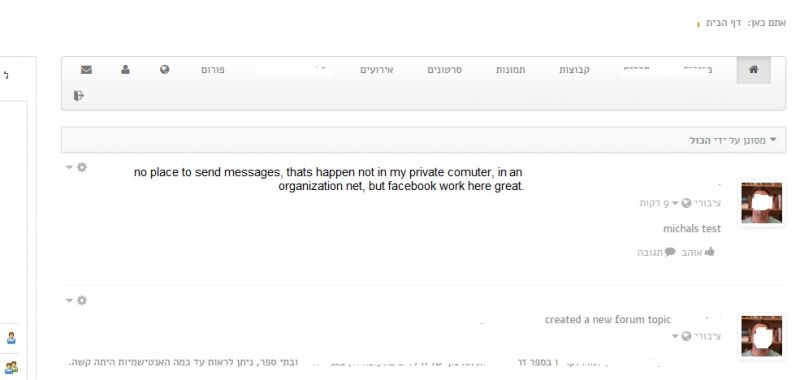
cant send messages to the wall

hi,
it seems that everything is block.
i found why, its firewall issiue at the organization, how to solve it?
all the site is working good, but cant send post to the wall. all the area of the send post , pic, video is disappeared.
BR
Amit
Hi, Amit.
I'm sorry but I can't confirm that:
prntscr.com/4lrwki
Your site and post box are perfectly accessible for me.
I can post (I did it as you can see on printscreen) and all options in post box are displayed.
Could you elaborate?
- Instead of saying: 'it's not working', explain the problem in detail.
- Screenshots with the URL visible in them and the problem marked are more than welcome.
- Tell us how to replicate the problem, we can't fix it if we can't find it.
- Make sure that your site/server meets JomSocial System Requirements
- Make sure to setup JomSocial Cron Job
- Always provide us with access details to the backend and ftp. We need it to debug problems.
- If you have a similar problem, but a solution you found isn't working, open a new thread instead of 'merging' with an existing one.
- Use the "Thank You" feature on any post that helped you
Hi, Amit.
Please, check your site on different computer or ask someone to do that too. I was on your site, did a printscreen so you saw that your site is displaying well for me. It could be your local issue...
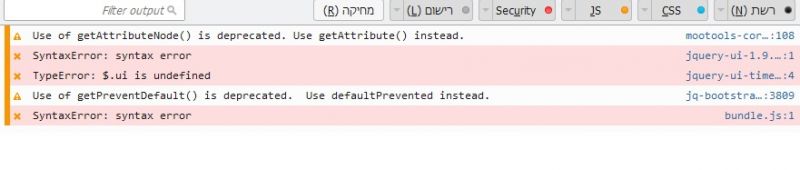
Try to use Chrome with enabled console... there you'll see if there are errors.
You said in your previous post that this is caused by "firewall issiue at the organization". So it needs to be fixed there as well. We can't do anything about it as this is local issue.
- Instead of saying: 'it's not working', explain the problem in detail.
- Screenshots with the URL visible in them and the problem marked are more than welcome.
- Tell us how to replicate the problem, we can't fix it if we can't find it.
- Make sure that your site/server meets JomSocial System Requirements
- Make sure to setup JomSocial Cron Job
- Always provide us with access details to the backend and ftp. We need it to debug problems.
- If you have a similar problem, but a solution you found isn't working, open a new thread instead of 'merging' with an existing one.
- Use the "Thank You" feature on any post that helped you
Hi, Amit.
You wrote:
"the jomsocial community is working great here"
and
"but my site isnt"
So what is the difference between "JomSocial community that works great" and "your site"?
Isn't it the same?
We tested your site on few computer and every time it was working fine.
- Instead of saying: 'it's not working', explain the problem in detail.
- Screenshots with the URL visible in them and the problem marked are more than welcome.
- Tell us how to replicate the problem, we can't fix it if we can't find it.
- Make sure that your site/server meets JomSocial System Requirements
- Make sure to setup JomSocial Cron Job
- Always provide us with access details to the backend and ftp. We need it to debug problems.
- If you have a similar problem, but a solution you found isn't working, open a new thread instead of 'merging' with an existing one.
- Use the "Thank You" feature on any post that helped you