Welcome the Technical Support section. Help us in assisting you by providing us with a concise and descriptive elaboration of your issues. Be specific and if possible, provide us with a step-by-step instruction in replicating your problem.
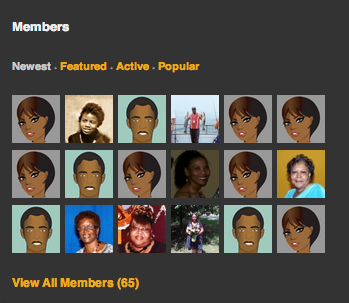
I am using a copy of the Members Module to show a few members (avatars) on my home page (this is NOT a reference to JS frontpage). See link provided with this post to my live site running JS 3.2.0.5 and this is the way I want the avatars sized. In Firefox the image info shows this: 64px × 64px (scaled to 48px × 48px)
However, when I upgrade to JS 3.2.0.6 the avatars become very large and the image info reads: 64px × 64px (scaled to 185px × 185px). Where is this being changed? And how do I correct it? I never experienced this problem in the past when I upgraded.
I discovered the problem when I installed the JS 3.2.0.6 upgrade on a local copy of my live site as I always do before upgrading the live site.
I have provided access to my live site so that you can see how I want it to look after the upgrade. If you need me to go ahead and upgrade to JS 3.2.0.6 after you look at it I will do so.
Please go to my website. Do not login to Admin. Do not login to JomSocial. Just look at the main page of my website. I am using the Members Module on that page and the Avatars are oversized. I want them to be 48x48 like they were before I upgraded to JS 3.2.0.6. More Info:
In JS 3.2.0.5 this information appeared in module.css:
.../components/com_community/assets/modules/module.css
For all modules page we designed for responsive display, so it will work fine on the small box like sidebar, and it will adjust automatically on the large box.
Please tell me there is a way to override this. I don't want to redesign my site simply because you issued a bug fix upgrade. I have used this feature for over a year in my design.