Notice

The forum is in read only mode.

Support Forum

Welcome! Support Forums have been reactivated
Welcome the Technical Support section. Help us in assisting you by providing us with a concise and descriptive elaboration of your issues. Be specific and if possible, provide us with a step-by-step instruction in replicating your problem.

How to upgrade to jomsocial 3.2

12 years 5 months ago
  • linda's Avatar
    Topic Author
  • linda
  • Offline
  • Junior Boarder
  • Posts: 196
  • Thank you received: 5
Licenses:
JomSocial Active

We are using jomsocial 3.1 verson.

How to upgrade to JomSocial 3.2 version?


I looked the introducation and it is said we need to uninstall the old version and re-install this new version.

How to do it?

If we uninstall all the setup we made would be lost or not?

Thanks

12 years 5 months ago
Licenses:
JomSocial Expired GURU Expired Publisher Expired AdAgency Expired iSEO Expired Socialize Expired

Hi linda,
You can reinstall latest version on existing one.
But I would suggest you to have a whole site backup.
One another important thing is, if you have customize any code then it will be gone after upgrade to the latest version.
So please have a copy of changes files and after upgrade need to be merge the changes.
Thanks

12 years 5 months ago
  • linda's Avatar
    Topic Author
  • linda
  • Offline
  • Junior Boarder
  • Posts: 196
  • Thank you received: 5
Licenses:
JomSocial Active

Hi Ashraf,

I want to upgrade to jomsocial 3.2.

Can you please advise how to uninstall and then install jomsocial 3.2?

We need to do the backup first.

Thanks.

Linda

12 years 5 months ago
Licenses:
JomSocial Expired GURU Expired Publisher Expired AdAgency Expired iSEO Expired Socialize Expired

Hi linda,
I have backup whole site using akeebabackup.
Do you want me to upgrade jomsocial with latest on behalf?

If you want to do with your own then just go to
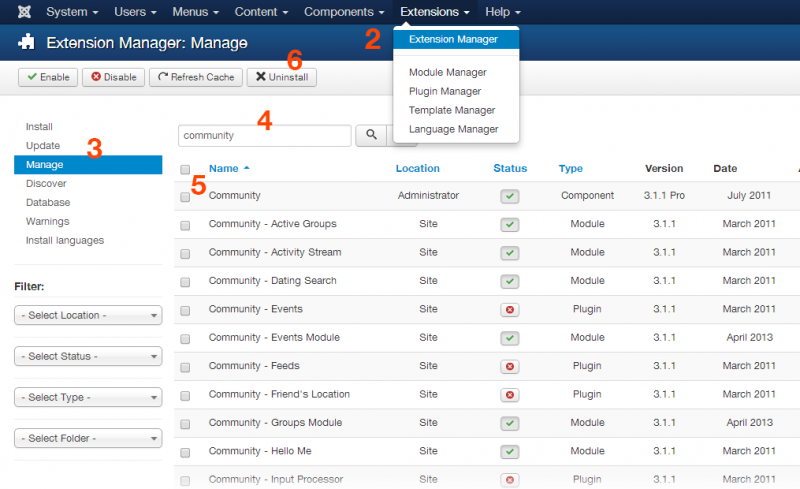
1. admin and login
2. Extension > Extension manager
3. Select "Manage" from left sidebar
4. Search with the word "community"
5. Select first row "Community"
6. Press uninstall button
See screenshot of the step with numbering.
Do same process and to uninstall all modules and plugins by searching two words "community","jomsocial".
Thanks

Attachments:
Moderators: Piotr Garasiński
Powered by Kunena Forum

Join 180,000 websites creating Amazing communities

JomSocial is the most complete, easy-to-use addon that turns Joomla CMS into a
full -fledged, social networking site

TRY NOW BUY NOW