Support Forum
Not able to create a group

ISSUE SUMMARY:
I installed JomSocial and haven't been able to create a group from either front end or the back-end through import.
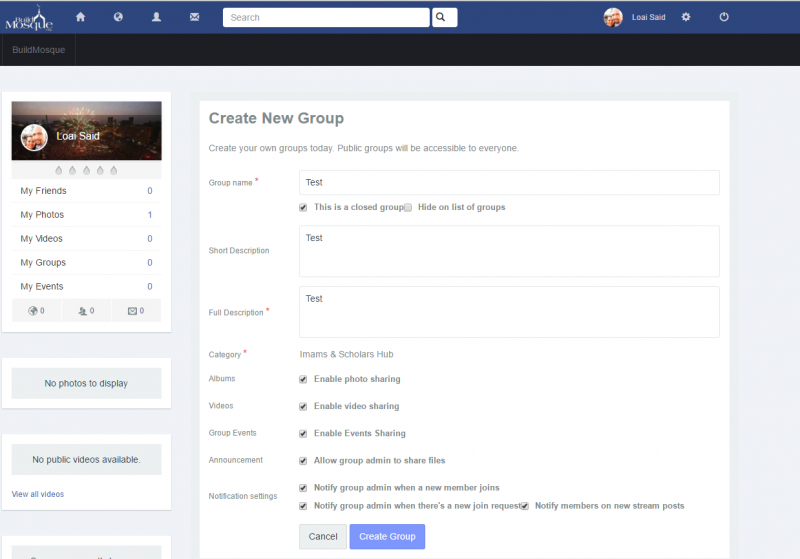
STEPS TO REPLICATE (Front End):
1. Login
2. Go To Groups
3. Click Create Group
4. Fill In All Information
5. Click Create Group
RESUL: Nothing Happens
EXPECTED RESULT Group to be created
BROWSER Google Chrome
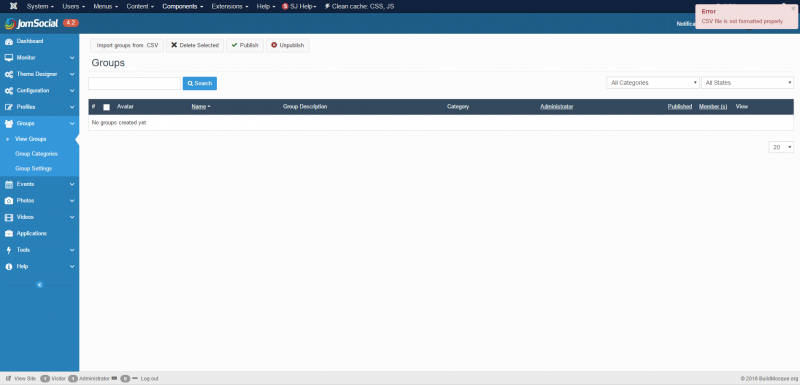
STEPS TO REPLICATE (Back-end):
1. Login
2. Go To JomScoial
3. Go to Groups -> View Group
4. Download template and fill it with a group information
5. Attempt to upload
RESUL: Error message with incorrect syntax
EXPECTED RESULT to be uploaded and create the group
BROWSER Google Chrome
HI.
I'm sorry but I can't log in to your site frontend due to authentication issue:
i.imgur.com/BpYfrRz.png
Please, read this:
www.sourcecoast.com/forums/jfbconnect/jf...cationjfbconnectauth
- Instead of saying: 'it's not working', explain the problem in detail.
- Screenshots with the URL visible in them and the problem marked are more than welcome.
- Tell us how to replicate the problem, we can't fix it if we can't find it.
- Make sure that your site/server meets JomSocial System Requirements
- Make sure to setup JomSocial Cron Job
- Always provide us with access details to the backend and ftp. We need it to debug problems.
- If you have a similar problem, but a solution you found isn't working, open a new thread instead of 'merging' with an existing one.
- Use the "Thank You" feature on any post that helped you
HI, Loai.
I'm sorry but this time credentials seems to not work:
i.prntscr.com/30ef82ac5c644f1480a99027e23720cc.png
Could you check them?
- Instead of saying: 'it's not working', explain the problem in detail.
- Screenshots with the URL visible in them and the problem marked are more than welcome.
- Tell us how to replicate the problem, we can't fix it if we can't find it.
- Make sure that your site/server meets JomSocial System Requirements
- Make sure to setup JomSocial Cron Job
- Always provide us with access details to the backend and ftp. We need it to debug problems.
- If you have a similar problem, but a solution you found isn't working, open a new thread instead of 'merging' with an existing one.
- Use the "Thank You" feature on any post that helped you
Hi.
The only way to share your site credentials with us is to edit your first post here.
Under main text area you'll see credentials box with fields.
Correct your site credentials there.
They are visible ONLY for us and connection is secured with SSL.
- Instead of saying: 'it's not working', explain the problem in detail.
- Screenshots with the URL visible in them and the problem marked are more than welcome.
- Tell us how to replicate the problem, we can't fix it if we can't find it.
- Make sure that your site/server meets JomSocial System Requirements
- Make sure to setup JomSocial Cron Job
- Always provide us with access details to the backend and ftp. We need it to debug problems.
- If you have a similar problem, but a solution you found isn't working, open a new thread instead of 'merging' with an existing one.
- Use the "Thank You" feature on any post that helped you