Notice

The forum is in read only mode.

Support Forum

Welcome! Support Forums have been reactivated
Welcome the Technical Support section. Help us in assisting you by providing us with a concise and descriptive elaboration of your issues. Be specific and if possible, provide us with a step-by-step instruction in replicating your problem.

Unable to Edit Date for Events under Group Events

11 years 10 months ago
  • Arthur's Avatar
    Topic Author
  • Arthur
  • Offline
  • Fresh Boarder
  • Posts: 70
  • Thank you received: 7
Licenses:
JomSocial Expired AdAgency Expired iSEO Expired

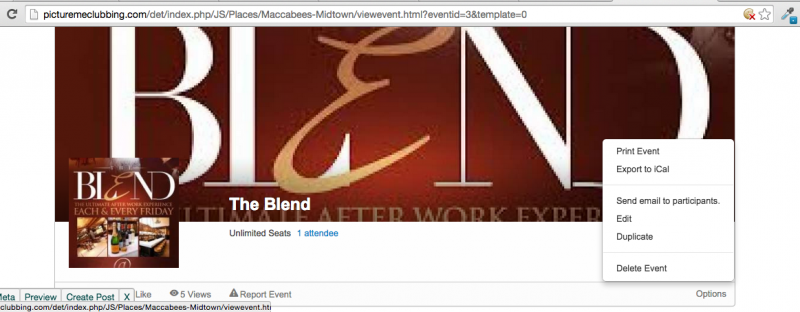
I just noticed something. I'm not sure if this in error or if the option was never there, but first there are no frontend means of editing a mistake made during the creation of an event under groups. Second, in the admin area you can't even edit the location. Just the Description and Title.

If this not an error I guess I can place this in future requests but it would seem to be a given option. New, Edit, Delete options for Event Posts.

11 years 10 months ago
  • Dimas Tekad Santosa's Avatar
  • Dimas Tekad Santosa
  • Visitor
  • Thank you received: 0
Licenses:

Hi Arthur,

Actually you can edit event on frontend, but because you have conflict with your joomla template, so the link for editing can't be seen.

But if you change to default template, the link for editing the event is showing fine.

thank you

Attachments:
11 years 9 months ago
  • Arthur's Avatar
    Topic Author
  • Arthur
  • Offline
  • Fresh Boarder
  • Posts: 70
  • Thank you received: 7
Licenses:
JomSocial Expired AdAgency Expired iSEO Expired

So in that little gray area the edit link supposed to show? Is this a simple fix you can help me with? My template provider isn't the best at replying in support. Come to think of it, the Jomsocial navigation bar would not show as well when I had it published. :-( So this problem can pop up anywhere?

11 years 9 months ago
  • Dimas Tekad Santosa's Avatar
  • Dimas Tekad Santosa
  • Visitor
  • Thank you received: 0
Licenses:

Yes, it should be showed, please provide me the FTP access.. I will debug the code.

thank you

11 years 9 months ago
  • Arthur's Avatar
    Topic Author
  • Arthur
  • Offline
  • Fresh Boarder
  • Posts: 70
  • Thank you received: 7
Licenses:
JomSocial Expired AdAgency Expired iSEO Expired

I started over with my install so I could troubleshoot things. I went and edited the first post with FTP information. Thanks for the help and Happy New Year!

11 years 9 months ago
  • Dimas Tekad Santosa's Avatar
  • Dimas Tekad Santosa
  • Visitor
  • Thank you received: 0
Licenses:

for fixing this, please you open this file templates/sj_tini/css/template-lavender.css, find this code :

.collapse {
  overflow: hidden;
}

replace :
.collapse {
  overflow: hidden;
display: inherit;
}

I hope it will work.

11 years 9 months ago
  • Arthur's Avatar
    Topic Author
  • Arthur
  • Offline
  • Fresh Boarder
  • Posts: 70
  • Thank you received: 7
Licenses:
JomSocial Expired AdAgency Expired iSEO Expired

When i went to edit the area you spoke of, it was already done. Did you do it? And the txt still isn't showing.

11 years 9 months ago
  • Arthur's Avatar
    Topic Author
  • Arthur
  • Offline
  • Fresh Boarder
  • Posts: 70
  • Thank you received: 7
Licenses:
JomSocial Expired AdAgency Expired iSEO Expired

I take that back. I see i have to do this edit for each template theme for it to show. Thanks all good now!

Moderators: Piotr Garasiński
Powered by Kunena Forum

Join 180,000 websites creating Amazing communities

JomSocial is the most complete, easy-to-use addon that turns Joomla CMS into a
full -fledged, social networking site

TRY NOW BUY NOW