Notice

The forum is in read only mode.

Support Forum

Welcome! Support Forums have been reactivated
Welcome the Technical Support section. Help us in assisting you by providing us with a concise and descriptive elaboration of your issues. Be specific and if possible, provide us with a step-by-step instruction in replicating your problem.

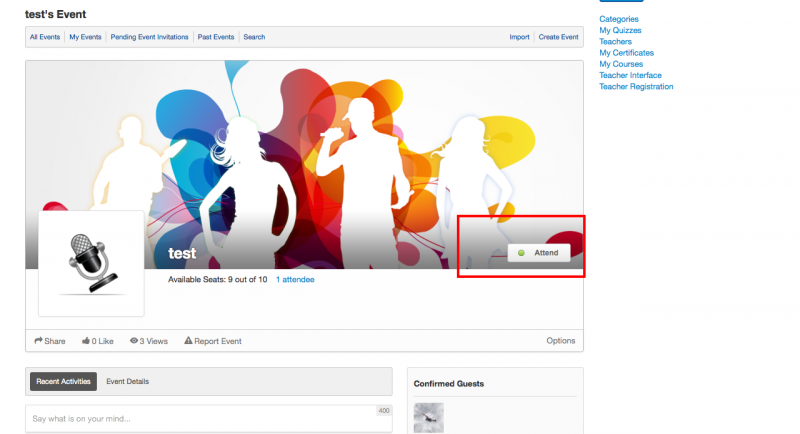
"Response" button is invisible a mount of time before event start.

11 years 10 months ago
  • Cheryl's Avatar
    Topic Author
  • Cheryl
  • Offline
  • Fresh Boarder
  • Posts: 72
  • Thank you received: 2
Licenses:
JomSocial Expired

Hi guys,

Last week, we created and announced that users needed to RSVP on our event page to be eligible to win prizes.
We noticed that "Respone" button was missing about 15 minutes before the scheduled start time.
I don't know whether It is your business rule for event.
If this is your rule, Please help me to disable this rule because we don't need this even this is conflict with meaning of event.

Please response us soon because we have a same event on Wednesday(16/07)

Thanks and best regards.

11 years 10 months ago
Licenses:

Hi Cheryl,

you can do it by using override documentation.jomsocial.com/wiki/Customizing_Template :
/components/com_community/templates/default/events.viewevent.php

and edit it

line 44:
From
<?php if( $handler->isAllowed() && !$isPastEvent ) { ?>

To
<?php if( $handler->isAllowed()) { ?>

Regards,
Albert

11 years 10 months ago
  • Cheryl's Avatar
    Topic Author
  • Cheryl
  • Offline
  • Fresh Boarder
  • Posts: 72
  • Thank you received: 2
Licenses:
JomSocial Expired

Hi Albertus,

With your answer, you meant that Jomsocial have that rule ?
I just want to make sure that the "Response" button is not disable before event start.
I don't want it always visible.
Please answer me soon because I am going to have an event tomorrow.
BR,

11 years 10 months ago
Licenses:

Hi Cherly,

sorry for late respond, because we on different timezone here. my timezone GMT +8

I just want make sure, do mean this?


this code
$handler->isAllowed()
mean, the user have permission to that event.
and this code
!$isPastEvent
mean the event is not as past events.

simple say that button will visible if the event still not end yet.

Regards,
Albert

Attachments:
11 years 10 months ago
  • Cheryl's Avatar
    Topic Author
  • Cheryl
  • Offline
  • Fresh Boarder
  • Posts: 72
  • Thank you received: 2
Licenses:
JomSocial Expired

Thank you very much Albert.

Moderators: Piotr Garasiński
Powered by Kunena Forum

Join 180,000 websites creating Amazing communities

JomSocial is the most complete, easy-to-use addon that turns Joomla CMS into a
full -fledged, social networking site

TRY NOW BUY NOW