Video Back End Configuration
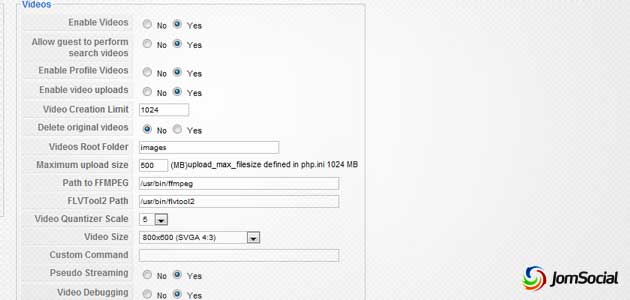
Video-related configuration is located under JomSocial Configuration > Media tab.
- Enable Videos: Enable or disable the videos functionality in JomSocial.
- Enable guest search: Option to disallow guests from searching videos.
- Enable profile videos: Allow users to select a video for their profile.
- Enable videos upload: Enable or disable the videos uploading feature in JomSocial.
- Video creation limit: Set a limit to creation of videos per user.
- Delete original videos: If enabled, original videos are deleted once the videos are converted to the appropriate formats.
- Videos root folder: Set the path to where videos are stored.
- Maximum video upload size: Set the maximum uploaded video size allowed in Megabytes (MB)
- FFMPEG Path: Set the absolute path to FFMPEG binary. If the binary is not found, JomSocial will not be able to convert videos into .flv formats.
- FLVTool2 Path: Set the absolute path to FLVTool2 binary to enable flash video metadata injections.
- Video Quantizer Scale: Select the video quality from a scale of 1 (Excellent) to 31 (Worst). 5, 9 and 11 are recommended settings.
- Videos Size: Set the video frame size in width X height format.
- Custom Command: Specify additional commands for FFMPEG ( Advanced Users )
- Pseudo streaming: Allow users to skip to specific section of the video.
Setting up Video Categories

To create new video categories, head over to JomSocial Control Panel and click on Video Categories.

Subsequently click on 'New' button and a cWindow will appear for you to submit the new category.