Support Forum
Publisher Pro Issue

Michal,
I am sorry you don't see the problem. I am looking at the page,
madd-talent.com/mt-times/issues/mttjanuary2016
, on Internet Explorer 11, Firfox 43.0.1 and Google Chrome 47.0.2526.106 and all three, I get the attached screen image.
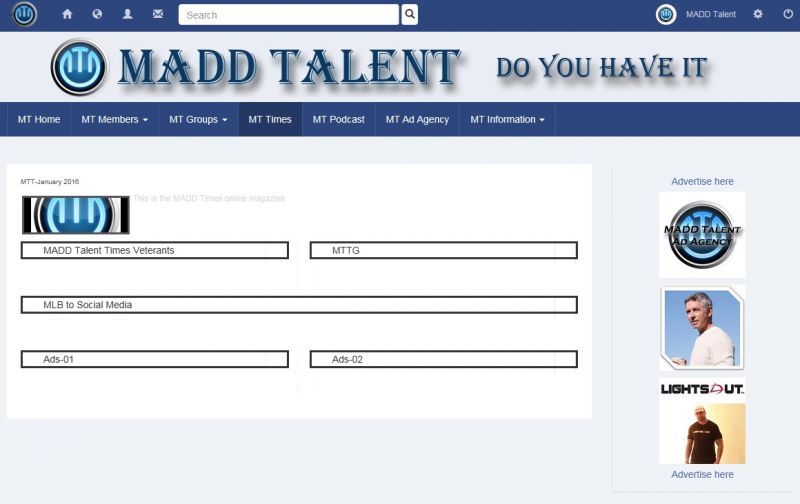
When I select your attached URL: i.imgur.com/R7ONakY.png , I get the exact same screen shot. I am getting the page with black boxes with nothing placed within them. I could be wrong, but I should see the article or articles within 1 or multiple boxes. If you don't know what's going on with this, I can assure you that I won't know. However, I have your latest post on what you are doing to correct this. I will spend some time today going over this and trying to get this to display correctly. If I can get this to work by following your detailed instructions, it will of course be fixed and I will purchase this Publisher Pro again. If I cannot get this to display, I will have no choice but to leave this to fix in your very capable hands. I will make another post on this tread later today after I exhaust myself in trying to resolve it myself.
Thanks again for your continued patients,
David
Hi, David.
Please, take a closer look on my printscreen:
i.imgur.com/R7ONakY.png
.
It's not the same as yours :) First two boxes are filled with articles.
I did exactly as I described (for both of them) and articles appeared...
- Instead of saying: 'it's not working', explain the problem in detail.
- Screenshots with the URL visible in them and the problem marked are more than welcome.
- Tell us how to replicate the problem, we can't fix it if we can't find it.
- Make sure that your site/server meets JomSocial System Requirements
- Make sure to setup JomSocial Cron Job
- Always provide us with access details to the backend and ftp. We need it to debug problems.
- If you have a similar problem, but a solution you found isn't working, open a new thread instead of 'merging' with an existing one.
- Use the "Thank You" feature on any post that helped you
Michal,
Good day. I hope your holidays were nice. I am sorry to drive you right back to this, but this Publisher Pro just is not working and I can't figure this out. I am now using Fire Fox and the other issue is gone. The content is now showing up where it's supposed to. However, I just created a new article to test Publisher Pro, I also created a brand new publication and issue as well to add this new article to. The article is called "All About the Bass" and if you go into the back-end and look under Articles, you see the article. However, when you go into Publisher Pro, -> Issues -> MADD Talent Times and then select the specific Article drop down, this article just does not show up.
Please take a look at this and explain this too me. I just can't believe that I am having all these issue with this Publisher Pro. The video's and all the tutorials I have read make it look so easy, but it just is not working that way on my system for some reason. Please help.
Thanks,
David
Hi, David.
It's because "Specific articles" is a ZONE. So if you want article to appear in that zone - you need to add it there.
i.imgur.com/eHVGkWt.png
Result after adding article to "Specific articles" zone:
i.imgur.com/iwFRlfU.png
- Instead of saying: 'it's not working', explain the problem in detail.
- Screenshots with the URL visible in them and the problem marked are more than welcome.
- Tell us how to replicate the problem, we can't fix it if we can't find it.
- Make sure that your site/server meets JomSocial System Requirements
- Make sure to setup JomSocial Cron Job
- Always provide us with access details to the backend and ftp. We need it to debug problems.
- If you have a similar problem, but a solution you found isn't working, open a new thread instead of 'merging' with an existing one.
- Use the "Thank You" feature on any post that helped you
Michal,
Good day. I will assume this will be Michal, if not, I apologize. None the less, I am still having issues with Publisher Pro. I created a new article and then went to the MT Football Issue to place the article and the newly created article is not showing up under the Specific Articles drop down. I created this article with create new article and it did not show up. I deleted it and created it in Publisher Pro and it did not show up again. I don't know if there is some setting that I don't see and I am missing it, but it's just not working correctly. To test this out, I then opened the MT Football Issue and then added 4 of the articles there were showing up under the specific articles drop down and saved. Looked at the issue on the front end and they did not show up. I went back to the back-end in Publisher Pro and deleted those articles from the issue and saved. When I did this, the articles I deleted from the issue did not show up in the specific articles drop down. I could never figure this out, but something is not working with the Specific Issue drop down. The articles just are not showing up. Can you take a look or tell me what it is that I am doing wrong please.
Thanks,
David
Hi, David.
I try to explain step by step. In my previous post I mentioned that "Specific articles" is not a group or something similar.... but a ZONE. So you need to add articles to that zone.
1. Create article using com_content (Joomla! articles). It will appear in Backend -> Components -> Publisher -> Content -> Articles
i.imgur.com/SOsDo3n.png
2. Now browse to Backend -> Components -> Publisher -> Design -> Zones
i.imgur.com/sSpNYRX.png
3. Click "New" button in upper right corner
4. Select as "Type" -> "Specific articles", set name and what is most important here select article (article selection is made in modal window).
i.imgur.com/RTRU7Cs.png
. Remember to select zone style. Do any other necessary settings if needed and save.
5. Now article will be displayed in zone list as "Specific article":
i.imgur.com/pKidJuU.png
6. Browse to Backend -> Components -> Publisher -> Content -> Issues
7. Choose issue to edit
8. Choose "Specific articles" from dropdown list
9. Finally your article should by on the list:
i.imgur.com/BXNElhZ.png
- Instead of saying: 'it's not working', explain the problem in detail.
- Screenshots with the URL visible in them and the problem marked are more than welcome.
- Tell us how to replicate the problem, we can't fix it if we can't find it.
- Make sure that your site/server meets JomSocial System Requirements
- Make sure to setup JomSocial Cron Job
- Always provide us with access details to the backend and ftp. We need it to debug problems.
- If you have a similar problem, but a solution you found isn't working, open a new thread instead of 'merging' with an existing one.
- Use the "Thank You" feature on any post that helped you
MIchal,
Thank you again for your help. I read the first two lines of your comment to me and suddenly remembered how it's done. I am sorry to ask the same stupid question of you again. I know you are busy. Now, I think everything is now working fine. So at this point, I need to know how to pay for this new license, if you could tell me please. Also, when I purchased this last year the first time, I got a subscription to the JomSocial School or something like that where there were tons of video's on how to use this package. When I purchase this again, will I have access to those video's again?
Thanks,
David
Hi, David.
I'm sorry I just noticed your answer - you didn't changed thread status from "Resolved" to "Pending Support" so it was gone from my list.
How to purchase license? If you already purchased in in past browse here:
www.jomsocial.com/component/digistore/licenses
and it should be on the list. Just use renewal option.
If it's not on the list, browse here:
www.jomsocial.com/products/products/3-ot...16-publisher-pro/215
and just purchase new license.
- Instead of saying: 'it's not working', explain the problem in detail.
- Screenshots with the URL visible in them and the problem marked are more than welcome.
- Tell us how to replicate the problem, we can't fix it if we can't find it.
- Make sure that your site/server meets JomSocial System Requirements
- Make sure to setup JomSocial Cron Job
- Always provide us with access details to the backend and ftp. We need it to debug problems.
- If you have a similar problem, but a solution you found isn't working, open a new thread instead of 'merging' with an existing one.
- Use the "Thank You" feature on any post that helped you