Support Forum
problem upload video

hi
i have ffmeo and flvtool2
ffmpeg : /usr/bin/ffmpeg
flvtool2 : /usr/bin/flvtool2
uploaded video.mp4 (2MB) but no process, and show in pending video, but not show on all video or my video
please help me.
Hi.
1. Make sure that you have installed FFMPEG library on your server
2. Make sure that FFMPEG library is in latest version
3. Make sure that you provided correct path to FFMPEG libray in JS configuration
4. Configure cron job for video processing:
documentation.jomsocial.com/wiki/Setting_Up_Cron_Job
Please, read:
documentation.jomsocial.com/wiki/Video_L..._Upload_Requirements
documentation.jomsocial.com/wiki/Cron_sa...ld_not_convert_video
'
Also please, contact with your hosting provider to check FFMPEG version installed on your server.
- Instead of saying: 'it's not working', explain the problem in detail.
- Screenshots with the URL visible in them and the problem marked are more than welcome.
- Tell us how to replicate the problem, we can't fix it if we can't find it.
- Make sure that your site/server meets JomSocial System Requirements
- Make sure to setup JomSocial Cron Job
- Always provide us with access details to the backend and ftp. We need it to debug problems.
- If you have a similar problem, but a solution you found isn't working, open a new thread instead of 'merging' with an existing one.
- Use the "Thank You" feature on any post that helped you
i see : Minimum: FFMPEG; to get it running, it also requires exec/passthru/shell_exec/system access.
in my server :
disable_function : exec , passthru , shell_exec , system
1- These functions must be enabled? (certainly?)
2- cornjob on my server has enable,Is on my joomla must be enable?
3- if enable : exec , passthru , shell_exec , system ---> server security is very low and Dangerous, There is no other way?
Hi.
Sure, you may click "Execute cron" in Backend -> Components -> JomSocial -> Monitor -> Mail queue -> Execute cron (button upper right). But what's the point... will you execute it every hour?
If you don't want to set required settings on your server... then you may set external service for this.
Required settings are not unsafe... your hosting provider told you that they are?
- Instead of saying: 'it's not working', explain the problem in detail.
- Screenshots with the URL visible in them and the problem marked are more than welcome.
- Tell us how to replicate the problem, we can't fix it if we can't find it.
- Make sure that your site/server meets JomSocial System Requirements
- Make sure to setup JomSocial Cron Job
- Always provide us with access details to the backend and ftp. We need it to debug problems.
- If you have a similar problem, but a solution you found isn't working, open a new thread instead of 'merging' with an existing one.
- Use the "Thank You" feature on any post that helped you
i clicked and show :
<messages>
<message>Could not convert video</message>
<message>No temporary videos to delete.</message>
<message>No files to transfer.</message>
<message>No Videos to transfer.</message>
<message>
No avatars or cover of users needed to be transferred
</message>
<message>
No avatars or cover of groups needed to be transferred
</message>
<message>
No avatars or cover of events needed to be transferred
</message>
<message>Removed Pending Invitation for Past Event</message>
</messages>
with Cron Job i can convert videos? without enable exec , passthru , shell_exec , system ?
no need edit php.ini and enable function : exec , passthru , shell_exec , system ?
are you sure?
i am administrator server
What do I do ?
Hi, Davood.
Enable them if they are required.
What is FFMPEG version installed on server?
- Instead of saying: 'it's not working', explain the problem in detail.
- Screenshots with the URL visible in them and the problem marked are more than welcome.
- Tell us how to replicate the problem, we can't fix it if we can't find it.
- Make sure that your site/server meets JomSocial System Requirements
- Make sure to setup JomSocial Cron Job
- Always provide us with access details to the backend and ftp. We need it to debug problems.
- If you have a similar problem, but a solution you found isn't working, open a new thread instead of 'merging' with an existing one.
- Use the "Thank You" feature on any post that helped you
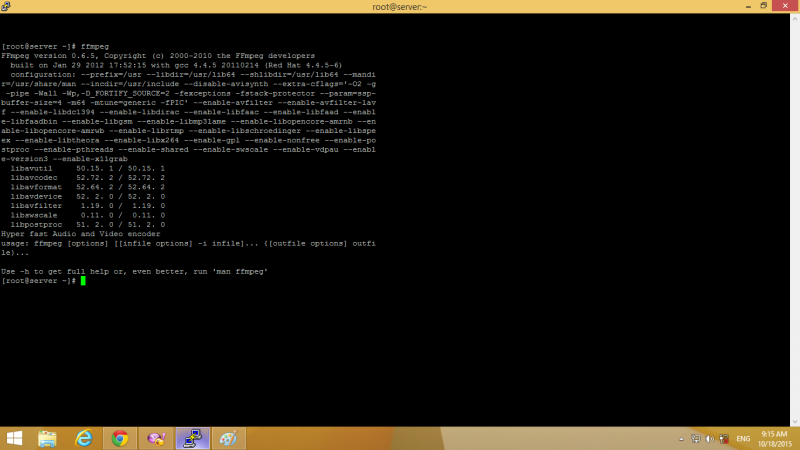
HI.
You use a VERY old version of FFMPEG. Current version is: 2.8.1
Video conversion will not work with such old version.
Please, upgrade it.
As for cron you may try with those settings disabled... not sure if this will work.
- Instead of saying: 'it's not working', explain the problem in detail.
- Screenshots with the URL visible in them and the problem marked are more than welcome.
- Tell us how to replicate the problem, we can't fix it if we can't find it.
- Make sure that your site/server meets JomSocial System Requirements
- Make sure to setup JomSocial Cron Job
- Always provide us with access details to the backend and ftp. We need it to debug problems.
- If you have a similar problem, but a solution you found isn't working, open a new thread instead of 'merging' with an existing one.
- Use the "Thank You" feature on any post that helped you
how to upgrade ? please give me link for help.
I do not understand :
Necessary edit php.ini and enable funcetion : exec , passthru , shell_exec , system ???
if do not enable , it work video converter jomsocial ???
Hi.
I'm sorry but we don't support server setting, configuration or library installation.
Please, search in Web for documentation - probably you'll find it on FFMPEG library site.
If your documentation mention: do this, set like that.... then you should follow it.
If you have objections - do as you like (do tests) but you'll be on your own.
if you don't want to enable certain settings - don't but we can't guarantee the results.
- Instead of saying: 'it's not working', explain the problem in detail.
- Screenshots with the URL visible in them and the problem marked are more than welcome.
- Tell us how to replicate the problem, we can't fix it if we can't find it.
- Make sure that your site/server meets JomSocial System Requirements
- Make sure to setup JomSocial Cron Job
- Always provide us with access details to the backend and ftp. We need it to debug problems.
- If you have a similar problem, but a solution you found isn't working, open a new thread instead of 'merging' with an existing one.
- Use the "Thank You" feature on any post that helped you
I now what to do?
1-upgared ffmepg
2- enable function ? or if required enable?
3- add wget -O /dev/null "
www.domain.com/index.php?option=com_community&task=cron
" > /dev/null to Cron job?
please help me. step by step
i using OS : Centos 6.7
HI.
You provided steps by your self. Just follow them.
I can't help you with upgrading FFMPEG or enabling/disabling settings on your server as this is beyond scope of our technical support.
Defining cron job is described in our documentation
bit.ly/10OzfPN
- Instead of saying: 'it's not working', explain the problem in detail.
- Screenshots with the URL visible in them and the problem marked are more than welcome.
- Tell us how to replicate the problem, we can't fix it if we can't find it.
- Make sure that your site/server meets JomSocial System Requirements
- Make sure to setup JomSocial Cron Job
- Always provide us with access details to the backend and ftp. We need it to debug problems.
- If you have a similar problem, but a solution you found isn't working, open a new thread instead of 'merging' with an existing one.
- Use the "Thank You" feature on any post that helped you