Support Forum
getAvatar instead of getThumbAvatar in members module
-

Topic Author - Hans Simtanda
- Offline
- Fresh Boarder
- Posts: 9
- Thank you received: 0
Licenses:
JomSocial ActiveHi, i Will Like to setup my members module to "getAvatar" instead of "getThumbAvatar", because I am not sutisfied with thumbnails quality, when enlarging them to suit my members needs.
Hi, Hans.
But you may always change avatar thumb size to get it in better quality/size. Just edit this file:
ROOT/components/com_community/defines.community.php and look for avatar size in line 33.
New size will be applied to new avatars. All old avatars will need to be re-uploaded.
- Instead of saying: 'it's not working', explain the problem in detail.
- Screenshots with the URL visible in them and the problem marked are more than welcome.
- Tell us how to replicate the problem, we can't fix it if we can't find it.
- Make sure that your site/server meets JomSocial System Requirements
- Make sure to setup JomSocial Cron Job
- Always provide us with access details to the backend and ftp. We need it to debug problems.
- If you have a similar problem, but a solution you found isn't working, open a new thread instead of 'merging' with an existing one.
- Use the "Thank You" feature on any post that helped you
-
Topic Author - Hans Simtanda
- Offline
- Fresh Boarder
- Posts: 9
- Thank you received: 0
Licenses:
JomSocial Active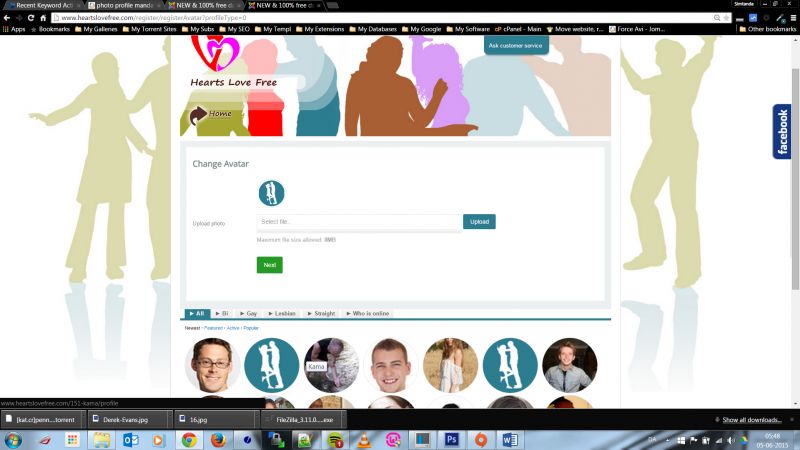
Hi, Hans.
This is a bug as avatar generated here should follow settings in file.
I'll report this to our developers.
- Instead of saying: 'it's not working', explain the problem in detail.
- Screenshots with the URL visible in them and the problem marked are more than welcome.
- Tell us how to replicate the problem, we can't fix it if we can't find it.
- Make sure that your site/server meets JomSocial System Requirements
- Make sure to setup JomSocial Cron Job
- Always provide us with access details to the backend and ftp. We need it to debug problems.
- If you have a similar problem, but a solution you found isn't working, open a new thread instead of 'merging' with an existing one.
- Use the "Thank You" feature on any post that helped you
-
Topic Author - Hans Simtanda
- Offline
- Fresh Boarder
- Posts: 9
- Thank you received: 0
Licenses:
JomSocial ActiveOk, inform me when solved
-
Topic Author - Hans Simtanda
- Offline
- Fresh Boarder
- Posts: 9
- Thank you received: 0
Licenses:
JomSocial Active
Another bug is under registration, once a user has reached the page where he has to upload a profile photo and decides he wants to go back a few steps an correct his information an attached error page appears, when he clicks next!!!
TIP: Under registration on upload profile photo page, one should be able to crop the uploaded profile photo. VERY IMPORTANT!
That's it, please include and fix these requests as i am a big fan of Jomsocial! Keep up the good work.
Cheers
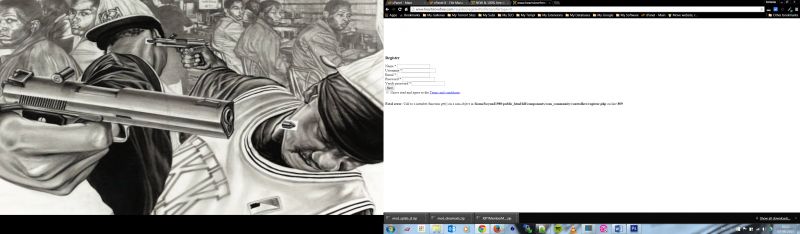
Hi, Hans.
Forum golden rule is: ONE thread = ONE issue. I'm sorry but you'll need to open new thread for your new issue as it will be ignored in this thread.
- Instead of saying: 'it's not working', explain the problem in detail.
- Screenshots with the URL visible in them and the problem marked are more than welcome.
- Tell us how to replicate the problem, we can't fix it if we can't find it.
- Make sure that your site/server meets JomSocial System Requirements
- Make sure to setup JomSocial Cron Job
- Always provide us with access details to the backend and ftp. We need it to debug problems.
- If you have a similar problem, but a solution you found isn't working, open a new thread instead of 'merging' with an existing one.
- Use the "Thank You" feature on any post that helped you
-
Topic Author - Hans Simtanda
- Offline
- Fresh Boarder
- Posts: 9
- Thank you received: 0
Licenses:
JomSocial ActiveHi Michael, until you fix this bug, could you give me a step by step tutorial on how to replace getThumbAvatar to getAvatar, because i want to officially launch my site via Google AdWords etc., so i need my thumbs to be tight!
Hi, Hans.
I'm sorry but I can't... as this is not easy as it seams. There are required dependencies so this will be rather a core files hack... also workaround may cause issues in different places. So we need to wait for developer. I hope this will be fixed during next week. I'm really sorry but it's not up to me...
- Instead of saying: 'it's not working', explain the problem in detail.
- Screenshots with the URL visible in them and the problem marked are more than welcome.
- Tell us how to replicate the problem, we can't fix it if we can't find it.
- Make sure that your site/server meets JomSocial System Requirements
- Make sure to setup JomSocial Cron Job
- Always provide us with access details to the backend and ftp. We need it to debug problems.
- If you have a similar problem, but a solution you found isn't working, open a new thread instead of 'merging' with an existing one.
- Use the "Thank You" feature on any post that helped you
Hi, Hans.
Could you try to set new size for: COMMUNITY_SMALL_AVATAR_WIDTH
And then check if this is fine.
- Instead of saying: 'it's not working', explain the problem in detail.
- Screenshots with the URL visible in them and the problem marked are more than welcome.
- Tell us how to replicate the problem, we can't fix it if we can't find it.
- Make sure that your site/server meets JomSocial System Requirements
- Make sure to setup JomSocial Cron Job
- Always provide us with access details to the backend and ftp. We need it to debug problems.
- If you have a similar problem, but a solution you found isn't working, open a new thread instead of 'merging' with an existing one.
- Use the "Thank You" feature on any post that helped you
-
Topic Author - Hans Simtanda
- Offline
- Fresh Boarder
- Posts: 9
- Thank you received: 0
Licenses:
JomSocial Active
The following are my current values, they apply with the backend and not the frontend???
define('COMMUNITY_OVERSAMPLING_FACTOR', 2);
define('COMMUNITY_SMALL_AVATAR_WIDTH', 512);
define('COMMUNITY_PHOTO_THUMBNAIL_SIZE', 512);
-
Topic Author - Hans Simtanda
- Offline
- Fresh Boarder
- Posts: 9
- Thank you received: 0
Licenses:
JomSocial ActiveJust tell me the path to the file used under registration with upload and avatar generation code
Hi, Hans.
This is not a bug in avatar upload/generation during registration but rather with avatar use/display.
Avatar is correctly generated during registration
prntscr.com/7mm13c
It follows file setting.
Just it's not used in "Who's on-line" box and on stream.
- Instead of saying: 'it's not working', explain the problem in detail.
- Screenshots with the URL visible in them and the problem marked are more than welcome.
- Tell us how to replicate the problem, we can't fix it if we can't find it.
- Make sure that your site/server meets JomSocial System Requirements
- Make sure to setup JomSocial Cron Job
- Always provide us with access details to the backend and ftp. We need it to debug problems.
- If you have a similar problem, but a solution you found isn't working, open a new thread instead of 'merging' with an existing one.
- Use the "Thank You" feature on any post that helped you
-
Topic Author - Hans Simtanda
- Offline
- Fresh Boarder
- Posts: 9
- Thank you received: 0
Licenses:
JomSocial ActiveSo any instructions on how i get it to show on "Who's on-line" and members module? I now have 554 users/members and they are expecting quality service!